
Pinterest is the space were a half formed idea for a room, an outfit, or a recipe take shape.

Pinterest It is less a social network and more a visual search engine and personal library for your aspirations. With over a billion downloads and a 4.5 star rating from more than 11 million reviewers, the app’s scale is undeniable. Its appeal, however, lies in its function: it is a tool for planning and discovering what comes next. The app size is a manageable 90MB, and its user base spans a wide age range, from Gen Z planning aesthetics to homeowners managing renovation projects.
What Is Pinterest, Really?
At its core, Pinterest is a visual discovery engine. Its primary purpose is not to broadcast your life but to collect and organize ideas for your life. Developed by Pinterest, Inc., the platform distinguishes itself from traditional social media. The focus is less on followers and likes and more on personal curation and actionable inspiration. Think of it as a digital pinboard or a visual bookmarking tool that learns your taste. The question it answers isn’t “What are my friends doing?” but “What could I do?” This foundational difference is what makes a Pinterest for project planning such a powerful use case, whether you’re planning a wedding, redesigning a living space, or simply looking for your next weeknight dinner recipe.
How Pinterest Works
Understanding the basic architecture makes the platform infinitely more useful. It operates on a few key components.
The fundamental unit is the Pin. A Pin is more than a saved image; it’s a visual bookmark that links back to its original source, a blog, a product page, or another website. When you save a Pin, you’re not just saving a picture; you’re saving the idea and its potential instructions or purchase link.
These Pins are stored on Boards. Boards are your custom made categories, like digital filing cabinets for your interests. You might have a board for “Summer Outfit Inspiration,” another for “Small Bathroom Ideas,” and another for “Easy Pasta Recipes.” This system of organization is what transforms a random collection of images into a structured plan of action.
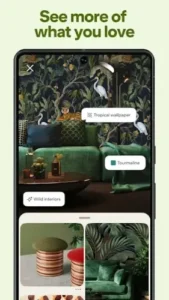
The intelligence behind the curtain is a sophisticated AI. The platform’s algorithm analyzes every Pin you save, every search you perform, and even how long you look at a certain image. It uses this data to power your personalized home feed, a continuously updating stream of recommendations tailored specifically to your evolving tastes. This is the “discovery” engine in action. Further aiding discovery is the Lens tool, a visual search feature that allows you to take a photo of anything, a pair of shoes, a piece of furniture, and find similar items and related ideas on Pinterest.
A Tour of the Key Pinterest Features
Beyond the basic save and organize function, the platform offers a suite of powerful tools.
-
Discovery & Curation: Your home feed is the main event for Pinterest inspiration, powered by AI. This is supplemented by trending topic searches and the ability to follow favorite creators to curate your incoming content stream.
-
Organization & Creation: The board system is flexible, allowing for sections within boards to further refine projects. The ability to create collages or mood boards directly in the app helps synthesize different Pins into a cohesive vision.
-
Shopping & Commerce: Pinterest shopping ideas become actionable through shoppable Pins, which tag products directly within an image and often provide real time pricing and links to purchase.
-
Interactive Tools: Features like Idea Try On use augmented reality to let you virtually test makeup or see how a chair would look in your room. Video Pins (Idea Pins) offer short form tutorials and deeper dives into concepts.
-
Social Functionality: While not its primary focus, the platform allows for private messaging, shared boards for collaborative planning, and commenting on Pins to ask questions or give feedback.
Pinterest User Experience: Design and Interface
Pinterest’s design is famously visual and intuitive. The signature interface is a cascading masonry grid of images, which creates a dynamic and visually rich browsing experience that feels both endless and personally curated. Navigation is straightforward, with clear tabs for Home, Search, Create, and your profile. The focus remains squarely on the content.
However, this experience is punctuated by promoted Pins. These ads are designed to blend seamlessly into the feed, which can be effective for advertisers but sometimes disrupts the organic flow for users. The frequency and relevance of these ads are a common point of discussion in user feedback.
The community on Pinterest is built around interests, not personal networks. Users range from the casual browser who saves a few recipes to the dedicated content creator who publishes detailed Pinterest DIY tutorials and builds a following. A key collaborative feature is the group board, where multiple users can pin to a shared board, making it ideal for planning events like a group vacation or a family holiday. The general tone of the community is supportive and aspirational, focused more on ideas and less on personal commentary. For those seeking a different flavor of visual inspiration, Canva offers a more direct, AI-powered toolset for creating your own graphics and designs from scratch.
Positioning Pinterest in the Digital Landscape
When evaluating Pinterest similar apps, it’s crucial to understand the different roles these platforms play. Instagram and TikTok are fundamentally social broadcasting networks. Their core dynamic is about sharing moments and building a following through feeds dominated by content from people you know or influencers you follow. The experience is reactive and centered on what is happening now.
Pinterest operates on a different premise. It is a proactive planning tool. People don’t typically come to Pinterest to see what their friends ate for lunch; they come to figure out what they themselves should cook for dinner next week. Its value is not in real-time updates but in evergreen inspiration. Compared to a tool like Canva, which is for creating designs, Pinterest is for discovering and collecting them. This distinction positions Pinterest not as a direct competitor to social media, but as a complementary utility for the planning phase that comes before creation or purchase. Understanding this is key to using the platform effectively; it is your personal catalog of possibilities.
Practical Pinterest Tips for a Better Experience
To move from passive scrolling to active curation, a few strategic Pinterest tips can dramatically enhance your results. The goal is to make the platform work for you, not the other way around.
First, master your board organization. Instead of creating one giant board for “Home Ideas,” create specific, actionable boards for “Kitchen Renovation 2025,” “Living Room Lighting,” and “Entryway Storage Solutions.” This specificity makes your saved pins far more useful when you’re ready to execute. You can take this further by using board sections. Within your “Wedding Planning” board, you can have sections for “Bridal Hair,” “Floral Arrangements,” and “Reception Seating Charts.” This level of organization transforms your profile from a collection of nice pictures into a functional project management tool.
Second, leverage the Lens tool beyond simple product searches. See a garden design you admire on your morning walk? Use Pinterest Lens to snap a photo and find similar landscaping ideas. In a store and unsure how to style a particular throw pillow? Use Lens to see it in different room settings. This turns your physical environment into a search query, bridging the gap between what you see in the real world and the creative ideas on the platform.
Finally, actively curate your feed. The algorithm is powerful, but it requires your input. Make a habit of saving pins that truly resonate and, just as importantly, muting pins or entire topics that do not. If you’re shown content that is irrelevant, use the three dot menu to select “Hide pin” or “See less like this.” This direct feedback is one of the most effective ways to use Pinterest for business or personal interests, as it trains the AI to refine your feed into a highly personalized stream of relevant inspiration.
Conclusion :
After examining its mechanics, community, and real-world use, the verdict on Pinterest is clear. It remains a uniquely powerful tool in the digital ecosystem. It succeeds not by competing directly with social media giants, but by carving out its own essential niche as a platform for planning and visual discovery.
The trade offs, particularly regarding the ad experience and the occasional removal of beloved features, are real and noted by its user base. However, these are often outweighed by the core utility the platform provides. For anyone engaged in a creative process, a purchasing decision, or simply the act of imagining a future project, Pinterest offers a structured, intuitive, and deeply personalized environment to bring vague ideas into sharp focus.
In conclusion, Pinterest is less an app and more a utility for the imagination. It is the digital equivalent of a well organized workshop, where the tools are ideas and the final project is a life better designed. Its value is proven by its continued relevance to a massive and diverse global audience.
Frequently Asked Questions (FAQ)
Is Pinterest free to use, and how does it make money?
Yes, the Pinterest app is completely free to download and use. The company generates revenue primarily through promoted pins, which are native ads that appear in your home feed and search results. These allow businesses to reach users based on their interests and search history.
What is the safest way to get the official Pinterest app?
The most secure method is to download Pinterest app directly from the official Google Play Store. You can also access the download link through the Pinterest Official Website to ensure you’re getting the legitimate app developed by Pinterest, Inc.
How can I get help if I’m having an issue with my account?
For account-specific problems, bugs, or to report content, you can contact Pinterest’s support team directly. They handle these inquiries and can be reached via their support system at help[at]pinterest.com.
Where can I find a detailed guide to all the features?
For a comprehensive, community driven overview of features, updates, and creative strategies, the Pinterest Wiki Page is an excellent resource. It often contains deeper insights and tutorials compiled by experienced users.
Can I use Pinterest for my small business?
Absolutely. Many businesses use Pinterest as a visual catalog and discovery tool. You can create boards for your products, use rich pins to show real-time pricing, and create idea pins to showcase how your products can be used. This makes it a powerful platform for reaching customers actively looking for inspiration.