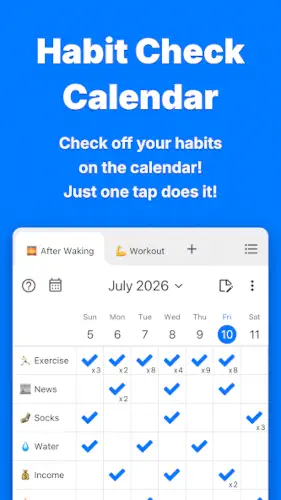
Habit Check Calendar transforms habit tracking from a chore into a visual experience you actually want to check every day.
With a strong 4.4 star rating from 7,000 reviews on Google Play, developer Naoki Otsu has created something rare: a habit tracker that combines simplicity with visual motivation . The Habit Check Calendar app requires approximately 92 MB of storage, is rated for ages 4 and up, and works completely offline without requiring any login or cloud account .
What Exactly Is Habit Check Calendar?
Habit Check Calendar is a daily habit tracker with a weekly calendar view designed to help you check in on your habits and build consistency through visual progress tracking. The core concept is refreshingly simple: check off your weekly calendar to track your habits, visualize your efforts with an easy to view weekly layout, and turn daily checks into a sure path to consistent growth.
What makes this app different from the dozens of other habit trackers out there? It strips away everything unnecessary and focuses on what actually matters: seeing your progress visually, checking in with one tap, and never needing to remember a password. The app requires no login, starts immediately, and keeps data on your device with optional backup and restore functionality.
Track Habits Visually with a Weekly Calendar
The weekly calendar view is the heart of Habit Check Calendar. You see an entire week of habits at a glance, with each day’s check-ins clearly visible . One tap check-ins let you mark habits complete in a fraction of a second. Multiple habits display on one screen, so you never have to scroll endlessly to find what you need.
Swipe left or right to change weeks. The navigation is intuitive and seamless. Over time, you start to notice patterns. You see which days you are consistent and which days need more attention. The visual feedback is immediate and satisfying. That satisfaction is what keeps you coming back.
Privacy First, No Login Required
This is where Habit Check Calendar truly stands out. You do not need to create an account. You do not need to remember a password. You do not need to worry about your habit data being sold or shared . Your data stays on your device by default.
For users who value privacy, this is a game changer. No cloud dependency. No data mining. No third-party access. Just your habits, your progress, and your device. Optional backup and restore lets you move data across devices if needed, but the default is local storage . Biometric authentication (Face ID and Touch ID) adds an extra layer of security for sensitive habit data.
Habit Check Calendar Core Features
Weekly Calendar Habit Tracking
The weekly view is the centerpiece of the app . You see all your habits displayed across the week with clear visual indicators of completion. One tap check-ins make logging habits feel effortless rather than burdensome. Swipe left or right to navigate between weeks, and watch your progress patterns emerge over time. The visual representation of your consistency is both motivating and informative.
Unlimited Tabs for Organization
Organize your habits into unlimited tabs based on your life areas. Work habits go in one tab. Health habits go in another. Study habits in a third. The structure is entirely up to you. Create tabs for “Work,” “Workouts,” “Study,” “Health,” or anything else that matters to you. The archive function lets you hide calendars you do not want to display while keeping the data intact. This flexibility means the app grows with you as your habits evolve.
1,000+ Emojis for Personalization
Emojis transform habit tracking from a dry checklist into something visually engaging. Choose from over 1,000 emojis to represent each habit. Replace standard checkmarks with emojis that resonate with you. A running habit gets a running emoji. A reading habit gets a book emoji. A water tracking habit gets a water drop. The visual enjoyment creates a positive association with habit checking, which makes you more likely to do it consistently.
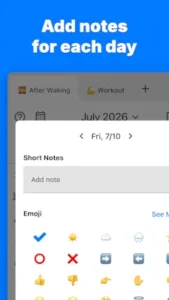
Daily Memos for Reflection
Record your daily insights and achievements with memos attached to each day. Write freely about what worked, what did not, and what you learned. Short notes or long reflections. Both are supported. The memo history lets you view past notes in one place, creating a journal of your habit building journey. This turns Habit Check Calendar from a simple tracker into a tool for genuine self reflection and growth.
Reports and Analytics
Numbers do not lie. The reports section shows you your all-time check streaks, monthly reports, and longest check streaks. Progress charts visualize your consistency over time. Switch between “Last 7 days,” “Last 28 days,” or “Last 6 months” to see trends at different scales . Seeing your efforts confirmed with numbers provides objective evidence of your progress, which is incredibly motivating.
Notifications and Reminders
Set custom reminders at the time you choose with any message you like. Habit specific notifications let you set different reminder times for different habits. The app automatically skips notifications for habits you have already checked, so you never get unnecessary reminders. This thoughtful design reduces notification fatigue and makes the reminders feel helpful rather than annoying.
Backup and Restore
Automatic backup protects your data without requiring any manual effort. Restore your data anytime, even across different devices or operating systems. This means you can switch from iOS to Android or upgrade your phone without losing your progress. Biometric authentication (Face ID and Touch ID) adds an extra layer of security to your habit records.
Dark Mode and Color Themes
Choose your theme from Light, Dark, or automatic switching based on your device settings. Change the background to any color you like. Personalize the visual experience to match your preferences. A workspace that looks good feels better to use, and Habit Check Calendar gives you full control over the aesthetics.
CSV Export
Export an individual calendar or all of your data in CSV format. This standard format works with spreadsheets and other analysis tools. Full data portability means you are never locked in. If you decide to switch apps or want to analyze your data in more detail, you can take everything with you.
Check Count Customization
Freely set how many check-ins you want per day for each habit. Track habits that need to be done multiple times per day. Set different frequencies for different habits. The flexibility matches your actual needs rather than forcing you into a one size fits-all approach.
Widgets
Access your habit tracker from your home screen with customizable widgets. Check progress without opening the app. Check habits directly from the widget. Choose from small, medium, and large widget sizes. iOS users can also access lock screen widgets. Quickly undo accidental checks from the widget. This integration makes habit tracking frictionless and always within reach.
Habit Check Calendar Graphics and Design
Habit Check Calendar uses a clean, minimalist, user friendly design optimized for quick habit check-ins and visual progress tracking. The simple interface has minimal friction, making it easy to use consistently. The weekly calendar view presents information clearly. Emoji integration adds visual enjoyment. Color customization and dark mode let you personalize the experience. Intuitive swipe navigation makes changing weeks effortless.
The app has been praised for its “simple” and “highly complete” design with almost no screen transitions, reducing friction and making habit tracking feel effortless rather than stressful . The images and animations are clean and satisfying.
What Users Say About Habit Check Calendar App
What Works
Users consistently praise the simple, intuitive interface that makes habit tracking feel effortless. The weekly calendar view provides clear visual progress tracking. One tap check-ins make logging habits quick and painless. 1,000+ emojis add personalization and visual enjoyment. Unlimited tabs provide flexible organization. Daily memos enable reflection and journaling. Reports and charts visualize progress effectively. Notifications support consistency. Backup and restore protect data. Dark mode and color themes provide personalization. CSV export ensures data portability. No login required respects privacy.
Where The App Could Improve
Common criticisms include limited advanced features compared to paid competitors, no built-in social features or community challenges, backup/restore may require manual steps rather than automatic cloud sync, report depth may be less detailed than some users prefer, and platform differences between iOS and Android versions .
Check out Streaks for another habit tracker with similar visual progress features, or explore the full collection of productivity apps to find your next habit building tool.
Habit Check Calendar Tips For Getting Started
Getting started with Habit Check Calendar is straightforward, but a few smart choices early on will help you build a system that actually sticks. Here is what to focus on first.
Beginner Advice
Start with 3-5 habits to avoid overwhelm. The most common mistake people make with habit trackers is trying to track too many things at once. Start small. Choose the habits that matter most. Three to five is a manageable number. Once those become automatic, add more. A focused tracker is more effective than a crowded one.
Choose meaningful emojis for visual motivation. Habit Check Calendar gives you over 1,000 emojis to choose from. Use them strategically. A running habit gets a running emoji. A reading habit gets a book emoji. A water tracking habit gets a water drop. The emoji you choose creates a visual association that makes checking in more enjoyable. That enjoyment translates to consistency.
Organize habits with tabs for different life areas. Create tabs for Work, Health, Study, Personal, or whatever categories make sense for your life. This keeps your tracker organized and prevents clutter. When you open a tab, you see only the habits relevant to that area of your life. This reduces cognitive load and makes checking in faster.
Set realistic reminder times that fit your schedule. Notifications only work if they arrive when you can actually act on them. Think about your daily rhythm. Set reminders for times when you are likely to be available. Morning habits get morning reminders. Evening habits get evening reminders. The app lets you set habit specific notification times, so you are not stuck with a one size fits all schedule.
Use daily memos to record insights and reflect. The memo feature is easy to overlook, but it is one of the most powerful tools in the app. Write a short note about what worked, what did not, or what you learned. Over time, these memos become a journal of your habit building journey. They help you see patterns and understand your own behavior better.
Check the weekly view to see patterns and adjust. The weekly calendar shows you your progress at a glance. Use it. Look for patterns. Are you consistently missing the same habit on the same day? Are there days when you check everything off? The visual feedback helps you adjust your approach based on real data rather than guesswork.
Enable notifications to prevent forgetting habits. Life gets busy. Notifications are your safety net. Enable them. Set custom messages that remind you why each habit matters. The app automatically skips notifications for habits you have already checked, so you never get unnecessary reminders.
Backup your data to protect your progress. Automatic backup protects your data without requiring any manual effort. Enable it. Your progress is valuable. Losing it because you forgot to backup is avoidable. The app supports cross-device restore, so you can switch phones without losing your streaks.
Add widgets to your home screen for quick access. Widgets let you check habits without opening the app. Add a widget to your home screen. Check habits directly from the widget. Choose from small, medium, or large sizes based on how much information you want visible. This reduces friction and makes checking in feel effortless.
Start with free features before exploring advanced options. The free version of Habit Check Calendar is generous and fully functional. Start with the basics. Learn the weekly calendar view. Get comfortable with one tap check-ins. Once you have built a consistent habit tracking routine, explore the advanced features like CSV export, multiple daily checks, and biometric security.
Advanced Strategy
Use unlimited tabs strategically by life area or priority. Tabs are not just for organization. They are for focus. Create tabs based on priority. A “Non Negotiable” tab for habits you must do every day. A “Growth” tab for habits that move you forward. A “Maintenance” tab for habits that keep things running. The structure of your tabs shapes how you think about your habits.
Leverage emoji psychology for positive associations. The emojis you choose create emotional associations. Choose emojis that make you feel good. A smiling emoji for a habit that brings joy. A strong emoji for a habit that builds strength. A calm emoji for a habit that reduces stress. The visual cues prime your brain for positive feelings, which makes you more likely to follow through.
Analyze reports regularly to identify patterns. The reports section is not just for looking back. It is for learning. Check your reports weekly. Which habits are you most consistent with? Which ones need more attention? Are there patterns based on the day of the week? The data tells a story. Read it.
Set multiple daily checks for habits needing repetition. Some habits need to happen more than once a day. Drinking water. Taking medication. Practicing a skill. Set multiple daily checks for these habits. Track each instance. The app supports this flexibility, and it ensures you do not miss a single repetition.
Use archive function to hide completed habits. When you have successfully built a habit, archive it. Hide it from your active view while keeping the data intact. This keeps your tracker focused on what you are currently working on. The archive function prevents clutter while preserving your history.
Export data for deeper spreadsheet analysis. CSV export lets you analyze your habit data in spreadsheets. Create charts. Calculate averages. Identify trends. For users who love data, this feature turns Habit Check Calendar into a powerful personal analytics tool.
Combine memos with journaling practices. The memo feature is perfect for journaling. Write a few sentences each day about your habits. What was easy? What was hard? What did you learn? Over time, these memos become a valuable record of your personal growth.
Set habit-specific reminder times. Not every habit happens at the same time. Morning meditation. Afternoon exercise. Evening reading. Set different reminder times for different habits. The app supports this. Use it. Your reminders will feel more relevant and less intrusive.
Use biometric security for sensitive data. If you track sensitive habits, enable biometric authentication. Face ID and Touch ID keep your data secure. No one else can access your habit records without your permission.
Review longest streaks for motivation. Your longest streaks are proof of what you are capable of. Review them regularly. They remind you of your consistency. They motivate you to keep going. They show you that building habits is possible.
Habit Check Calendar Similar Apps
Habit Check Calendar sits in a crowded space of habit tracking apps, but its weekly calendar view and privacy-first approach set it apart. Here is how it compares.
| App | Similarity | Key Difference |
|---|---|---|
| Streaks | Habit tracker with streak tracking and visual progress | Streaks focuses on daily streaks. Habit Check Calendar emphasizes weekly calendar visualization . |
| Habitica | Gamified habit tracker with RPG elements and social features | Habitica uses game mechanics. Habit Check Calendar is simpler and privacy focused without gamification . |
| Loop Habit Tracker | Open source habit tracker with simple interface and analytics | Loop is open source with a different visual style. Habit Check Calendar offers weekly calendar view and emoji personalization. |
| HabitBull | Habit tracker with statistics, reminders, and widgets | HabitBull has more advanced analytics. Habit Check Calendar is simpler and more privacy focused. |
| Strides | Habit and goal tracker with multiple tracking methods | Strides supports goals and habits. Habit Check Calendar focuses exclusively on habit tracking. |
| Done | Simple habit tracker with calendar view and streaks | Done has a similar simplicity. Habit Check Calendar offers unlimited tabs and emoji personalization. |
Habit Check Calendar is closest to Loop Habit Tracker and Done because it emphasizes simplicity, visual progress tracking, and privacy focused design. It differs from Habitica through its non gamified approach and focus on calendar based visualization rather than RPG elements. For users who want a simple, visual tracker without social pressure or gamification, Habit Check Calendar is a strong choice.
Who Is Habit Check Calendar For?
Habit Check Calendar is for users who want a simple, visual habit tracker without the complexity of gamification or social features. If you have tried Habitica and found the RPG elements distracting, this app might be a better fit. If you want to see your progress on a weekly calendar rather than just a daily streak, this app delivers.
Privacy conscious individuals will appreciate the no-login, local-data approach. Your habit data stays on your device. No cloud accounts. No data mining. No third party access. For users who value privacy, this is a significant advantage over cloud-based alternatives.
Users who prefer weekly calendar visualization will find the app’s core design appealing. Seeing an entire week at a glance helps you spot patterns and adjust your approach. The visual feedback is immediate and satisfying.
People who want emoji based personalization will enjoy the 1,000+ emoji library. Replacing standard checkmarks with meaningful emojis creates a positive visual association with habit tracking. This small touch makes a significant difference in consistency.
If you want a habit tracker that respects your privacy, works offline, and shows your progress on a weekly calendar, Habit Check Calendar is worth trying.
Conclusion
Habit Check Calendar delivers a habit tracking experience that stands out for its simplicity and visual approach. The weekly calendar view keeps you focused on consistency. The 1,000+ emojis make tracking enjoyable. The unlimited tabs keep everything organized. The privacy first design ensures your data stays yours.
The app has limitations. Advanced features are limited compared to paid competitors. There are no built-in social features or community challenges. Backup and restore may require manual steps. Report depth may be less detailed than some users prefer. Platform differences between iOS and Android exist.
For users willing to embrace a simple, visual approach to habit tracking, Habit Check Calendar offers a compelling experience. It does not try to be everything to everyone. It focuses on doing one thing well: helping you build consistent habits through weekly calendar visualization.
If you want a habit tracker that works offline, respects your privacy, and makes tracking visually enjoyable, Habit Check Calendar is worth downloading.
Your habits are the small choices you make every day. Start tracking them today.
Habit Check Calendar FAQ
How do I download Habit Check Calendar and is it really free?
Yes, Download Habit Check Calendar from the Official Google Play Store.
Does Habit Check Calendar require an account or internet connection?
No. Habit Check Calendar does not require any login, sign-up, or cloud account. You can start using the app immediately after download. All your data stays on your device by default. The app works completely offline. No internet connection is needed for tracking habits, checking in, or viewing reports. This privacy first approach means your habit data is never shared with any server or third party .
How do I backup my data and restore it on a new device?
Habit Check Calendar includes a backup and restore feature to protect your progress. You can back up your data automatically and restore it anytime, even across different devices or operating systems. To backup, go to Settings, select Backup, and your data will be saved. To restore on a new device, install the app, go to Settings, select Restore, and choose your backup file. The app also supports CSV export if you want to analyze your data in spreadsheets .
What if I encounter a problem or need support?
If you experience any issues with Habit Check Calendar, you can contact the developer directly. Naoki Otsu, the independent front end engineer who created the app, provides support through the following channels:
-
Email: info[at]naokiotsu.com – for bug reports, feature requests, and general support
-
Google Play: Visit the developer page for updates and contact information
The developer actively maintains the app and responds to user feedback.
Can I set different reminder times for different habits?
Yes. Habit Check Calendar supports habit-specific notifications . You can set different reminder times for different habits based on when you want to perform each one. Morning habits can have morning reminders. Evening habits can have evening reminders. The app also automatically skips notifications for habits you have already checked, so you never receive unnecessary reminders . This thoughtful design reduces notification fatigue and makes reminders genuinely helpful.