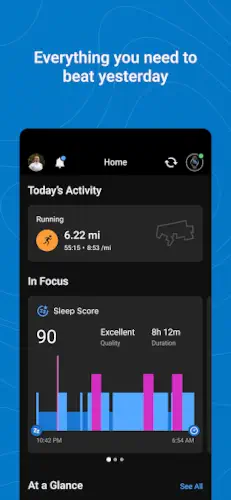
Garmin Connect is not an app you open to check a step count and close.
Garmin Connect is a data analysis room that only starts working when you have a Garmin device on your wrist. Currently, it holds a 4.8 star rating from over 1.1 million reviews on Google Play, with 50 million+ downloads. The app size sits around 140 MB on Android. The age rating is 3+ on Google Play and 12+ on the App Store due to regional content policies.
What Is Garmin Connect and How Does It Work?
It is the central data hub for Garmin hardware, not a standalone fitness app. Everything your watch records, including running, cycling, swimming, sleep, heart rate and stress, flows here. What you see in the app is organized analysis, not a pile of raw numbers.
The logic works in three layers. The first layer is storage: activity records upload and stay permanently, so you can look back at a marathon from three years ago. The second layer is analysis: pace, cadence, VO2 max, running dynamics and heart rate zones are only summaries on the watch. The app is where you unfold them into trends. The third layer is control: you build training plans, draw routes, change watch faces and adjust notification settings here, then sync them back to the watch. It is free, ad-free and Garmin makes money selling hardware, so the app does not need to charge you a subscription.
What Garmin Connect Brings to the Table
Like we said early, Its core purpose is to act as the central hub for all Garmin wearable data. Everything your Forerunner, Venu, fēnix or Instinct records ends up here. You see detailed breakdowns of running cadence, swimming stroke rate and cycling power, not just a generic “45 minutes of activity.”
It is free, has no ads and puts no subscription wall in front of basic functions. This is increasingly rare among fitness apps. Garmin makes money selling hardware. The software is a companion service, so the company does not rely on pop-ups or paywalls to generate revenue. You buy the watch and the app should work fully. This sounds like common sense until you compare it to calorie trackers that charge a subscription just to scan a barcode.
The Mechanics of Tracking Your Health
Activity Tracking and Analysis
The depth of data analysis for running, cycling and swimming is the most solid part of Garmin Connect. After an activity, you do not just see total distance and average pace. Cadence, vertical oscillation, ground contact time and left/right balance are all listed if your device supports them. The problem is that most people never scroll down. They look at total time and close the app, then wonder why their training is not improving. The data is there. If you do not look at it, it will not help you.
Health Metric Trends
Heart rate, sleep, stress, Body Battery and menstrual cycle tracking are all available on the free version. The value of trend charts is that they filter out single day noise. One bad night of sleep means nothing, but two weeks of declining deep sleep is your body sending a signal. This feature does not cost money, but it requires you to spend two minutes looking at the weekly view.
Workout and Course Creation
Custom workouts and route creation are underrated features within the Garmin ecosystem. You can build an interval running plan in the app and sync it directly to your watch. The watch will prompt you to speed up or recover according to the steps. Route creation works the same way. Draw a path, send it to the device and the watch handles navigation. For anyone running unfamiliar roads, this saves you from pulling out your phone to check a map.
The Badge System
Badges are surface level gamification. Completing a 10K, hitting a step goal for seven straight days, or cycling 200 kilometers in a month all earn you virtual badges. For some people, this is meaningless. For others, it is the reason they keep going. Which group you belong to is something you only learn by trying.
Device Integration and Daily Use
Garmin Device Sync
Watch and app syncing is the core experience. Activity records, health data, notifications and weather all travel through this channel. But this is also where user complaints cluster. Another user said every time they open the app, they have to wait a long time for syncing to finish. This is not universal, but it is frequent enough that you should know about it before buying a Garmin.
Third Party App Sync
Garmin Connect and MyFitnessPal syncing lets you reflect activity calories burned directly in your calorie budget. Syncing with Strava pushes running and cycling data into a larger athletic community. However, third party sync stability depends on the APIs on both ends. Sometimes data is delayed. Sometimes sync breaks. If you rely on these connections for training decisions, pay attention.
SMS and Call Integration
Receiving texts and viewing incoming calls on your watch is useful when you are cycling or your hands are busy. But its value depends on the stability of the connection between your phone and watch. If the connection drops, notifications stop. It is that simple.
Customizable Home Screen
You can arrange data cards on the home screen according to your habits. Put sleep at the top, or put steps at the top, depending on what you care about most each day. The level of customization is not high, but it reduces the number of swipes every time you open the app.
How to Connect Your Garmin Watch to Your Phone
Pairing takes three to five minutes, but you have to start in the right place. Do not pair from your phone’s Bluetooth settings. That is the most common mistake. The correct process is to download Garmin Connect from the Google Play Store or Apple App Store, turn on Bluetooth, then press and hold the button on your watch to enter settings and select “Pair Phone.” A brand new watch will display a QR code on the screen that you scan with your phone to start pairing.
If your watch is already set up but has lost its connection, go to the watch settings, select “Connect,” and choose “Pair Phone” to trigger the pairing mode again. Once paired, the watch will automatically sync health data and workouts. You can adjust notification permissions separately in the app settings.
What Metrics Does Garmin Track and Monitor?
The coverage depends on which watch you wear, but the baseline includes steps, heart rate, resting heart rate, sleep stages, stress score, Body Battery, respiration rate, blood oxygen and menstrual cycle tracking. The workout data goes deeper: running includes pace, cadence, vertical oscillation, ground contact time and left/right balance. Cycling includes power, cadence and speed. Swimming includes stroke rate, SWOLF score and stroke count.
But the value of the Garmin Connect app is not in recording these numbers. It is in viewing them together. On days when your Body Battery is low, your training performance usually drops. After a week of declining sleep scores, your resting heart rate often starts to climb. Looking at any single metric in isolation makes it easy to misjudge. Putting them on the same timeline reveals cause and effect.
Garmin Connect Design and Interface
The interface is clean, data visualization is clear and dark mode follows system settings. But information density is high and new users can easily feel lost about where to look. This is not a design flaw. It is the inevitable result of having too many features. Garmin did not try to make this a dumbed down app. It assumes you know what you want to see and gives you deep enough entry points to find it.
How Long Does a Garmin Watch Battery Last?
There is no single answer because battery life depends on which modes you use. Take the Forerunner 570 as an example: in smartwatch mode with daily wear, notifications and wrist heart rate, the 42mm version lasts up to 10 days and the 47mm version lasts up to 11 days. In pure GPS mode, the 42mm version lasts 18 hours, while the 47mm version, with a larger battery, reaches 16 hours in auto select satellite mode. If you play music, GPS mode battery life drops to 8 to 9 hours.
In real world use, if you run three to four times a week for an hour with GPS, plus daily notifications and sleep tracking, most Forerunner and Venu models will last five to seven days. The fēnix series has a larger battery and solar versions can push past two weeks. The key variables are GPS frequency and screen brightness. A common tip is to lower screen brightness and turn off unnecessary gesture wake to squeeze out an extra day of battery life.
How to Get the Hardest Garmin Badges
The hardest badges in the system are mostly the 8 point tier. Insanity requires running 100 miles (about 160 kilometers) in a single activity, which is beyond the single effort limit of most amateur runners. 100K Ultra is a single 100 kilometer run, one step below Insanity but still demanding extreme endurance and fueling strategy. Speedy Century requires riding 100 miles in under five hours. There is a speed threshold, so you cannot just cruise to earn it.
Two badges rely on luck and discipline rather than fitness. Mythical Sleep requires a sleep score of 100, which is the maximum score in Garmin’s sleep algorithm. Many people wear the watch for years and never see it once. 60 Day Goal Getter requires hitting your daily step goal for 60 consecutive days. If you use auto adjusting goals, a high step day will raise tomorrow’s target, making the streak harder to maintain than it sounds. To find these badges, tap your profile picture on the app home screen, go to “All Badges,” and filter by points to see the 8 point badges at the top.
How to Fix Garmin Connect App Not Syncing
First, check if there is a green dot at the top of the app home screen. If there is a green dot, the connection is fine and the sync animation should appear next to the device icon. If there is no green dot, try these steps in order:
Step one: Confirm Bluetooth is on for both your phone and watch and your phone has an internet connection. Step two: Restart both the watch and the phone. Often it is just a temporary glitch. Step three: Check if the watch has battery saver or stealth mode enabled, as these modes cut Bluetooth. Step four: If the first three steps do not work, remove the watch from both the Garmin Connect app and your phone’s system Bluetooth list, then pair it again from inside the app.
Can You Customize Your Garmin Watch Face?
Yes, there are three ways. The Connect IQ Store is the official watch face library. Most faces are free and a few well designed ones are paid via Garmin Pay. Search for the style you want, tap install and it appears on your watch after syncing. The Face It feature inside the Connect IQ app lets you turn your own photos into a watch face. Choose an image, crop it, place your data fields and install it so your watch shows your photo alongside steps or heart rate.
Newer models like the fēnix 8, Forerunner 970 and Venu 4 support making changes directly on the watch. Press and hold the middle button to enter watch face settings, switch designs, change data fields and adjust colors without pulling out your phone. Older watches can also adjust data fields on pre-installed faces from the wrist, but they cannot freely change layouts like the newer models.
What Users Say About Garmin Connect App
Garmin device owners rate the deep integration highly. Every piece of data your watch records can be found with corresponding analysis in the app without exporting to another tool. Privacy is also recognized: data is not shared with third parties, encrypted in transit and you can request deletion. The completeness of the free version satisfies long term users. Some explicitly say subscription features add no extra value because the free version already covers all daily training needs.
Post update bugs are the biggest pain point. Users report the app becoming almost unusable after updates, crashing when opening activity details. Sleep and nap detection false positives also recur and incorrectly logged naps cannot be deleted. The closed nature of third party integration frustrates some users who feel forced into paid services to move data smoothly. Subscription value is also questioned, especially given how closed the ecosystem already is.
Garmin Connect Tips
Enable Automatic Activity Detection
Garmin’s automatic detection is more detailed than most competitors. Your watch will automatically identify walking, running, cycling and even pool swimming without you pressing start. But many people do not realize that automatically detected activities are not saved automatically. A card pops up on the home screen asking if you were just running. You have to confirm it before it enters your official record.
If you want cleaner data, turn on automatic detection but turn off auto save. You will get a prompt after each workout and confirm it manually. The upside is you will not accidentally log a dog walk as a training session. The downside is one extra tap. For anyone serious about their training data, that trade-off is worth it.
A frequent Garmin Connect tip on Reddit is to customize the In Focus section on your home screen. The default layout shows what Garmin thinks is important, not what you need. If you are training for a race, put training status and recovery time at the top. If you are working on sleep, put your sleep score first. Saving three swipes every time you open the app adds up over a year.
Use Custom Workouts
Custom workouts are the most underrated feature in the Garmin ecosystem. You can build an interval running plan in the app’s training menu, setting warm-up, fast segments, recovery, repeat counts and cool down, then sync it to your watch. The watch guides you through each step while you run, so you do not have to check your phone mid-workout.
What makes this feature truly valuable is course creation and route navigation. You can draw a route in Garmin Connect on the web or in the app and send it to your watch. When you ride or run long distances, the watch handles turn by turn directions. For anyone running in a new city or on trail routes, this saves you from stopping to check your phone and eliminates the anxiety of getting lost.
Wear the Watch to Bed
Sleep tracking only works when the watch stays on your wrist overnight. This sounds obvious, but plenty of users wear the watch during the day, take it off to charge at night and then wonder why the app says sleep data is insufficient.
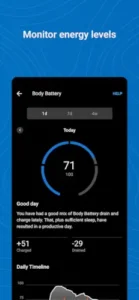
Garmin’s sleep data depth sits in the top tier of consumer wearables. Sleep stages, HRV status, respiration rate and blood oxygen all combine to tell a more complete story than just “you slept seven hours.” Body Battery converts sleep quality into an energy budget for the next day. If you wake up with a Body Battery of 30, a high-intensity workout will likely fall apart. That number is more honest than how you feel.
One real issue to know about in advance: nap detection false positives. Users report that Garmin sometimes identifies sitting on the couch watching TV as a nap and incorrectly logged naps cannot be manually deleted. This is not universal, but if you care about clean data, knowing this beforehand is better than getting frustrated later.
Join Leaderboards and Challenges
Challenges and leaderboards are the entire social layer of Garmin Connect. There is no Strava style segment competition or follower feed. The social aspect is closed, friend based and measured in completed activities and milestones. Finish a 10K, hit a step goal for seven straight days or cycle 200 kilometers in a month and you earn a virtual badge.
For some people, this means nothing. For others, it is the thing that pushes them out the door on a Wednesday night when they would rather stay in. A consensus among users on Garmin Connect reddit is that if you do not have real life friends using Garmin, the leaderboard motivation drops by half. Finding two or three colleagues or running buddies to add as friends is far more effective than adding a bunch of strangers.
How to Search and Filter Your Workouts in Garmin Connect
There are two entry points in the training menu and they do completely different things. “Find a Workout” is Garmin’s built-in course library. You can filter by activity type, difficulty, targeted muscle group and duration. If you only have forty minutes during lunch, set the filters to yoga, intermediate and 40 minutes, and you will find a session like “Midday Energy Boost.” You can see a breakdown of every movement and when you sync it to the watch, the watch guides you through each step with animations showing the correct posture.
“Create a Workout” is for building your own sessions. Set your warm-up, intervals, recovery and repeat counts, then sync to the watch. A frequent Garmin Connect tip is to save your created workouts as bookmarks so you can pull them up next time without rebuilding them. If you are training for a race, schedule your plan a week in advance. Once synced, you open the watch each day and see exactly what to do without making decisions on the fly.
Garmin Connect Similar Apps
Garmin Connect vs Google Fit
Google Fit is free, ad-free and simple, but it only cares about your activity level. Heart Points are its core metric and nutrition and deep training analysis are not priorities. Garmin Connect leads by more than one level in data depth, but only if you wear a Garmin watch. If you just want to know how much you moved today, Google Fit is enough. If you want to understand why your training is not improving, Garmin Connect has the answer.
Garmin Connect vs Samsung Health
Samsung Health is free, ad-free and deeply integrated with Galaxy Watch. Its sleep tracking, stress monitoring and social challenges are solid, but it is also a closed ecosystem. The difference is hardware. Wear Garmin, install Garmin Connect. Wear Galaxy Watch, install Samsung Health. Anyone searching connect for Garmin has likely already bought the watch and does not need to choose between the two.
Garmin Connect vs Strava
Strava is a social platform. Garmin Connect is a data analysis tool. Strava lets you compare segment times with others. Garmin Connect lets you compare yourself with your past self. They can sync, but the purpose is different. If you want to be seen, Strava is better. If you want to get faster, Garmin Connect’s Body Battery, Training Readiness and HRV trends are more useful.
Garmin Connect vs MyFitnessPal
MyFitnessPal handles food. Garmin Connect handles movement. When synced, you can see the balance of intake and burn in one place. But MyFitnessPal’s free version has ads, while Garmin Connect does not. If you only want a tool to record exercise, Garmin Connect is cleaner. If you need calorie tracking, using both together makes sense.
If you are looking for an alternative outside the Garmin ecosystem, Samsung Health’s free features and Galaxy Watch integration is another closed but complete option. It will not give you Garmin level training data depth, but it is free, ad-free and tightly integrated with Samsung devices.
Conclusion
Who Garmin Connect Is For
People who already own a Garmin watch and want to use it seriously. Runners, cyclists and swimmers who need to see cadence, power and stroke rate details to adjust training. Users who value privacy, do not want ads and refuse to accept subscription walls in front of basic features.
Who Should Look Elsewhere
People without a Garmin device. This app has almost no standalone value without the hardware. People who prioritize social sharing and segment competition should use Strava. People with low tolerance for software instability may find the iOS disconnect issues frustrating after updates.
The value of Garmin Connect depends on what is on your wrist. If you wear a Garmin, it is the most complete data outlet in the ecosystem: free, ad-free and deep enough. If you do not wear a Garmin, it is just an app you do not need to download. The real question to ask yourself is this: are you willing to accept a piece of software that occasionally lags, occasionally disconnects, but never charges you a subscription, in exchange for the depth of your training data? If your answer is yes, you have already paid the entry fee to the Garmin ecosystem.
FAQ
Where is the official Garmin Connect download ?
You can download Garmin Connect App from the Official Google Play Store.
What is the official website?
The main hub is garmin.com, which handles account management and product support. For feature documentation, the official Garmin Support Center covers every technical question you might have.
How do I contact support if my watch stops syncing or I need billing help?
The primary support email is Android.Dev[at]garmin.com (always check the email support in google play store). For hardware issues like dead pixels or battery drain, emailing support with your device serial number and a short video of the problem speeds up the warranty process. If you have billing questions regarding Garmin Pay or accessory purchases, the same email routes you to the correct department.
Is Garmin Connect free to use?
Yes. The free version covers all data measured by Garmin watches: activity analysis, sleep, HRV, Body Battery, stress and menstrual cycle tracking, all without a subscription. Garmin’s business model is selling hardware. The app is a companion service. Searches for Garmin Connect codes usually point to occasional hardware discount codes tied to the Connect+ subscription, not codes that unlock app features. Basic functionality is never charged for, which is increasingly rare among fitness apps.
Does Garmin Connect work with non Garmin devices?
Technically you can install it, but almost all core value disappears. Without a Garmin watch, you cannot access Body Battery, Training Readiness, HRV status or deep sleep analysis. It can serve as a basic activity recorder, but among free health apps, Google Fit or Samsung Health do that better. The Garmin Connect app has very low standalone value. It is an extension of the watch, not a replacement.
Can I create custom workouts in the app?
Yes. In the training menu, you can create structured workouts for running, cycling, swimming and strength training. You set steps, duration, target heart rate or pace zones and sync it to the watch, which then guides you through each step. Route creation can also be done in the app or on the web. This feature is free and does not require Connect+.
Is my data private?
The Play Store listing states that data is not shared with third parties, encrypted in transit and you can request deletion. Garmin collects personal info, health and fitness data and three other data types. For people who care about where their data goes, this is more transparent than most competitors.