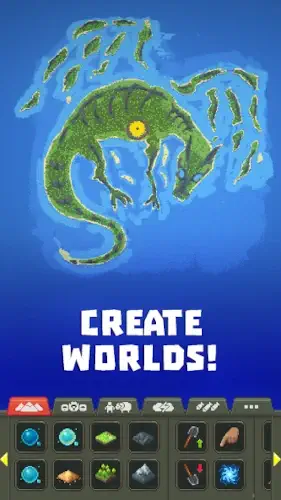
WorldBox has become the go to sandbox for digital deities.
With 10 million downloads and a 4.6 star rating from over 500K reviews, WorldBox proves you don’t need cutting edge graphics to create compelling worlds, just endless creativity and a willingness to occasionally smite your creations. Rated for ages 10+, it’s equally loved by casual players and hardcore simulation fans.
What Makes WorldBox Different?
Most god games give you limited tools or push microtransactions. WorldBox stands out by:
-
Rewarding Curiosity, Not Skill
There’s no “winning”, just experimenting. Drop a meteor on a thriving elf kingdom just to see how the dwarves react. The game’s magic lies in these unscripted moments. -
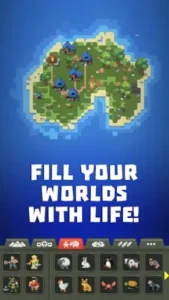
Civilizations That Feel Alive
Unlike static city builders, WorldBox societies:-
Develop unique languages (visible as floating text bubbles)
-
Form religions that spark holy wars
-
Pass down genetic traits through generations
-
-
No Nasty Monetization
The one time $7.99 premium upgrade removes ads and unlocks everything, no battle passes, no energy systems.
WorldBox Features :
God Tools Worth Mastering
-
Terraforming Brushes:
Paint biomes (forests, deserts) or raise/lower land to create islands or trenches. -
Disaster Menu:
From subtle plagues to showy nukes, each affects civilizations differently. -
Unit Possession (New in Monolith Update):
Take control of a single villager to experience your world from ground level.
Why the Premium Upgrade Pays Off
| Free Version | Premium ($7.99) |
|---|---|
| Basic creatures | 30+ species (demons, aliens) |
| 5 disasters | 20+ (including zombie virus) |
| Ads every 30 mins | Ad-free forever |
Best Premium Feature: The “History” tab tracks civilization rise/falls across centuries.
Visuals That Serve the Gameplay
The pixel art isn’t just nostalgic, it’s functional:
-
Clear Symbols: Skulls mark battles, hearts show marriages
-
Performance: Runs at 60FPS on devices as old as the Samsung Galaxy S8
-
Dark Mode: Easy on eyes during late night world building
The minimalist UI means some powers are buried in sub menus (tip: long press the lightning bolt icon).
WorldBox: What Players Think (And How to Speed Up Your Civilizations)
What Players Love
-
“Finally, Fair Monetization!”
-
The one time $7.99 premium model is a breath of fresh air in mobile gaming
-
No ads interrupting meteor strikes or kingdom building
-
“Bought premium after 10 minutes because the devs earned it.”
-
-
Emergent Storytelling
-
Unscripted moments like:
-
Dwarves tunneling under elf forests to steal resources
-
Orc clans developing a hatred for sheep (and declaring wars over them)
-
-
“My humans started worshipping a tree I accidentally blessed. Now they protect it with their lives.”
-
-
The Little Details
-
Genetic traits passing through generations
-
Languages evolving differently in isolated villages
-
*”Found a 200 year old dwarf who survived 3 plagues. His descendants are immune!”*
-
Common Complaints
-
Why Can’t They Invent Anything?
Civilizations cap at medieval tech (castles, swords). Players want:-
Gunpowder
-
Steam engines
-
“My elves have been rebuilding the same wooden huts for 500 years.”
-
-
Bugs That Hurt
-
Save files corrupting after updates (rare but devastating)
-
Pathfinding issues where units get stuck
-
“Lost a world where dragons and humans coexisted peacefully. Never recovered.”
-
-
Limited Late Game
Once you’ve tested all disasters and traits, some players crave:-
Space age progression
-
Deeper diplomacy options
-
How to Make Civilizations Advance Faster in WorldBox
Want your pixel people to build cities before you get bored? Try these proven methods:
Step 1: Give Them Resources (But Not Too Many)
-
Place 3-4 berry bushes near starting villages
-
Add 1-2 stone deposits (not more, overabundance slows expansion)
-
Why it works: Scarcity forces exploration and conflict
Step 2: Control the Map Size
-
Small worlds (100×100 tiles) develop 2x faster than large ones
-
Medium (256×256) is ideal for balance
-
Pro tip: Use ocean borders to prevent sprawl
Step 3: Strategic Disasters
-
Controlled fires clear forests for farmland
-
Lightning strikes near ore deposits reveal metals faster
-
One plague every 50 years culls weak genetics
Step 4: Play Favorites
-
Bless your chosen civilization with:
-
+50% health (helps survive early wars)
-
Curiosity trait (makes them explore more)
-
-
Warning: Overpowered clans get lazy
Step 5: Force Interactions
-
Drop neutral creatures (sheep, deer) between rival kingdoms
-
Create narrow land bridges to funnel trade/war
-
Advanced tactic: Possess a unit to broker peace
What Doesn’t Work
-
Spamming resources (causes hoarding, not progress)
-
Constant miracles (makes civilizations dependent)
-
Giant maps (spreads populations too thin)
WorldBox vs. Alternatives:
| Feature | WorldBox | TheoTown | Godus |
|---|---|---|---|
| Tech Progression | Medieval | Modern | Stone→Space |
| Disasters | 20+ types | Basic fires | None |
| Creativity | Unlimited | Structured | Guided |
Choose WorldBox If:
-
You care more about emerging stories than graphics
-
Want to experiment without tutorials
-
Prefer one purchase over microtransactions
Conclusion :
You’ll Love It If You:
-
Rewatch Primitive Technology videos for fun
-
Have ever wondered “what if ants had nukes?”
-
Enjoy games where the best stories are unscripted
Skip If You:
-
Need quests or achievements to feel progress
-
Prefer hyper realistic graphics
-
Want civilizations to reach the stars
FAQ
How do I download WorldBox on Android?
Get WorldBox from Play Store here. For iOS or PC, check the official website.
My WorldBox civilizations are stuck in medieval age, how do I fix this?
Try adjusting evolution speed in settings. If issues persist, contact support at supworldbox[at]gmail.com.
What’s the best way to create dynamic worlds in WorldBox?
Experiment with disasters, diplomacy, and divine powers. The more chaos, the more unexpected the stories.
Is there a way to speed up civilization progress?
Yes, use the “Fast Forward” mode or tweak world rules. Some players also boost resources to accelerate growth.