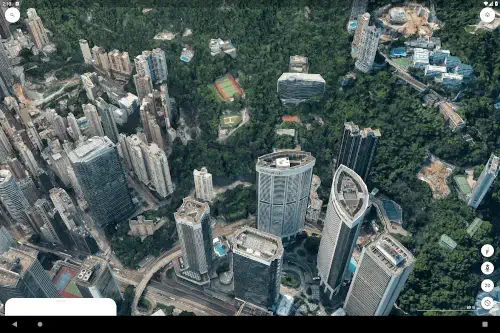
Google Earth functions as a powerful platform for exploration, education, and creation, offering an unprecedented level of detail and perspective.
Google Earth app holds a 4.0 star rating from over 10 million user reviews on the Google Play Store. With a download size of approximately 200MB, it is designed for a universal age range, from students to retirees, anyone with an interest in our world.
Mechanics of Google Earth Navigation
The fundamental experience of how to use Google Earth is built on intuitive gesture control. You can spin the globe, zoom from a satellite view down to street level, and tilt your perspective to see landscapes in 3D. This fluid movement makes the planet feel tangible.
The search function acts as your instant teleportation device. You can find any address, city, or landmark on Earth with precision. Once you arrive, the power of Google Earth layers and perspectives becomes apparent. You can switch between a high-resolution satellite view, a photorealistic 3D model, and the ground level immersion of Street View to build a complete understanding of any place.
For those seeking guided discovery, the Google Earth Voyager stories provide curated, educational tours from partners like NASA and BBC Earth. These interactive narratives cover topics from wildlife migration to ancient history, transforming passive viewing into an engaging learning experience.
Google Earth Features That Go Beyond Exploration
What separates this from a standard mapping application are its creation tools. The Google Earth 3D view allows you to explore cities and natural wonders in stunning detail from any angle, providing a sense of scale and topography that a flat map cannot.
The ability for Google Earth project creation is a game changer. You can build custom maps by adding placemarks, drawing lines and shapes, and embedding your own photos and text. This is ideal for planning a trip, documenting research, or telling a story. These projects can be shared, enabling real time collaboration on Google Earth projects with others, making it a powerful tool for team-based work.
Practical tools are also integrated. The Google Earth measurement tool allows you to calculate distances between points, the area of a specific piece of land, or the elevation of a mountain with a few taps. Furthermore, the historical imagery on Google Earth lets you slide through time to observe how urban development, deforestation, or natural events have altered a landscape over the years.
The Google Earth User Interface and Performance
The application’s visual fidelity is its cornerstone. The quality of the satellite imagery and the smoothness of the 3D rendering on capable devices create a genuinely immersive experience. The interface is designed to facilitate discovery, with key tools accessible without cluttering the view of the planet itself.
However, some technical considerations exist based on user feedback. While the visuals are often breathtaking, some users report stability issues, such as app crashes, particularly when using the more demanding 3D rendering features. Additionally, the precision of drawing tools on a mobile touchscreen can be limiting for highly detailed project work, where a desktop computer might offer more control.
For those interested in a different perspective, a similar application for global visualization is Zoom Earth, which focuses on live weather patterns and satellite imagery. Yet, for a comprehensive tool that blends detailed exploration with creative project building, Google Earth maintains a distinct position.
Google Earth Tips
To get the most from the platform, a few Google Earth tips can significantly enhance your experience. For the curious explorer, start with the Voyager section. These guided tours are perfect for discovering new topics and understanding how to layer information on a map.
If you are a planner or creator, begin your first project by using the “Create Project” feature. You can add placemarks with notes, draw paths to trace a route, and embed photos directly from your camera roll. Once your project is taking shape, use the share function to invite others to view or edit, turning your Google Earth map into a collaborative effort.
For the practical user, the measurement tool is invaluable. You can calculate the distance of a hiking trail or the area of a plot of land with a few taps. For reconnaissance, whether planning a trip or scouting a location, nothing beats the ground level perspective of Google Earth Street View. Simply drag the Pegman icon onto a street to get a 360-degree view. For advanced users interested in global-scale data analysis, the separate Google Earth Engine platform provides access to satellite imagery and geospatial datasets for scientific use.
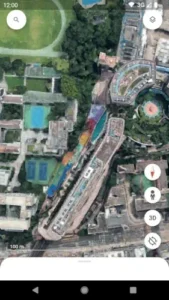
Google Earth Apps in the Mapping Ecosystem
Where does the Google Earth web and mobile experience fit among other mapping tools? A neutral comparison helps clarify its niche. Apps like Zoom Earth specialize in real time weather data and live satellite feeds. OsmAnd is built for functionality, offering detailed offline topographic maps and navigation. Standard GPS apps are optimized for turn by turn directions from point A to point B.
The family of Google Earth apps occupies a unique space. Its primary strength is not routing or real time data, but immersive exploration and data rich project creation. It is less about getting you to a destination and more about helping you understand and present the context of a place in profound visual detail.
Conclusion :
The Google Earth app serves as a unique platform that masterfully combines a comprehensive visual database of our planet with creative and collaborative tools. It is more than a digital atlas; it is a canvas for storytelling, a lab for analysis, and a window to every corner of the globe.
For anyone with a spark of curiosity about the world, Google Earth is an essential application. It provides a powerful, accessible means to visualize, understand, and share information about any place on Earth, making the vast and complex nature of our planet comprehensible and connected.
Frequently Asked Questions
What can I actually do with Google Earth?
It lets you explore the planet in high resolution 3D, visit street-level views with Street View, create custom maps with your own notes and photos, and take guided educational tours on topics like history and nature. It is more an interactive globe than a simple navigation app.
How do I perform a Google Earth download and is it free?
You can get the Google Earth app for free from the official Google Play Store.
What is the difference between Google Earth and Google Maps?
Google Maps is optimized for navigation and finding local businesses with driving, walking, and transit directions. Google Earth is designed for immersive exploration, 3D visualization, and creating detailed geographical projects. It is for understanding the world, not just navigating it.
Can I use Google Earth without an internet connection?
The functionality is limited without a connection. While you cannot stream new high resolution imagery or use all features, you can access areas you have previously viewed if they are cached. For full access, a stable internet connection is required.
Where can I learn about its development or get technical support?
For its technical history and the underlying technology, you can check the Wikipedia page for Google Earth. For application-specific support, you can contact Google at apps-help[at]google.com.