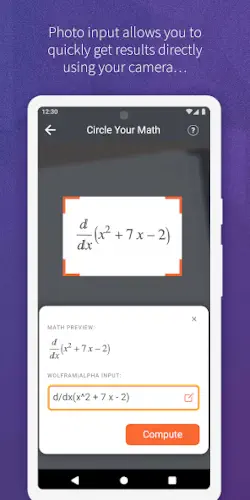
WolframAlpha app tool is not a search engine. It is a computational knowledge engine.
WolframAlpha it computes the answer. It shows you the steps. It gives you graphs and tables.
What is WolframAlpha exactly?
You are looking at a computational knowledge engine app by Wolfram Group LLC that answers factual and mathematical queries by computing results from curated data and algorithms rather than just searching the web.
WolframAlpha is built on the Wolfram Language and the Mathematica engine, using a vast knowledge base of structured data and algorithms to compute answers to questions in fields ranging from math and physics to finance, nutrition, and geography. On mobile, it is offered as both a free Classic app and a Pro enabled app with in app purchases, while the Pro subscription unlocks step by step solutions, advanced input tools, and extra features across platforms.
The app covers over 1,000 domains, with dynamic computation over 50,000 types of algorithms and access to 10 trillion pieces of curated data from primary sources.
WolframAlpha holds a 4.6 star rating from more than 2,000 reviews for the Classic app. The app size is roughly 100 MB. The age rating is Everyone. The app is free with optional in app purchases for Pro features.
A computational knowledge engine that answers factual and mathematical queries
The category matters here. WolframAlpha is not a search engine. It is not a calculator. It is a computational knowledge engine. You ask a question. The tool computes the answer. It uses curated data and algorithms. The results are reliable and detailed.
Who this tool was built for
Students who need step-by-step math and science solutions
Do you struggle with calculus? Physics? Chemistry? WolframAlpha gives step by step solutions. The Pro version is especially useful for homework help.
Professionals and researchers who need reliable data driven answers
Engineers. Scientists. Financial analysts. WolframAlpha provides accurate, computed answers. The data is curated from primary sources.
Educators who need examples and visualizations for teaching
Teachers can use WolframAlpha to generate examples. The visualizations help explain concepts. The tool is useful for classroom demonstrations.
Anyone who wants computed answers to factual questions
Curious about nutrition? Astronomy? Geography? WolframAlpha can answer factual questions. The answers are computed, not just searched.
WolframAlpha Main Features
Natural language queries in plain English
You can ask questions in plain English. Integrate x squared dx. Calories in a banana. The tool understands natural language.
Math solvers for calculus, algebra, trigonometry, and more
The math solvers are comprehensive. Calculus. Algebra. Trigonometry. Equation solving. Basic math. The coverage is broad.
Step by step solutions for homework style problems (Pro feature)
Pro users get step by step solutions. The solutions show the work. The feature is useful for learning.
Photo input for math problems (iOS and macOS Pro feature)
You can snap a picture of a math problem. The tool recognizes the problem. It gives you results and steps. The feature is convenient.
Extended keyboards for math symbols and scientific notation
The app has specialized keyboards. Math symbols. Scientific notation. The keyboards speed up input.
File and image upload for analysis (Pro feature)
You can upload images and data files. The tool analyzes them. The feature is useful for research.
Input assistants for popular subjects
The tool has input assistants. Courses. Finance. Health. The assistants guide you to answers.
Thousands of domains from stocks and spacecraft to weather and food
The coverage is vast. Stocks. Spacecraft. Weather. Food. The domains are diverse.
Visual and tabular output with plots, charts, and tables
The results include visuals. Plots. Charts. Tables. The visualizations help explain the data.
Cross platform Pro subscription across website, iOS, and Android
One Pro subscription works across platforms. Website. iOS. Android. The cross platform support is convenient.
WolframAlpha Graphics and Design
Functional and data focused interface prioritizing clear formulas, tables, and plots
The design is functional. The focus is on data. Formulas. Tables. Plots. The interface supports the content.
Layout centers on a single query bar with results displayed as scrollable pods
The layout is simple. A single query bar. Results appear as scrollable pods. The design is straightforward.
UI is dated and not very exploratory compared to the website
The mobile UI is dated. The website offers a richer experience. The app is less exploratory.
Where the design works well
The app is functional. The results are clear. The layout is simple.
Where the app experience lags behind the website and monetization confuses users
The app is less polished than the website. The monetization is confusing. Free Classic app. Paid Pro app. The confusion frustrates users.
What users say about the WolframAlpha app
The parts people enjoy
Positive reviews often mention the computational power. The math solvers are praised. The breadth of domains is impressive.
The parts people complain about
No computational tool escapes criticism. Here is what comes up most often.
Android Pro users report the app being nearly unusable with subscription activation loops
The Android Pro app has issues. Subscription activation loops. The app is nearly unusable for some users.
iOS users feel the app lags behind the website in features
The iOS app has fewer features than the website. The problem generator is missing. The app feels limited.
Confusion between the free Classic app and the paid Pro app
Users are confused. Classic app is free. Pro app is paid. The distinction is unclear.
UI feels dated and not very exploratory
The UI is dated. The app is not exploratory. The experience is less engaging than the website.
How the WolframAlpha app mechanics work
Enter a query using text, specialized keyboards, photo input, or file upload
You can enter a query in multiple ways. Text. Keyboards. Photo. File upload. The input is flexible.
WolframAlpha computes an answer using its knowledge base and algorithms
The tool computes the answer. It uses the knowledge base. It uses algorithms. The computation is the core.
Results show input interpretation, plots, tables, and related data
The results are detailed. Input interpretation. Plots. Tables. Related data. The information is comprehensive.
Explore related pods for deeper data, alternative forms, and step by step solutions
You can explore related pods. Deeper data. Alternative forms. Step by step solutions. The exploration adds depth.
Use outputs for homework, research, or decision making
The outputs are useful. Homework. Research. Decision making. The tool is versatile.
Looking for another computational tool for math and science problem solving? Check out Photomath, a popular app for solving math problems with step by step explanations using photo input.
WolframAlpha Tips that actually help
You can start WolframAlpha app and enter your first query in seconds. Getting the most out of the computational engine and avoiding frustration takes a little strategy. These tips help you get accurate answers and use the tool effectively.
Use the website for complex work; it often provides a better experience than the mobile app
Here is a question. Why do some users prefer the website over the app? The website has more features.
WolframAlpha tips from experienced users all say the same thing. The website is better for complex work. The app is convenient for quick queries. A user who uses the website for research gets more functionality. A user who relies only on the app misses features.
Leverage natural language; phrase questions as you would ask a tutor
WolframAlpha similar apps require specific syntax. This tool understands natural language.
Phrase questions as you would ask a tutor. Integrate x squared dx. Calories in a banana. A user who uses natural language gets better results. A user who uses rigid syntax may get errors.
Explore example queries to learn syntax and discover capabilities
The tool has many features. You may not know they exist.
Browse example queries. Learn syntax. Discover capabilities. A user who explores examples gets more from the tool. A user who only types basic queries misses the depth.
Use step by step solutions to learn methods, not just copy answers
Pro users get step by step solutions. The solutions are detailed.
Use them to learn methods. Do not just copy answers. A user who learns from the solutions improves their skills. A user who copies without understanding misses the point.
Try specialized domains for nutrition, finance, astronomy, and engineering
WolframAlpha app is not just for math. It covers many domains.
Try specialized domains. Nutrition. Finance. Astronomy. Engineering. A user who explores domains discovers new uses. A user who sticks to math misses the breadth.
Check input interpretation if results look off; rephrase accordingly
Sometimes the results are off. The tool may misinterpret the query.
Check the input interpretation. See how the tool understood your question. A user who checks interpretation corrects errors. A user who ignores it repeats mistakes.
Use on desktop for long sessions; pair mobile with desktop under one Pro subscription
WolframAlpha codes for free trials sometimes appear during promotions. More importantly, the Pro subscription works across platforms.
Use the desktop for long sessions. Use the mobile for quick queries. A user who pairs both platforms gets flexibility. A user who only uses one platform limits themselves.
Keep the Classic app in mind; many Android users prefer its stability
The Pro app has issues on Android. The Classic app is more stable.
Consider the Classic app. A user who chooses the Classic app avoids frustration. A user who insists on Pro may face bugs.
Apps similar to WolframAlpha
If you like WolframAlpha, here are four other apps worth your time. Each offers something similar with a different twist.
Photomath and Microsoft Math Solver
Photomath is the most direct comparison for math. Photo input. Step by step solutions. WolframAlpha similar apps should start here. The difference is that Photomath is focused on math, not general knowledge. Good for users who only need math help.
Symbolab
Symbolab is another math solver. Step by step solutions. Algebra. Calculus. The difference is that Symbolab is more specialized in math and less broad in other domains. Good for users who want deep math support.
Desmos
Desmos is a graphing calculator. It visualizes functions. The difference is that Desmos is focused on graphing, not computation. Good for users who need visualizations.
General knowledge engines
General knowledge engines like Google Assistant and Siri answer factual questions. The difference is that they search the web, not compute answers. Good for users who want quick facts without computation.
WolframAlpha Community
No built in social features like chats, feeds, or shared workspaces
No multiplayer. No chat. No leaderboards. The tool is for personal use.
Community exists through forums, Reddit threads, and Q&A sites
Users share tips on Reddit. They ask questions on forums. They discuss use cases on Q&A sites. The community is external.
Users share clever queries, teaching tips, and troubleshooting advice
The community shares clever queries. They post teaching tips. They offer troubleshooting advice. The sharing is helpful.
Educational use: teachers and students discuss integrating into coursework
Teachers discuss using WolframAlpha in class. Students share how they use it for homework. The educational use is common.
Conclusion
WolframAlpha works for three types of people. First, students who need step-by-step math and science solutions and reliable homework help. Second, professionals and researchers who need reliable data-driven answers for engineering, finance, and science. Third, educators who need examples and visualizations for teaching and classroom demonstrations.
Do you need a computational knowledge engine for math, science, and factual queries, even if the mobile app experience is less polished than the website and the monetization is confusing? Or do you prefer simpler tools like Photomath for math only?
If the first one, WolframAlpha offers unmatched computational depth and breadth. If the second one, look at Photomath or Symbolab for math-focused tools. Both answers are fine. Just know what you want.
FAQ
How do I get WolframAlpha download on my phone?
Go to the Google Play Store if you use Android. Search for WolframAlpha. The developer is Wolfram Group LLC. Tap install or use the direct link to Download WolframAlpha from the Official Play Store.
Is WolframAlpha free to use, or do I need to pay?
There are two versions. The free Classic app offers basic computations and results. The Pro app unlocks step by step solutions, photo input, file uploads, and advanced features. Pro requires a subscription. You can try the free version first to see if the app meets your needs before upgrading.
I have a problem with the app. Who do I contact?
Send an email to the Wolfram support team. They handle account issues, billing problems, bug reports, and technical support. Here is the address: playstore.wolfram[at]gmail.com. For WolframAlpha download problems or installation issues, that same email applies. Include your device model, app version, and a description of the problem.
What is the difference between the free Classic app and the Pro app?
The free Classic app gives you basic computations and results. The Pro app adds step-by-step solutions, photo input for math problems, file and image upload for analysis, extended keyboards, and advanced features. Pro requires a subscription. The Pro subscription works across all platforms, including the website, iOS, and Android. If you only need quick calculations, the free version is sufficient. If you need detailed solutions for homework or research, Pro is worth considering.