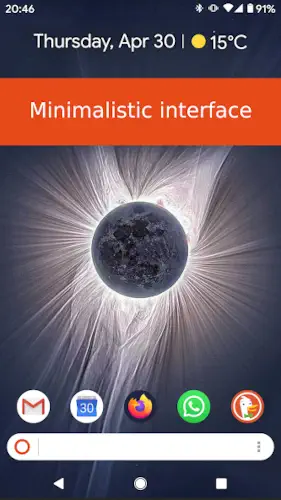
KISS Launcher strips your Android home screen down to a single search bar and a row of favorites, then asks you to type a few letters to launch anything.
KISS Launcher is developed by Neamar, this free and open source launcher has earned a 4.4 star rating from over 4700k reviews on Google Play and has been downloaded more than 500,000 times. The app weighs in at just 2MB, is rated for ages 3 and up, and never connects to the internet .
What Is KISS Launcher?
KISS Launcher is a free, open source Android home screen replacement built around one idea: type a few letters to launch anything. Instead of icon grids, multiple pages and widgets, KISS gives you a clean search bar, a short list of favorite apps and a smart results list that learns from your usage. At just 2mb, never connecting to the internet, and collecting no data, KISS positions itself as a privacy first, ultra lightweight launcher for people who want speed over visual customization.
The name says it all. KISS stands for “Keep It Simple, Stupid.” The entire philosophy is built on removing everything that slows you down. No animations. No icon packs. No widget pages. Just a search bar on your wallpaper and a list that responds instantly to what you type.
Search First Home Screen
The home screen is essentially a wallpaper with a search bar and a favorites row. Tap the search bar and start typing. A few letters are usually enough to find what you want. The launcher filters apps, contacts, settings and even specific app activities like individual chats as you type. Results adapt to your usage over time, so the apps you open most often rise to the top of the list. There are no icon grids and no multi-page home screens. You type, you launch, you move on. The speed is the feature.
Favorites Bar and History
Below the search bar sits a row of pinned apps for one-tap access to essentials. Phone, Messages, Camera, Maps. The apps you use every day, always within reach. Below that, a history list shows recently used apps and search history for quick re-launching. You can also tag apps by context, so typing a tag like “#work” filters the results to only show work related apps. It is organization without the visual clutter.
Free and Open Source
The entire app is free with no in-app purchases and no ads. It is licensed under GPLv3+ with source code available on GitHub. No data collection, no data shared with third parties and no internet permission at all. For privacy conscious users, KISS is about as clean as a launcher gets. There is no paid tier because there is nothing to pay for. The project is community driven and maintained by contributors who believe in the FOSS philosophy.
KISS Launcher Core Features
Search First Home Screen
Tap the search bar and type a few letters. Find apps, contacts, settings and app activities. Results adapt to usage, prioritizing frequently opened items.
Favorites Bar
Row of pinned apps just below the search bar. One tap access to essentials like Phone, Messages and Camera. Quick access without searching.
History and Recent Apps
Recently used apps and search history. Quick re-launch of frequent apps. Learns from usage patterns to surface what you need faster.
Tags and Organization
Tag apps by context (work, social, finance). Tags appear in search to narrow results. Organization without visual clutter.
Gestures
Optional double tap to lock screen. Swipe actions and other shortcuts. Uses Accessibility API for gestures.
Themes and Customization
Light and dark theme options. Dynamic color (Material You style on supported devices). Basic color tweaks for personalization.
Privacy and Performance
No data collection, no data shared with third parties. No internet permission. Extremely small APK at around 2mb. Minimal RAM and CPU usage, which helps battery life on older devices.
Open Source (FOSS)
Licensed under GPLv3+. Source code available on GitHub. Community contributions and forks keep the project alive and evolving.
KISS Launcher Graphics and Design
KISS Launcher uses an ultra minimal interface: wallpaper, search bar, favorites row and results list. There are no icon grids, no multi page home screens and no widget pages by default. The layout is text heavy and search centric, emphasizing typing and list results over visual browsing.
Basic theming includes light and dark modes plus some dynamic color options on supported devices. Overall visual customization is limited compared to Nova or Niagara. There are no animations, icon packs or decorative elements beyond basic Material Design. Visually, KISS is one of the most stripped down mainstream Android launchers, closer to a search bar on your wallpaper than a traditional home screen.
What Users Say About KISS Launcher App
What Works
Users consistently praise KISS for being extremely fast and lightweight, especially on older or low end devices. The tiny size and minimal resource usage make a noticeable difference in responsiveness and battery life. Reviewers highlight how quickly they can launch apps and contacts by typing a few letters and how the launcher learns frequent choices to surface them faster. Many appreciate the empty home screen that fully shows their wallpaper with no icons or widgets cluttering the view. The privacy friendly and open source nature is frequently highlighted as a major positive.
Where The App Could Improve
Common criticisms include limited visual customization. Users who want themes, icon packs, grids or deep UI tweaks find KISS too basic compared to Nova, Niagara or Lawnchair. The lack of a dedicated widget page and limited gesture depth are common requests from power users. Some reviews mention occasional bugs like missing app icons (white circles), crashes or tags disappearing, often fixable by restarting the launcher. A few users note incomplete settings search or difficulty changing default search behavior.
Check out Niagara Launcher for a minimalist launcher with more visual polish and one-handed ergonomics, or explore the full collection of Android apps to find your next productivity tool.
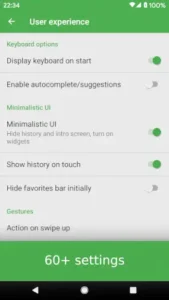
KISS Launcher Tips
Getting started with KISS Launcher is easy because there is so little to set up. But a few smart choices early on will make the search first approach feel natural within a day.
Beginner Advice
Curate your favorites bar with only daily essentials. The favorites row is your one tap access. Phone, Messages, Camera, Maps and one productivity app is a solid starting point. Everything else lives in search. A short favorites row keeps the home screen clean and makes the launcher feel purposeful instead of overwhelming.
Use search as your primary way to launch apps. This is the whole point of KISS. Instead of scrolling through an icon grid, tap the search bar and type the first few letters of what you want. Spotify becomes “spo.” Chrome becomes “chr.” Within a day, this becomes faster than any icon grid could ever be.
Let history learn your habits for faster results. KISS tracks which apps and contacts you open most often and moves them up in search results. After a week of use, opening your most-used apps requires only one or two letters. The launcher gets faster the more you use it.
Tag apps by context for quick filtering. Create tags like “work,” “social,” or “finance” and apply them to relevant apps. Then in search, type “#work” to filter down to only work related apps. It is organization without folders, folders without clutter, and filtering without visual overhead.
Enable double tap to lock for quick screen-off. The double tap gesture uses the Accessibility API to lock your screen instantly. It is a small convenience that adds up over hundreds of unlocks per day. Go to settings, enable the gesture, and get used to tapping twice on the home screen when you are done.
Hide bloat and distractions from search results. Preinstalled apps and things you never open clutter your search results. Hide them. You can always unhide if needed. A clean search index makes finding what you actually want faster.
Start with the default theme, switch to dark if preferred. The default light theme is clean and readable. If you use your phone at night, switch to dark mode in settings. Both maintain the text-heavy, minimal aesthetic that KISS is built around.
Test search with a few letters to get comfortable. Spend five minutes typing single letters and watching results filter. Get familiar with how the launcher prioritizes. The muscle memory builds fast, and once it clicks, you will not want to go back to icon grids.
Combine with other wellbeing tools for stronger effect. KISS removes visual clutter. Pair it with grayscale mode to reduce color stimulation. Add an app blocker if you need hard limits. Together, they create a calmer phone experience than any single tool can deliver.
Try KISS on older devices for a performance boost. The 2MB size and minimal resource usage make a noticeable difference on older phones. If you have a device that struggles with heavier launchers, KISS can feel like a new phone. The responsiveness and battery savings are immediate.
Advanced Strategy
Use tags strategically for work, social, and finance. Tags become powerful when you use them consistently. Build a tagging system that matches how you think about your apps. Then in search, tags become your shortcuts to narrow results instantly.
Leverage history to see your most-used apps. KISS history shows you what you actually open. It is a quiet mirror on your phone habits. If you see too much of one app, that is useful information. You can also use history to quickly re-launch something you opened yesterday.
Configure gestures for frequently used tools. Beyond double tap to lock, KISS supports swipe actions and other shortcuts. Assign gestures to tools you use often. The less you have to search, the faster your phone becomes.
Hide apps you do not want appearing in search. Some apps should not appear in search results at all. Banking apps, for example, or anything you want to deliberately access. Hiding them means they never accidentally surface when you are typing something else.
Pair KISS with app blockers and grayscale mode. KISS handles the launcher layer. App blockers handle the hard limits. Grayscale removes the dopamine pull of color. Together, they create an intentional phone environment that is hard to fall into mindlessly.
Adjust search behavior for your preferred engine. KISS lets you configure the search behavior, including which web search engine opens when you search for something that is not an app. If you prefer DuckDuckGo over Google, set it. Small tweaks make the launcher feel like yours.
Use KISS on low-spec devices for best performance. Older phones benefit most from KISS. If you have a device that feels sluggish with other launchers, KISS can revive it. The resource usage is so low that the difference is noticeable in daily use.
Share your setup with minimalist communities. The KISS community on Reddit and other platforms shares favorite configurations, tagging systems and tips. Sharing what works for you and learning from others keeps the launcher improving and helps new users get the most out of it.
Experiment with dynamic color on supported devices. On Android 12 and above, KISS supports dynamic color theming that adapts to your wallpaper. It is a small touch that makes the launcher feel native to your device. Try it if your phone supports it.
Use favorites for quick access to essentials. The favorites bar is not just for convenience. It is a curation exercise. Choosing which apps deserve one tap access forces you to think about what you actually use every day. A thoughtful favorites bar is the difference between a good launcher and a great one.
Best Lightweight Android Launcher for Old Phones
If your phone is three or more years old and every launcher feels sluggish, KISS Launcher is the answer. Here is why it works where heavier launchers fail.
2 MB changes everything. Most modern launchers are 30 to 100 MB. Nova, Niagara and Lawnchair all carry visual assets, animations, and codebases that demand RAM and CPU cycles. KISS is 2 MB. That is not a typo. The entire app is smaller than a single high resolution photo. On an older device with limited resources, that difference is immediately noticeable in swipe responsiveness and app launch speed.
No internet permission means no background overhead. KISS never connects to the internet. It does not phone home, does not fetch ads, does not sync anything. Every cycle it would otherwise spend on network tasks goes toward launching your apps faster. On older phones, this is significant. Apps that constantly poll servers drain battery and slow everything down. KISS does none of that.
Minimal RAM and CPU usage. KISS keeps a small footprint in memory. It does not load animations, icon packs or widget frameworks by default. On a phone with 2 GB or 3 GB of RAM, that headroom translates into smoother multitasking. You can switch between apps without the launcher being evicted and redrawn.
Results adapt as you type. The search first interface means you rarely scroll through app grids. Type two or three letters and the app appears. On a slow device, this is faster than tapping through multiple pages of icons. It removes the visual overhead entirely.
Real world impact. Users on older devices have reported that KISS makes their phones feel revived. One reviewer described it as “blazingly fast” on low end hardware. Another noted that battery life improved noticeably after switching. These are not small wins. On a phone that struggles with basic navigation, a responsive launcher changes how you use the entire device.
What you give up. You lose icon grids, widgets, and visual polish. If you rely on a weather widget or a calendar widget on your home screen, KISS does not offer that without workarounds. It also has limited theming. But for users who prioritize speed on aging hardware, these trade-offs are easy to accept.
Pair KISS with a lighter browser and lighter messaging app and an older phone becomes genuinely usable again. The launcher is the single biggest performance win available for most aging Android devices.
Most Secure Android Launcher: How to Protect Your Privacy
Most launchers ask for a lot. Location. Contacts. Storage. Internet. Notification access. Accessibility services. Every permission is a potential data collection point. KISS Launcher asks for almost nothing.
No internet permission. This is the biggest privacy differentiator. KISS cannot connect to the internet. It physically cannot send your data anywhere. There is no server to receive it, no analytics to track your usage, no ads to serve you. The permission is not in the manifest. For a launcher, this is exceptionally rare.
No data collection. The Google Play data safety section confirms that KISS does not collect user data and does not share data with third parties. There is no “we may collect” language. There is no privacy policy full of carve outs. The app collects nothing because it has no reason to.
No analytics or tracking. There are no crash reporters phoning home, no usage analytics, no A/B testing frameworks. The app is a launcher. It launches apps. It does not report on you doing so.
Open source and auditable. KISS is licensed under GPLv3+ with source code publicly available on GitHub. Anyone can inspect exactly what the app does. This is not a promise. It is verifiable fact. Privacy claims from closed source apps are trust based. Privacy claims from open source apps are audit based.
The Accessibility Service is optional and local. If you enable double tap to lock, KISS uses the Accessibility API. This permission can be sensitive, but the developer states it is used only for that specific gesture and nothing else. The service is disabled by default. You choose whether to enable it.
No telemetry, no profiles, no advertising ID. KISS does not access your advertising ID. It does not build a profile of your usage. It does not sell or share anything. The launcher simply does not participate in the data economy.
Compare that to alternatives. Nova Launcher was acquired by a data company and introduced tracking code and ads in the free version. Niagara collects crash analytics. Many launchers include trackers for advertising attribution. KISS has none of this.
What this means practically. When you use KISS, your home screen usage is not being logged. Your app launches are not being profiled. Your contacts are not being uploaded. Your location is not being accessed. The launcher does its job and nothing else. For privacy conscious users, that is the entire point.
Other privacy measures to pair with KISS. Disable Google account sync for launcher data if you use another launcher previously. Review which apps have access to your contacts and location. Use a DNS level ad blocker to catch what apps might otherwise send. KISS handles the launcher layer. The rest of your privacy strategy is about the apps you install, not the launcher itself. But KISS removes one of the biggest potential privacy risks on any phone.
KISS Launcher Similar Apps
| App | Best for | Key Difference |
|---|---|---|
| KISS Launcher | Search first minimalism, speed, privacy | Search bar plus favorites plus results list. No icon grid. FOSS and no internet permission. |
| Niagara Launcher | All around minimalism with one-handed ergonomics | Vertical list plus wave alphabet. Icons, compact widgets. More visually polished than KISS. |
| Olauncher | Extreme distraction reduction, text-only home | Text list with no icons at all. FOSS and no data collection. More radical than KISS. |
| Nova Launcher | Deep customization, traditional grid | Classic icon grid, dock, multiple pages. Best for power customizers. Not minimal by default. |
| Lawnchair | Pixel style minimalism, open source | Pixel like grid, clean design. Free and open source. More icon centric than KISS. |
KISS is the best search first, ultra lightweight launcher for users who want speed and privacy above all else. If you want visual polish with your minimalism, Niagara is the better fit. If you want maximum distraction reduction with no icons at all, Olauncher wins. If you want deep customization with a traditional grid, Nova remains the standard.
Who Is KISS Launcher For?
KISS Launcher is for users who want speed and search first launching. If you have ever found yourself scrolling through pages of icons looking for an app you know is installed somewhere, KISS solves that. Type a few letters and it appears. The interaction is faster than any icon grid can be.
Privacy conscious users who prefer open source apps will find KISS appealing. It does not collect data. It does not share data. It does not even have internet permission. The source code is available on GitHub. For users who care about what their apps are doing, KISS is transparent and clean.
People with older or low spec devices will appreciate KISS for its performance. At 2MB, it uses almost no resources. If your current launcher feels sluggish, KISS can make your phone feel new again. The battery savings are real, especially on devices that struggle with heavier software.
Minimalists who want a nearly empty home screen will feel at home immediately. The home screen is wallpaper, search bar and a row of favorites. Nothing else. If you have ever wanted your phone to be a quiet tool rather than a busy dashboard, KISS delivers that experience.
If you want a launcher that gets out of your way and lets you find anything in seconds, KISS Launcher is worth trying.
Is KISS Launcher Free?
The short answer: yes, and there is no asterisk, no premium tier and no subscription hiding behind the word “free.”
The entire app is free. Every feature in KISS Launcher is available in the free download. There are no in-app purchases, no ads and no paid Pro version. You get the search first home screen, the favorites bar, history, tags, gestures, themes and privacy protections without paying anything.
There is no paid tier because there is nothing to pay for. KISS is not a freemium app with a crippled free version. It is a fully functional launcher distributed under GPLv3+, meaning the source code is open and the project is community maintained. The developer does not monetize the app. There is no business model pushing you toward a subscription.
What you actually get for zero dollars:
-
Search first home screen that finds apps, contacts, settings and app activities by typing a few letters
-
Favorites bar for one tap access to essentials
-
History and recent apps that learn your usage patterns
-
Tags for organizing apps by context
-
Optional double tap to lock and other gestures
-
Light and dark theme options plus dynamic color
-
Full privacy protection: no data collection, no internet permission
-
2 MB size with minimal RAM and CPU usage
Compare that to alternatives. Niagara Launcher charges around $13.99 per year or $42.99 lifetime for Pro. Nova Launcher charges around $4.99 one time for Prime. KISS charges nothing, ever. There is no upsell. There is no “unlock advanced features” screen. There is no subscription nag.
The trade-off is not monetization. It is scope. KISS is not trying to be the most feature rich launcher. It does not have a dedicated widget page, deep visual customization, or the polish of a commercial product. It is a focused tool that does one thing exceptionally well: let you launch anything by typing. If that is what you want, you pay nothing. If you want more features, other launchers charge for those features. KISS does not pretend to be something it is not.
For users on a budget or anyone tired of subscription fatigue, this matters. The launcher category has moved toward paid tiers and yearly renewals. KISS remains a genuinely free, genuinely open source alternative. That is not a marketing angle. It is a fact.
Conclusion
KISS Launcher delivers a search first Android home screen experience that stands out for its speed, privacy and simplicity. The search bar replaces the icon grid. The favorites bar keeps essentials one tap away. The history learns your habits. The 2MB size and lack of internet permission make it one of the cleanest launchers available.
The app has limitations. Visual customization is limited compared to Nova or Niagara. There is no dedicated widget page. Occasional bugs appear in reviews, though most are fixable. Search limitations exist for some users.
For users willing to embrace the search first philosophy and accept that fewer features means fewer distractions, KISS offers a compelling launcher experience. It does not try to be the most customizable launcher or the most visually polished. It tries to be the fastest and the lightest. And for hundreds of thousands of users, that is exactly what they need.
If you want a launcher that respects your time, your privacy and your device’s resources, KISS Launcher is worth downloading.
Type a few letters. Launch anything. That is the whole idea.
KISS Launcher Frequently Asked Questions
How do I download KISS Launcher and is it really free?
KISS Launcher is completely free to download and use. You can download KISS Launcher from the official Google Play Store or through the official GitHub repository . The app is just 2MB in size, is rated for ages 3 and up, and contains no ads, no in-app purchases and no internet permission whatsoever. There is no paid tier or Pro version. Every feature is available in the free download. The launcher is licensed under GPLv3+, which means the source code is fully open and available for anyone to inspect, modify, or contribute to.
Where can I find guides, tips, and community resources?
The KISS Launcher GitHub repository is the best starting point for documentation, issue tracking, and source code. The official website has setup information and links to the project.
What if I encounter a problem or need support?
For technical issues, bug reports, or general questions, contact the developer directly at contact@kisslauncher.com. The developer is responsive and the project is actively maintained by a community of contributors. You can also open an issue on the GitHub repository.
What makes KISS Launcher different from other minimalist launchers?
KISS Launcher is built around a search first philosophy. Instead of an icon grid or a vertical list, KISS gives you a search bar. You type a few letters and launch anything instantly. It also has a favorites bar for one tap access to essentials and learns your usage patterns to surface frequently opened apps first. At just 2mb and with no internet permission, KISS is one of the lightest and most privacy focused launchers available. It also does not collect or share any data.
Can KISS Launcher help reduce my screen time and distraction?
Yes. The search first approach adds a small amount of friction to launching apps. You have to consciously type what you want instead of reflexively tapping an icon. The favorites bar can be limited to only daily essentials, reducing the temptation to open distracting apps. KISS also lets you hide apps from search results entirely. Combined with app blockers or grayscale mode, KISS becomes a powerful tool for intentional phone use. The minimalist interface itself is designed to reduce visual stimulation and mindless scrolling.