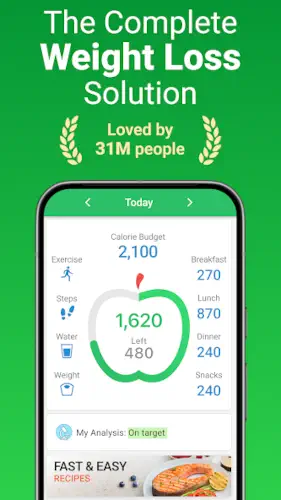
MyNetDiary does not ask for your money before it lets you scan a barcode.
That single detail separates MyNetDiary from almost every other major calorie tracker on the market. The app sits at 4.8 stars from roughly 119,000 reviews on Google Play, crossed 5 million downloads, and weighs in around 144 to 157 MB depending on your device. The age rating is 3+ on Google Play, though the App Store lists it at 12+ depending on region. Forbes Health ranked it the #1 Best Weight Loss App of 2025 and the New York Times called it simpler and quicker than the competition.
What MyNetDiary Is
It is a calorie tracker and food diary built around a staff verified database of over 2 million foods with up to 108 tracked nutrients. Most apps rely on crowdsourced data full of duplicates and errors. MyNetDiary’s team reviews 2,500 to 3,500 food entries daily, pulling from USDA and NCC research grade sources. That verification process matters when you are logging a branded product and need the macros to be right.
The free tier is genuinely functional. Barcode scanning, food label scanning, voice logging, offline logging and full macro tracking all work without a subscription. No account is required to start. No ads interrupt the diary. If you searched MyNetDiary free vs premium wondering whether the free version is a teaser, the answer is no. It is a complete tracker with the depth turned down.
The Mechanics of Tracking Your Intake
Food, Calories and Macros
The diary logs meals against custom calorie, carb, fat and protein targets. You can track up to 108 nutrients on the free tier, including vitamins, minerals, omegas and amino acids. Most competitors lock micronutrient depth behind Premium. MyNetDiary does not.
Scanning and Logging Options
The free barcode scanner pulls verified data from the same database the app uses for search. The food label scanner photographs a Nutrition Facts panel and logs every nutrient on it instantly. Meal Scan, which photographs your plate and matches it against the database, requires Premium. Voice logging works on the free tier for naming individual foods; AI Voice Logging for describing a whole meal in a sentence sits in Premium Plus .
Offline Logging
You can log meals without an internet connection and the app syncs once you reconnect. This feature alone puts MyNetDiary ahead of apps that require a live connection for every entry.
Diet Specific Modes
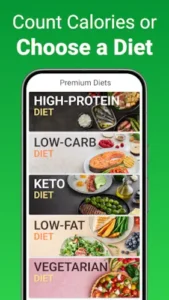
Custom macro splits and protein targets work on the free tier. Calorie and macro cycling, which adjusts targets over time, requires Premium.
Fitness Integration and Activity Tracking
Steps and Workouts
Health Connect and Samsung Health sync work for free users, pulling steps, exercise and weight data into your diary. The app adjusts your calorie budget based on activity and the free tier includes water logging and an exercise tracker.
Wearables and Sync
Wear OS support lets you log foods by voice, track water and weight and view macro breakdowns from your wrist. Direct sync with Fitbit, Garmin and Withings requires Premium. The workaround for free users is routing tracker data through Health Connect first.
The AI Diet Coach
Premium Plus unlocks an AI Coach that analyzes your logged meals and offers daily guidance. It shows trend charts inside the conversation and suggests adjustments based on what you actually ate, not what you planned to eat. For anyone who has searched MyNetDiary AI coach review, the honest framing is that it is a second opinion, not a replacement for the diary itself.
GLP-1 Companion
Premium includes nutrition first support for users on Ozempic, Wegovy, Mounjaro and similar medications. It sets protein targets and muscle protection strategies, which matters because GLP-1 users often struggle to eat enough protein while appetite is suppressed.
Free Tier vs Premium Subscriptions
The Free Experience
Unlimited food diary, free barcode scanner, food label scanner, voice logging, offline logging, macro tracking, 108 nutrients, exercise tracker, water log, customizable dashboard, weight loss charts, Professional Connect for sharing your diary with a dietitian and Wear OS support . No ads. No account required.
What Premium Unlocks
Meal Scan, Fitness Tracker Sync with Fitbit/Garmin/Withings, GLP-1 Companion, calorie and macro cycling, autologging regular meals, intermittent fasting, Advanced Autopilot (adaptive calorie targets based on your metabolism), health tracking for blood pressure and glucose, meal planner, recipe import, and 600+ dietitian designed recipes. Pricing runs $8.99 per month or $59.99 per year, with a lifetime option at $179.99 .
Premium Plus
AI Diet Coach, AI Suggest Meals, AI Restaurant Menu Scan and AI Voice Food Logging . Pricing sits at $14.99 per month or $99.99 per year .
MyNetDiary Design and Interface
The layout prioritizes speed. The dashboard is customizable, dark mode follows your system settings and the data density does not overwhelm despite tracking 108 nutrients. The trade-off some users mention is that the interface can feel less celebratory than competitors when you hit milestones. There is no confetti.
What Users Say About MyNetDiary App
What people like
Users call it the best nutrition tracker they have tried. Free barcode scanning stands out against competitors who paywall it. One reviewer reported losing over 80 pounds using the app. Another praised the food database depth, saying it has more entries than Weight Watchers. The free tier earns consistent mentions for being unusually generous.
Things to improve
AI Meal Scan accuracy varies depending on the dish. There is no way to transfer all meals to a different day at once. Goal celebrations feel underwhelming compared to apps that gamify progress. A small number of billing complaints appeared in recent scorecards, including charges after cancellation and unwanted annual upgrades.
How to Use MyNetDiary: A Beginner’s Guide
Do not start by setting a goal to lose ten pounds in a month. The calorie calculator inside MyNetDiary gives you an initial budget based on your height, weight, age and activity level. Treat that number as a starting point, not a strict rule.
The most common mistake beginners make is trying to eat perfectly on day one. Instead, spend the first three days just logging what you normally eat. Do not change your diet yet. Just record it. Many people think they eat very little until they log that afternoon latte and the evening bag of chips, which often account for a third of their daily calories. Once you have that baseline, you know exactly where to cut back without starving yourself.
To log food on the MyNetDiary app, type the food name into the search bar, select the portion size and tap to add it. If you are eating packaged food, use the free barcode scanner. It is faster than typing and automatically pulls in all the nutrients, including the micronutrients you usually ignore.
Can I Track Macros with MyNetDiary?
Yes, and you can do it on the free version. MyNetDiary allows you to set your carbohydrate, protein and fat ratios. It includes 16 preset plans, ranging from balanced to keto, high protein, and DASH. You can also manually lock in the gram target for a specific macronutrient and the system will adjust the other two automatically.
One detail worth noting: it is a good idea to lock in your protein target separately. If you are losing fat, you need at least 1.6 grams of protein per kilogram of body weight. Otherwise, a higher percentage of the weight you lose will be muscle. You can manually enter your protein grams in the macronutrient settings so that when you lower your total calories, the system cuts carbs and fat first while protecting your protein intake.
If you searched for MyNetDiary macro tracking to see if the free version is enough, the answer is yes. The paid version adds AI suggestions and deeper trend analysis, not the basic macro tracking itself.
Can You Track Water Intake with MyNetDiary?
Yes, and this feature is more complete than most competitors. The free water tracker supports custom container sizes, daily and weekly progress visualization, and both fixed and adaptive reminders. You tap the water glass icon to log a glass and you define the size yourself, whether it is 8 ounces or 200 milliliters.
If you are on GLP-1 medication, water tracking is especially important because nausea can make it easy to drink too little. The app syncs your water data to Samsung Health or Apple Health, so you can view it alongside your other health metrics.
How to Log Recipes and Homemade Meals in MyNetDiary
Homemade meals are the weak spot for most trackers because your kitchen recipes are not in the database. MyNetDiary handles this in two ways.
For a one-off homemade meal, use the Custom Food feature. Enter the name of the dish, fill in the total calories and macros, and save it. The next time you eat the same thing, search for the entry you created. You can also use the nutrition label scanner if the item has a label.
For meals you eat repeatedly, use the Recipe feature. Bundle the items you usually eat together into a “recipe.” For example, if your breakfast is always two eggs, a slice of whole wheat bread and black coffee, select those ingredients, tap the plate and cup icon on the toolbar and save it as a recipe. The next time you have breakfast, search for the recipe name and log it all at once instead of adding items one by one. This feature is available on the free version and does not require Premium.
How Often Does MyNetDiary Update Its Food Database?
The database is active. MyNetDiary’s food research team reviews and updates 2,500 to 3,500 food entries every day, adding and verifying about 300 foods daily. User submitted PhotoFood corrections are usually processed within 24 hours, and outdated or duplicate entries are cleaned up in the same timeframe.
This means if you scan a barcode and find the nutrition data is wrong or search for a restaurant dish and cannot find it, you can submit a correction yourself. Take two photos (the product name and the nutrition label), link the barcode and send it. The database updates within 24 hours and the food entry you previously logged corrects automatically. This response speed is rare among free trackers, where most competitor databases are crowdsourced and correction cycles take weeks or even months.
How to Export Your MyNetDiary Data
MyNetDiary does not have a one click “export CSV” button, but your data is not locked in. The most direct path is through health platforms: Apple Health and Samsung Health.
In the settings, open Apps & Devices, connect Apple Health or Samsung Health and select the data types you want to sync. MyNetDiary can export food and nutrients (up to 38 types to Apple Health and 30 types to Samsung Health), water, weight and exercise data. Syncing is off by default, so you need to turn it on manually and select the Read and Write permissions.
If you want the raw diary text, the most practical method is screenshots or using Professional Connect to share your diary with a dietitian so they can view it from the web. The app does not have a built-in batch export function, but health platform syncing covers most people’s needs: you can see MyNetDiary’s nutrition data in Apple Health alongside other health metrics from different sources.
MyNetDiary’s real advantage is not that one feature stands out, but that it gets the basics right for free. The scanner is free, there are no ads, the database is human reviewed, water tracking is more detailed than competitors and the recipe feature is buried but useful. You do not need to pay for any of this. The real question to ask yourself is this: if the free version can already scan, log recipes, track water and monitor 108 nutrients, what exactly are you paying for when you upgrade to Premium?
MyNetDiary Tips
Enable Automatic Activity Detection
Many users do not realize the free version of MyNetDiary already connects to Health Connect and Samsung Health. However, it does not pull that data automatically. You have to go into the settings and grant permissions first.
A more practical approach is to turn off the calorie adjustments for exercise. By default, the app adds burned calories back into your daily food budget. If you run five miles, the app might tell you that you have 2,200 calories left to eat and you might actually eat them. If your goal is steady weight loss, go into the settings and disable the activity calorie bonus. Keep your daily budget fixed. Exercise benefits your body, but it should not be a license to eat a slice of cake. Users on the MyNetDiary reddit forums often call this the “fixed budget method.” Many report that their body composition changes more consistently when they stop eating back their workout calories.
Use the Food Label Scanner
This is the most underrated tool in the free version. Instead of searching the 2 million item database for a specific brand of snack, just take a picture of the nutrition facts panel. The app reads every line of data and automatically fills it into your diary, including the micronutrients you might miss during a manual search.
For anyone who eats packaged food regularly, this saves more time than voice logging. Searching requires typing, confirming the brand and checking the serving size. Scanning a label takes two seconds. You can even build a list of your regular snacks by saving the scanned labels for quick access later. Reviews of the MyNetDiary app mention that using the label scanner cut their daily logging time from fifteen minutes down to four.
Share Your Diary with a Professional
The free version includes a feature called Professional Connect, which lets you share your food diary with a registered dietitian, coach, or doctor. Many people do not know this exists because it is buried deep in the settings menu with no promotion.
This is incredibly useful if you are seeing a nutritionist. They can see your actual intake over the past two weeks instead of relying on you to remember what you ate. If you do not have a dietitian, you can use it to show your fitness coach so your training plan and nutrition align. As one user on MyNetDiary reddit put it: “The first time my coach saw my real logs, he noticed I was 40 grams short on protein. That discovery was worth more than any training tweak.”
Adjust Goals as You Progress
The calorie calculator inside MyNetDiary will give you an initial target based on your weight, age and activity level. It does not update automatically every week. Your weight changes, your metabolism shifts, and the number that worked in week one might not create a deficit by week eight.
A simple way to check: if the scale does not move for two weeks and you are logging accurately, drop your daily target by 100 to 150 calories. Do not cut too much at once. Another overlooked detail is your protein target. If you are losing fat, you need at least 1.6 grams of protein per kilogram of body weight. Otherwise, a higher percentage of the weight you lose will be muscle. You can manually lock your protein grams in the macronutrient settings so the system cuts carbs and fat first when you lower your total calories.
Best Free Calorie Tracking Apps: Where Does MyNetDiary Rank?
In the free calorie tracker category, MyNetDiary holds a unique position. It offers barcode scanning, 108 nutrient tracking and an ad-free experience for free. Meanwhile, Lose It! and MyFitnessPal both lock their barcode scanners behind a paywall.
But rankings are not everything. If you want community challenges and streak motivation, Lose It! does that better, but you have to pay for the scanner. If you want a clean interface and fully free features, MyNetDiary leads. When people compare MyNetDiary similar apps, the usual question is: would you trade social features for a free scanner or a free scanner for no social layer? The answer depends on what you need more.
How MyNetDiary Compares to the Alternatives
MyNetDiary vs Lose It!
Lose It! has a larger database with 56 million items, but it puts the barcode scanner behind a Premium paywall. MyNetDiary has 2 million items, but every entry is verified by staff and the scanner is free. If you want the biggest database, Lose It! wins. If you do not want to pay a yearly fee for a basic function, MyNetDiary is the choice. Both apps put their AI features in a higher subscription tier, but MyNetDiary’s free level covers the daily needs of most people.
MyNetDiary vs Samsung Health
Samsung Health is free, ad-free and deeply integrated with the Galaxy Watch. It tracks steps, sleep and workouts. Food logging, however, is almost an afterthought. MyNetDiary’s core value is nutrition. If you own a Galaxy Watch and want one app to manage everything, Samsung Health is enough. If you log every meal and need micronutrient data, MyNetDiary is worth installing separately. They can coexist, with MyNetDiary pulling activity data from Samsung Health via Health Connect.
MyNetDiary vs Google Fit
Google Fit only cares about your activity level. Heart Points are its main metric and food logging is not a priority. MyNetDiary handles the intake side. They solve different problems. Google Fit is for people who just want to know how much they moved. MyNetDiary is for people who need to know why they are not losing weight despite moving.
MyNetDiary vs Strava
Strava is for cyclists and runners who want to compare segment times and share their training data. MyNetDiary is for people who want to know what to eat after a workout. Strava tracks performance. MyNetDiary tracks intake. The only overlap is when you sync your Strava workouts to MyNetDiary to reflect the burn in your budget. But that only works if you leave the “activity calorie bonus” turned on.
For those looking for MyNetDiary similar apps, if your core need is a free scanner combined with deep nutrition tracking, Lose It! offers community challenges and streak tracking that MyNetDiary lacks. But the trade-off is that Lose It! charges for the scanner. MyNetDiary takes a different path: no gamification, no social pressure, just solid features.
Conclusion
Who MyNetDiary Is For
People who want deep nutrition tracking, refuse to deal with ads, and will not pay for a scanner. People who value data accuracy over social motivation. People using GLP-1 medications who need protein and muscle protection guidance. If you searched for MyNetDiary for weight loss and wondered if the free version is enough, it is. The free tier covers more than most competitors’ paid tiers.
Who Should Look Elsewhere
People who want social challenges, friend leaderboards and streak motivation. People who expect AI food scanning to be completely accurate without manual correction. People who like celebration animations and point rewards when they hit a goal. MyNetDiary does not offer these. It will not even throw confetti when you reach your weight loss goal.
The Final Call
MyNetDiary builds solid features, but it will not pamper you. The free version can scan barcodes, track 108 nutrients, sync with your watch, log offline and share data with a dietitian. You pay for AI features and deeper data analysis, not basic usability. The real question to ask yourself is this: if the app is free, can scan, log and sync, what exactly are you paying for? If the answer is “because I need AI to make decisions for me,” then Premium Plus is worth it. If the answer is “because other apps charge,” you probably do not need to upgrade at all.
FAQ
Where is the safest place to get the MyNetDiary download and how much does it cost?
You can download MyNetDiary from the Official Google Play Store. The free tier is genuinely free with no ads, offering barcode scanning and 108 nutrient tracking. If you want the AI meal scanning or the GLP-1 companion features, Premium runs about $8.99 monthly or $59.99 annually. The Premium Plus tier, which includes the AI Diet Coach, sits at $14.99 monthly or $99.99 annually.
Is MyNetDiary free to use?
Yes. The free version includes unlimited food logging, barcode scanning, food label scanning, voice logging, offline logging, macro tracking, 108 nutrients, exercise tracking and water logging. There are no ads, and no account is required. This is rare among competitors.
Can I scan barcodes without Premium?
Yes. Barcode scanning is a free feature. The data comes from a staff verified database. Lose It! and MyFitnessPal both lock scanning behind a paywall. MyNetDiary does not. If you eat packaged foods regularly and refuse to subscribe, this is the most direct reason to choose it.
Does MyNetDiary work with my smartwatch?
Free users can sync basic activity data via Health Connect and Samsung Health. Direct connections to Fitbit, Garmin, and Withings require Premium. Wear OS support allows you to use voice logging, view macros, and log your weight from your wrist. That part does not require a subscription.
Is my data private?
The Play Store listing states that data is not shared with third parties and is encrypted in transit. You can request deletion. Note that the app collects personal and financial information. Read the privacy policy before paying if data handling matters to you.
What is the official website and where can I find a community wiki?
The official hub is mynetdiary.com, where you can manage your account and read their dietitian backed blog. There is no dedicated third party wiki, but the app’s official help center covers almost every technical question. For real world advice, the r/MyNetDiary community on Reddit acts as an unofficial knowledge base where users share tips on logging and discuss the latest updates.
How do I contact support if I need to cancel a subscription or report a bug?
The support email is support[at]mynetdiary.com. If you are dealing with billing through Google Play, you still need to cancel through those respective store settings. For technical bugs, like the food database missing an item or the app crashing, emailing support with your device model and a screenshot speeds up the resolution considerably.
Does the free version actually give me full access to the diet plans?
The free tier gives you the calorie calculator and macro tracking, but the structured diet plans like Keto, High Protein, and Low Carb are part of the Premium subscription. The free version focuses on the raw data of what you eat. If you want the app to tell you exactly what to eat for a specific diet, you will need to upgrade to unlock those customized meal plans and recipes.
Can I sync my fitness tracker without paying for Premium?
Basic step and activity syncing works for free if you route your data through Health Connect or Apple Health. However, direct native syncing with Fitbit, Garmin or Withings requires a Premium subscription. The workaround for free users is to ensure your smartwatch syncs to your phone’s native health app first, which MyNetDiary can then read automatically.