Opera is a feature focused browser that distinguishes itself by building powerful, practical tools like a free VPN and a robust ad blocker directly into its core experience.

Opera browser holds a 4.8 star rating from over 10 million user reviews. With a download size of approximately 90MB, it is designed for a wide age range, from younger users who appreciate its customization to professionals who value its built-in utilities for work and travel.
Features of Opera’s Integrated Toolbox
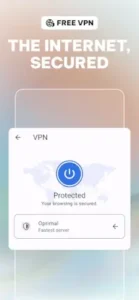
The most talked about feature is undoubtedly the Opera free VPN. With a single toggle in the menu, you can activate an unlimited virtual private network without creating an account or starting a trial. This is useful for securing your connection on public Wi-Fi or accessing region-restricted content, though it may not offer the same speed or advanced configuration as a dedicated paid VPN service.
Privacy and speed are further enhanced by its built-in ad and tracker blocking. The browser integrates uBlock Origin by default, one of the most effective tools for stopping ads and tracking scripts before they load. This is paired with Opera data compression, a technology that routes web traffic through Opera’s servers to compress images and code, reducing data usage and often speeding up page loads on slower connections.
For modern browsing needs, Opera AI integration is accessible directly in a sidebar or tab, allowing you to query AI models for summaries, translations, or creative tasks without leaving your browsing session.
Opera Characteristics: Customization and User Flow
Beyond core utilities, Opera offers a high degree of personal control. The Opera browser customization options are extensive. You can change the entire theme, set custom wallpapers on your home screen, rearrange the placement of icons, and enable a system wide dark mode. This level of aesthetic control is uncommon in most browsers.
Functionality extends across your devices with Opera sync. By creating a free Opera account, your open tabs, saved bookmarks, and even some settings can move seamlessly between your phone, tablet, and desktop computer. For multitasking, features like background audio play and a video pop-out player let you listen to podcasts or watch videos in a small, movable window while using other apps.
Opera User Experience and Performance
In daily use, the browser aims for a balance of speed and efficiency. The data compression can make a noticeable difference on metered connections, and the ad blocking typically results in cleaner, faster loading pages. The visual design is sleek and modern, with a layout designed for easy thumb navigation.
However, some users report points of friction. Occasional bugs can appear, such as permission dialogs for location access being obscured by other screen filters. Performance can also be inconsistent; the experience is generally smooth on newer hardware, but some users on older or less powerful devices report slower image loading or general lag.
Opera Insights
The consensus highlights clear strengths. The value provided by the Opera free VPN is a major draw, as is the effectiveness of its ad blocking, which users frequently praise for creating an uninterrupted experience on sites like YouTube. The high degree of Opera browser customization is also a significant positive, allowing users to create a visually unique browsing environment.
The primary considerations often involve stability. Some users encounter sporadic interface bugs, and performance is not uniformly excellent across all Android devices, suggesting that hardware compatibility can vary.
For those considering alternatives with a similar all in one philosophy, a comparable browser is Brave Browser, which also offers built-in ad blocking and privacy features. However, Opera’s inclusion of a free, no login VPN directly within the app gives it a distinct advantage for users seeking that specific, integrated functionality.
Opera Tips
Getting the most from the Opera app starts with a quick setup. Open the menu immediately after installation to activate its core features. Toggle on the free VPN and ensure the ad blocker is enabled; these are the foundational tools that define the Opera browser experience. It takes seconds and requires no account creation for the VPN to function.
To optimize your daily use, consider these Opera tips. If you have a limited data plan or are on a slow network, make sure the data saver (compression) feature is active in the settings. This can significantly reduce your mobile data consumption. For longer battery life, use the dark mode theme and a dark wallpaper, as OLED and AMOLED screens use less power to display black pixels. Do not overlook the Opera sync feature either; log into your Opera account on all your devices to create a seamless flow of tabs and bookmarks between your phone and computer.
If you encounter problems like slow page loading, a simple cache clear from the browser settings can often help. For issues where website permission dialogs are hidden or unresponsive, try temporarily disabling any external screen filters or blue light apps you have running, as these can sometimes interfere with the Opera browser’s native pop ups.
Opera Similar Apps
Where does the Opera app fit among its competitors? A neutral comparison helps illustrate its specific niche. Brave also focuses on built in ad blocking but adds a cryptocurrency rewards system for viewing privacy preserving ads. Firefox provides robust privacy through a wide array of user installed extensions and strong customization. DuckDuckGo prioritizes extreme privacy simplicity with automatic tracker blocking and data deletion.
The category of Opera similar apps often specializes in one area. Opera’s unique proposition is its “all in one” philosophy. It bundles a free VPN, a powerful ad blocker, and integrated AI tools into a single, highly customizable package. It is designed for users who want a full suite of utilities from the moment they install the browser, without needing to add extensions or manage separate subscriptions.
Conclusion :
The Opera browser serves a clear role: it prioritizes delivering a suite of convenient, powerful features directly to the user. It removes the friction of finding, installing, and configuring multiple separate tools, integrating them into a cohesive browsing environment.
For the user who wants a browser that simply does more right out of the box, Opera is an excellent choice. It is particularly well suited for those who place a high value on having a free, integrated VPN for basic privacy, strong ad blocking for a cleaner web, and the ability to deeply personalize their digital workspace. It demonstrates that a browser can be both a practical tool and a customizable platform.
Frequently Asked Questions
Is the VPN in Opera really free and unlimited?
Yes, the built-in VPN is completely free, does not require you to create an account, and has no data limits. It is designed for basic privacy protection on public networks and for accessing geo restricted content, though it may not offer the advanced features or speeds of a premium, standalone VPN service.
How do I perform an Opera download and set up the VPN?
You can get the Opera browser from the official Google Play Store. After installation, open the menu, tap on “VPN,” and toggle it on. No sign up is needed. For more details and desktop versions, the official Opera website is the central hub.
Can I use Opera extensions like uBlock Origin on mobile?
Opera has uBlock Origin’s filtering capabilities built directly into the browser, so you do not need to install it separately. For other extensions, the mobile version has a more limited selection compared to the desktop browser, focusing on its integrated feature set.
How does Opera compare to using Chrome with separate VPN and ad-blocker apps?
Opera integrates these tools directly, which is often more convenient and battery-efficient than running multiple separate applications. It also ensures the ad blocker and VPN work seamlessly with the browser’s data compression feature for faster loading.
Where can I learn about its development history or get support?
For technical background and company history, you can read the Wikipedia page for Opera. For help with the application itself, you can contact Opera’s support team at opera-for-android[at]support.opera.com.