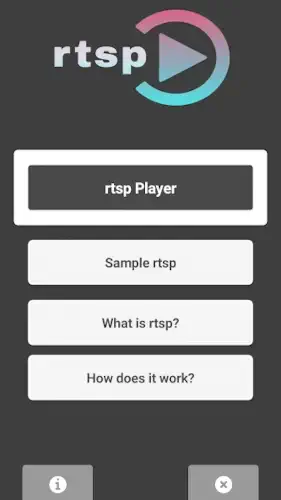
Most security camera apps drown you in unnecessary features while struggling with basic streaming. RTSP Player takes the opposite approach – it does one thing exceptionally well: delivering stable RTSP feeds without the bloat.
With a 4.7-star rating from over 1,000 users and a lean 15MB install size, RTSP Player app has become the go-to for everyone from security professionals checking CCTV feeds to pet owners monitoring their furry friends.
What RTSP Player Does
At its core, RTSP Player connects to your IP cameras using the Real Time Streaming Protocol. But unlike manufacturer apps that often buffer or crash, this third party solution offers:
-
Lower latency streams (often 1-2 seconds faster than camera brand apps)
-
Simpler interface with no confusing menus
-
Reliable background operation so you can check feeds while using other apps
The magic lies in what it doesn’t do – there’s no cloud storage upsells, no social features, just clean video playback. This makes it ideal for:
-
Small business owners monitoring their premises
-
Tech-savvy parents keeping an eye on kids’ rooms
-
Pet owners checking on animals during the day
RTSP Player Features That Matter in Real World Use
Multi Feed Switching That Doesn’t Lag
Unlike bulkier apps that stutter when changing cameras, RTSP Player handles feed switching instantly. This is crucial when:
-
Checking multiple store aisles quickly
-
Toggling between front and back yard cameras
-
Monitoring several pet areas in a large home
Background Streaming Done Right
The app continues running when minimized, allowing you to:
-
Listen to music while keeping an eye on feeds
-
Answer messages without losing your camera connection
-
Use navigation apps while monitoring delivery drivers
Automatic Quality Adjustment
When your WiFi weakens, the app seamlessly:
-
Reduces resolution to maintain stream stability
-
Prioritizes frame rate over quality for motion clarity
-
Returns to high quality when connection improves
Getting Started:
Formatting Your RTSP URL Correctly
The standard format is:
rtsp://username:password@IPaddress:554/stream
Pro tip: Test your URL in VLC first to confirm it works before adding to RTSP Player.
Optimizing Stream Quality
If you experience lag:
-
Tap the settings icon
-
Select “720p” or “480p”
-
Enable “Auto adjust” for fluctuating networks
Managing Ads Without Paying
While the free version shows ads, you can:
-
Enable airplane mode during critical monitoring
-
Use a firewall to block ad domains
-
Switch to mobile data if WiFi ads become intrusive
For those needing more features, TinyCam Monitor offers advanced PTZ controls but with greater complexity.
Addressing Common Frustrations
Why no PTZ controls?
The developer focuses on core streaming stability first. However:
-
Basic zoom works via pinch gestures
-
PTZ-capable alternatives exist for advanced users
-
The tradeoff is better performance on low-end devices
Streams sometimes freeze
Quick fixes:
-
Swipe down to refresh the feed
-
Restart the app completely
-
Check your camera’s RTSP service is running
Storage considerations
At just 15MB, the app:
-
Won’t bloat your phone
-
Works on devices as old as Android 7.0
-
Leaves room for other security apps
Advanced RTSP Player Tactics for Professional Monitoring
Why RTSP Player Stands Out as the Best RTSP Player for CCTV
Most users never tap into RTSP Player’s full potential. Beyond basic streaming, the app offers hidden efficiencies that make it the best RTSP player for CCTV systems. Here’s what security professionals and power users do differently:
The URL Management System You Should Be Using
Simply pasting RTSP links into the app works, but pros:
-
Store URLs in Google Keep with labels like “Backyard – 720p optimized”
-
Add credentials separately using notes like:
Camera 1: 192.168.1.101 | User: admin | Pass: 12345 -
Color code by priority (red for critical feeds, green for occasional checks)
This saves hours when:
-
Switching between 10+ camera setups
-
Reinstalling the app
-
Training new team members
The VLC Validation Step Nobody Does (But Should)
Before adding any feed to RTSP Player:
-
Open VLC
-
Navigate to Media > Open Network Stream
-
Paste your RTSP URL (
rtsp://admin:password@192.168.1.101:554/stream)
If it plays in VLC but not RTSP Player:
-
Check your phone’s firewall settings
-
Verify the camera supports baseline RTSP (not manufacturer-specific variants)
-
Test with and without credentials
Data Control That Actually Works
WiFi-only mode is just the start. To prevent cellular overages:
-
Set data warnings at 90% of your plan
-
Restrict background data for RTSP Player
-
Schedule checks during off-peak hours
For critical remote monitoring:
-
Use a dedicated hotspot with unlimited data
-
Enable audio only streams when visuals aren’t essential
-
Set lower FPS (10-15) for mobile viewing

How RTSP Player Compares to Alternatives
| App | Best For | Where It Falls Short |
|---|---|---|
| TinyCam | Advanced NVR features | Steep learning curve |
| IP Cam Viewer | Multi vendor compatibility | $5-$15 per premium feature |
| VLC | Troubleshooting streams | No camera grouping or presets |
RTSP Player wins for:
-
Emergency response teams needing instant feed access
-
Small business owners without IT staff
-
Home users who value simplicity over features
Alternatives make sense when:
-
You need PTZ controls (TinyCam)
-
Your cameras require ONVIF (IP Cam Viewer)
-
You’re testing new setups (VLC)
Conclusion :
RTSP Player isn’t the most powerful tool available. It won’t control PTZ cameras, analyze footage, or integrate with smart home systems. What it does better than any competitor is deliver stable, low latency streams without unnecessary complexity.
For these scenarios, it’s unbeatable:
-
Quick security checks during vacations
-
Monitoring contractors in your home
-
Keeping an eye on elderly relatives
FAQ
What are some essential RTSP player tips for better streaming?
Test streams first in VLC, bookmark your camera URLs, and use WiFi only mode. Need help? Email support: yerli.uygulama[at]gmail.com
Where can I find sample RTSP streams to test?
Try the demo URL: rtsp://wowzace2demo.streamlock.net/vod/mp4:BigBuckBunny_115k.mov. More samples are on the official RTSP Player site.
How do I download RTSP Player?
Get RTSP Player from the Google Play Store.
Why does my RTSP stream keep disconnecting?
Check your camera’s RTSP service is active, reduce stream quality in settings, or try the IP Cam Viewer alternative for stubborn feeds.
Can I use RTSP Player for baby monitors?
Yes, but ensure your camera supports RTSP and use encrypted streams (rtsp://username:password@IP). For easier setups, consider dedicated baby monitor apps.