Threads was designed as a companion for Instagram to fill the gap of the text based discussion that often got lost in the comments.
With over 100 million downloads and a 4.3 star rating from nearly 1.8 million reviews, the Threads app has secured its place. The app size is a lean 50MB, and its primary audience spans a broad age range of existing Instagram users, from young adults to professionals, who are looking for a more direct and conversational social experience.
What Is Threads, and Who Is It For?
Threads is a text based conversation app developed by the team behind Instagram. Its core function is to provide a platform for public, text centric discussions. If Instagram is your digital photo album, Threads is your corner cafe for the conversations that photo might inspire. The app is built for a specific user: someone already invested in the Instagram ecosystem who wants to engage in longer form dialogue, follow trending topics, and connect with creators and friends beyond a ‘like’ on a post.
The most significant feature of Threads is also its foundation: seamless integration with Instagram. The setup process is arguably the simplest in social media.
Your onboarding is instantaneous. The app uses your existing Instagram account, importing your username, bio, and profile link without any additional forms. This immediate familiarity lowers the barrier to entry significantly.
This extends to your social connections. Your Instagram following list is the seed for your Threads network. You instantly follow the same accounts, and they follow you, creating an active community from day one. This leverage of an established “social graph” is the app’s primary strategic advantage, eliminating the cold start problem that plagues new social networks.
For verified Instagram accounts, the blue checkmark carries over directly. This continuity reinforces authenticity and helps maintain your established identity across Meta’s ecosystem, making the transition to Threads for creators and businesses a logical extension of their online presence.
Threads Features and How to Use Them
Once inside, the toolset is designed for clear, controlled interaction.
-
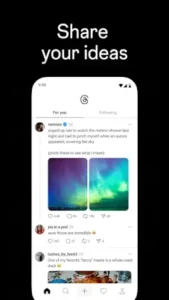
Creating Content: You can post text threads of up to 500 characters, attach photos, and create polls. The focus is on sparking dialogue rather than broadcasting a perfect image.
-
Conversation Controls: Each thread you start can be configured with specific reply permissions, from everyone, to only profiles you follow, or solely the accounts you mention. This gives you granular control over the discussion’s tone and participants.
-
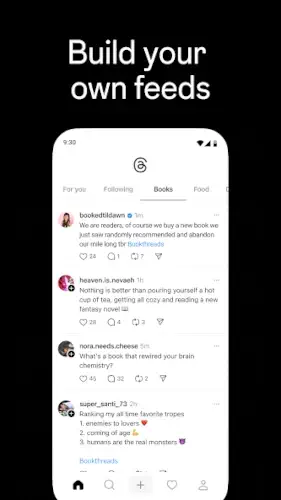
Discovery: A central feed surfaces content from people you follow and recommended accounts. A search function allows you to track Threads trending topics in real time, from sports to tech news.
-
The Fediverse: This is the app’s most forward-thinking feature. Threads is gradually integrating with the fediverse, a network of interconnected but independent social platforms like Mastodon. This means, over time, your Threads posts could be visible to and interact with users on other servers, moving beyond the walled garden of Instagram.
Threads User Experience: Design and Interface
The Threads interface is a study in minimalist design. It borrows Instagram’s visual DNA but strips it back to prioritize text. The color scheme is clean, the typography is clear and readable, and the layout is intuitive. Tabs at the bottom of the screen let you easily switch between your home feed, a search and discovery page, your activity, and your profile.
The navigation feels fluid, optimized for quickly scanning text posts and diving into comment threads. The performance is generally solid, with real time updates as new replies and likes come in. Notifications are a key part of the experience, designed to keep you looped into ongoing conversations you care about. For users seeking a different structure for community chat, Discord offers a server based model centered around specific interests and real time voice and text channels.
What Users Are Saying About Threads
User feedback paints a picture of a promising platform with clear room for growth. The overwhelming positive point is the quality of conversation. Many users find the discussions on Threads to be more thoughtful and community oriented than on other text-based apps, praising the strong sense of connection fostered by the Instagram based network.
However, the critiques are consistent. Some users report technical bugs, such as text input glitches and inconsistent notifications, which can disrupt the flow of conversation. Another common point of feedback relates to the algorithmic feed; while it surfaces interesting content, some users find it can feel chaotic or less relevant than a strictly chronological timeline, impacting the overall Threads user experience.
Threads in the Social Media Landscape
To understand where Threads fits, it’s essential to look at the existing players. When considering Threads similar apps, the most direct comparison is often Twitter/X. Both are built for real time, text based updates. However, their foundations differ. Twitter/X functions as a global public square, a broadcast medium for news, hot takes, and viral content, often among strangers. Threads, by contrast, leverages your pre existing Instagram network, which often creates a starting point of more familiar, interest-based connections. This can lead to a different initial tone; it feels more like a conversation at a party where you already know some guests, rather than shouting in a city square.
Another key comparison is with Mastodon, a pioneer in the fediverse. Threads is adopting this decentralized model, but from a position of immense scale. Where Mastodon requires users to choose a specific server (or “instance”) with its own rules, Threads acts as one massive, user friendly server that is gradually connecting to the rest. This lowers the technical barrier to entry for decentralized social networking significantly. Then there’s Reddit, which is organized around topics and communities (subreddits) rather than individual follows. Threads is more personality and creator driven, centered on the people you choose to follow and the discussions they start. Its unique position is as a conversation starter that is intrinsically tied to the world’s largest visual social graph.
Practical Threads Tips for Better Engagement
Moving from a passive user to an active participant requires a bit of strategy. Implementing a few key Threads tips can transform your experience from confusing to highly engaging.
First, take control of your feed. The algorithm is powerful, but it needs direction. The most effective method for how to use Threads for a better feed is to be proactive. When you find an account that shares high-quality content, don’t just follow them, actively engage with their posts through replies and likes. The algorithm interprets this as a strong signal. Conversely, use the option to mute or unfollow accounts that clutter your feed with irrelevant content. This active curation teaches the system your preferences more accurately than passive scrolling.
Second, master the conversation controls. Before you post a new thread, pause for a moment on the reply settings. If you’re starting a discussion you want to keep focused, limit replies to “Profiles you follow” or “Mentioned only.” This is a powerful Threads engagement strategy for preventing spam or off-topic replies in sensitive or targeted conversations. It allows you to shape the dialogue and create a safer, more relevant space for interaction, which is especially useful for creators and businesses managing their community.
Finally, don’t ignore the fediverse. While still in development, this is the feature that could redefine the platform’s long-term potential. Explore your settings to understand how your profile can eventually interact with other services like Mastodon. This isn’t just a technical checkbox; it’s a gateway to discovering communities and perspectives entirely outside the Instagram ecosystem. Engaging with this early can give you a first mover advantage in a broader, interconnected social web.
Conclusion :
After a thorough examination, the verdict on Threads is that it is a specialized and strategic tool, not a general-purpose social network. Its greatest strength is its seamless integration with Instagram, which provides an instant, active community, a hurdle that has doomed countless other social apps. It successfully creates a space for more nuanced, text-based conversation than its parent platform allows.
The trade-offs are part of its current identity. The feed can sometimes feel less chronologically organized than some users prefer, and the occasional bug reminds you that it’s a platform still maturing. It may not replace the raw, breaking-news speed of Twitter/X or the deep, topic-specific anonymity of Reddit.
In conclusion, Threads is best understood as Instagram’s conversation layer. It is the logical place to take the discussions that a photo or video sparks and give them room to breathe and develop. For Instagram users looking to deepen their connections and engage in more substantive dialogue with their existing audience, Threads is an exceptionally convenient and increasingly powerful option. Its future, particularly through the fediverse, points toward a more open social web, making it one of the most significant and interesting developments in the current social media landscape.
Frequently Asked Questions (FAQ)
Is Threads a separate app from Instagram?
Yes, Threads is a standalone application that requires a separate download. However, it is deeply integrated with Instagram, using your existing account for a seamless login and to populate your initial network of followers.
Where can I find the official Threads download link?
The official Threads app is available on the Google Play Store.
How do I report a bug or get account support?
For technical issues, bug reports, or account-specific problems, you can contact the Threads support team directly. They handle these inquiries and can be reached at instagram-android[at]meta.com.
Is there a resource to understand all the features?
For a detailed, community-maintained breakdown of features, updates, and the fediverse integration, the Threads Wiki Page serves as a comprehensive knowledge base.
Can I use Threads if I don’t have an Instagram account?
Currently, an active Instagram account is required to create a Threads profile. This integration is a core part of the app’s design, as it uses your Instagram identity and social connections to build your community from the start.