Tile Master Pro does not ask you to learn a new language of mechanics.
Tile Master Pro asks you to tap three matching tiles, clear the board, and repeat. That simplicity is the entire point and it explains why the game has crossed 10 million downloads with a 4.5 star rating from over 43,000 reviews on Google Play. The install size usually sits around 80 MB to 120 MB depending on your device architecture and the age rating is Everyone, which fits a game designed for anyone who has five minutes to spare. The trade-offs are real, though. The ad load is heavy enough that some players feel like they spend more time watching commercials than matching tiles and a few persistent bugs have annoyed the community.
What Is Tile Master Pro
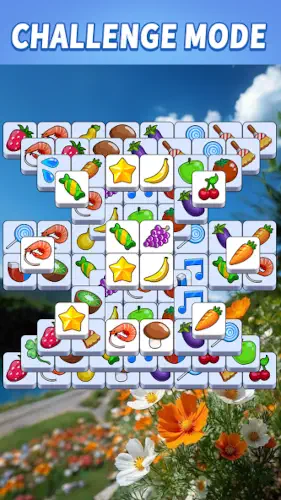
Higgs Studio built a tile matching game that leans on a mahjong inspired aesthetic instead of trying to reinvent the genre. You tap three identical tiles from a stacked board. They drop into a seven slot tray at the bottom. When three matching tiles gather in the tray, they disappear. If the tray fills up before you clear a set, the level ends.
That is the whole game. No energy timers, no stamina systems, no forced social mechanics. You pick it up, play a few levels and put it down. The appeal of Tile Master Pro is not novelty. It is the absence of friction. Most match 3 games drown you in currencies, daily missions, and popups. This one keeps the loop clean enough that you can play it while half paying attention to something else.
Tile Master Pro Mechanics of Matching and Clearing the Board
Tap to Match Gameplay
The board is a stack of tiles, and you can only tap tiles that are not covered by others. The seven slot tray is your constraint. Every tap either moves you closer to a clear or wastes a slot. The tension comes from the fact that you cannot see everything at once. You have to mentally track which tiles are available, which are buried, and which combinations are within reach.
Progression and Level Design
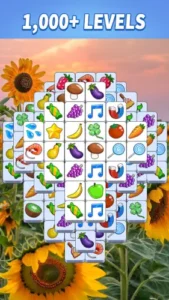
The game ships with hundreds of levels, and the difficulty rises gradually. Early levels are essentially tutorials disguised as puzzles. Later levels introduce denser stacks and tile distributions that require actual planning. Every few levels unlock new tile sets. Fruits, vegetables, stars, flowers. These are cosmetic, but they keep the board from looking stale after dozens of levels.
Boosters and Hints
You have access to power-ups and hints. A hint shows you a valid match. A booster can shuffle the board or undo a mistake. The mistake most players make is burning these early. The first fifty levels do not need them. Save them for the dense mid game boards where a single wrong tap fills your tray and ends the run.
Offline Play
This is one of the most practical features. You can play without Wi-Fi. On a flight, on the subway, in a basement with bad signal, the board still loads. The offline mode in Tile Master Pro does not feel like a degraded experience. It is the same game, just without the ad interruptions that require a connection.
Tile Master Pro Visual Themes and Design
The art style is bright and clean. Tiles are distinct enough that you can tell them apart at a glance, which matters more than you might think when the board is dense and you are tracking multiple potential matches. The sound design is soft. There is no aggressive music pushing you to hurry up.
The trade-off is that the visual polish does not extend to the ad experience. The ads that play between levels are jarring compared to the game itself. They break the zen atmosphere that the art style tries to create. The design of Tile Master Pro is calm. The monetization is not.
What Users Say About Tile Master Pro Game
What users like
Players describe it as easy to play and relaxing. The distinct tile colors and variety make matching satisfying. Many say it is less frustrating than other tile games because the failure state is clear. You fill the tray, you lose, you retry. No hidden mechanics, no sudden difficulty spikes.
Were it needs some work
The ads are the biggest complaint. Some players feel they watch more ads than they play. There are also bugs with continuing levels and coin purchases, which can kill momentum if you hit one mid session. One specific annoyance mentioned repeatedly is the shrinking close button on ads. As you progress, the button to close an ad gets smaller and harder to tap. This is not a bug. It is a design choice meant to keep you looking at the ad longer. It is also the kind of thing that makes players quit.
Tile Master Pro Tips
Match Near the Top First
The board is a stack, not a flat grid. Tiles at the top are fully exposed. Tiles underneath are hidden until the ones above them are removed. Your tray only holds seven tiles. If you waste slots on bottom layer tiles while the top layer is still cluttered, you will run out of space before you can clear anything.
Tile Master Pro tips often boil down to this one rule: clear the top layer first. It sounds obvious, but in the heat of a run, you will be tempted to chase a pair you already have in the tray. If that pair requires tapping a buried tile, ignore it. Clear what is accessible, then reassess.
Focus on One Tile Type at a Time
Your tray holds seven tiles. If you tap one of three different tile types, your tray fills up before any of them reach three. You lose. The fix is to commit. Pick one tile type, clear all three instances of it, and then move to the next. This means ignoring tiles that look “almost” ready. game Tile Master Pro rewards discipline, not greed.
Save Boosters for Tricky Levels
You have hints and power-ups. The early levels do not need them. If you burn a hint on level 12 because you cannot find the obvious match, you will be stuck on level 80 with nothing left. Save them for the dense boards where multiple tile types overlap and every tap fills a slot. If you can clear the board by looking at it, do not use a booster.
Play Offline for Uninterrupted Sessions
Tile Master Pro works without Wi-Fi. When you play offline, the ads that normally appear between levels cannot load. The game becomes faster, smoother, and closer to the zen experience the art style promises. Tile Master Pro similar games often require an internet connection, which makes the offline mode here a genuine advantage. You can play on a plane, on the subway, or in a waiting room with no signal, and the game runs exactly as intended.
If you are searching for Tile Master Pro codes, they usually do not exist in the traditional sense. The game does not use redeemable codes for coins or boosters. Your best source for free coins is daily rewards or watching optional ads. Tile Master Pro reddit threads confirm this. The developer does not distribute promo codes, so do not waste time looking for them.
Tile Master Pro Similar Games
Tile Master Pro vs Onet Puzzle
Onet Puzzle uses similar mechanics but a different art style. It is cleaner and more minimalist. Tile Master Pro leans harder into mahjong inspired visuals and the zen atmosphere. If you want a more stripped-down look, Onet is the pick. If you want the colorful, textured tiles, stay here.
Tile Master Pro vs Tile Planet
Tile Planet has more levels and a more detailed aesthetic. It also demands more of your attention. Tile Master Pro is simpler. It does not ask you to manage resources or complete daily missions. If you want depth, Tile Planet is better. If you want to turn your brain off for ten minutes, Tile Master Pro is the right choice.
Tile Master Pro vs Tile Master (Original)
The original Tile Master is an earlier version by the same developer. Tile Master Pro is the newer iteration with updated graphics and features. The original feels dated by comparison. If you are choosing between them, Pro is the one to install.
Tile Master Pro vs Tiledom
Tiledom focuses on beautiful, detailed tile art. It is visually impressive. Tile Master Pro focuses on a broader variety of tile sets and casual accessibility. If you care most about how the tiles look, Tiledom is worth a look. If you care about having more content and a simpler loop, Tile Master Pro is better.
If you want to try a tiles game online without installing anything, most of these options have web versions or can be played through browser emulators. But Tile Master Pro’s native offline mode is the reason to keep it on your phone.
Conclusion
Who Tile Master Pro Is For
Players who want a relaxing, low pressure puzzle game. Fans of mahjong-inspired art and colorful tile sets. Anyone who wants a match 3 game they can play offline without worrying about data usage.
Who Should Look Elsewhere
Players who cannot tolerate heavy ad interruptions. Users who get frustrated by technical bugs and coin purchase issues. Anyone looking for deep progression systems or social features. And players who want a harder puzzle challenge than triple match can provide.
FAQ
Where to download the Tile Master Pro and is it free?
You can download Tile Master Pro from theOfficial Google Play Store. The game is free to download and play, supported by ads. There are optional in-app purchases for coins or to remove ads, but you can clear hundreds of levels without spending a dime.
How do I contact support if I lose my progress or encounter a bug?
If you run into technical issues, especially with coin purchases not registering, the developer’s support email is tilemasterpro[at]outlook.com. You can usually find this contact info at the bottom of the Google Play listing or within the game’s settings menu. Including your player ID and a screenshot of the issue will help speed up the response.
Can I play Tile Master Pro offline?
Yes. It works without a network connection, and offline play skips the ads that require loading. This is one of the best reasons to keep it installed.
How do I get more coins?
Daily rewards and optional ad-watching are the main free sources. You can also buy them, but be aware of reported bugs where purchases do not register. Keep screenshots of your receipts.
Why does the close button on the ads keep getting smaller?
This is a deliberate design choice by the developer to keep you looking at the advertisement longer. It is not a bug, and there is currently no setting to disable it. If this frustrates you, the only workarounds are playing the game entirely offline or purchasing the ad-removal option.
Is there a way to remove ads?
Yes. The game offers a paid option to remove ads. If the ads are your main frustration, this is the only permanent fix. Offline play avoids most of them, but some rewards may not be available without a connection.