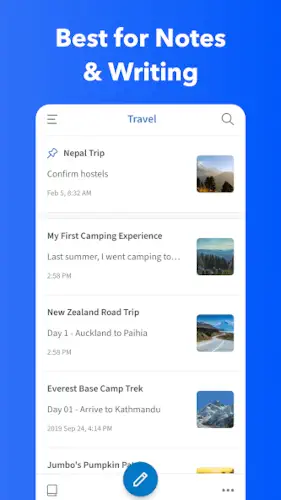
UpNote gives you rich text editing, markdown support, and cross platform sync without the bloat.
UpNote design is minimal and focus on writing.
What is UpNote?
Cross platform note taking app by UpNote Pte. Ltd. designed for fast, distraction free writing and clean organization of notes, journals, and to do lists across mobile and desktop.
UpNote is a lightweight, multi device note app available on iOS, macOS, Windows, Android, and Linux, built to help you capture ideas, keep a diary, and manage tasks in one place. It positions itself as a simpler, more affordable Evernote alternative, focusing on core note taking, journaling, and light task management rather than trying to be a full work OS like Notion. The app is free to start with a 50 note limit and offers a Premium tier with a widely advertised one time lifetime license.
UpNote holds a 4.6 star rating from more than 19,000 reviews. The app size is roughly 27 MB. The age rating is Everyone. The app is free with a premium upgrade available.
A cross platform note taking app for fast writing and clean organization
The category matters here. UpNote is not a work OS. It is not a database tool. It is a note taking app. You write notes. You organize them. You sync across devices. The focus is on speed and simplicity. The rich text editor and markdown support give you flexibility without overwhelming you.
Who this tool was built for
Journalers who want a clean, distraction free writing experience
If you keep a diary or journal, UpNote is for you. Focus mode hides everything except the editor. The design is clean. The experience is calm.
Students who need to organize lecture notes and study materials
Students can organize notes by subject. They can tag topics. They can use collapsible sections for long notes. The tool is for academic organization.
Professionals who want a simple, fast note taking tool without bloat
Professionals can capture meeting notes. They can manage to do lists. They can clip web pages. The tool is for work productivity.
Anyone who wants an affordable Evernote alternative with lifetime pricing
Evernote is expensive. Notion is complex. UpNote offers a one time lifetime license. The pricing is affordable.
UpNote Main Features
Rich Text Editor with fonts, headings, colors, highlights, tables, lists, code blocks, images, and videos
The editor is rich. Fonts. Headings. Colors. Highlights. Tables. Lists. Code blocks. Images. Videos. The formatting is flexible.
Markdown Support with shortcuts for fast formatting
You can use markdown shortcuts. Headings. Lists. Quotes. The formatting is fast.
Notebooks, Tags, and Pinning for organization
You can organize with notebooks. You can add tags. You can pin important notes. The organization is flexible.
Focus Mode for distraction free writing with typewriter mode
Focus mode hides everything. Only the editor remains. Typewriter mode keeps the current line centered. The writing is distraction free.
Lock and Privacy with passcode and biometric unlock
You can lock notes. You can lock notebooks. You can lock the app. Biometric unlock is supported. The privacy is strong.
Cross Device Sync and Offline Use
Your notes sync across devices. The sync is fast. You can work offline. The sync works when you reconnect.
Attachments and Tables (Premium)
Premium users can attach files. They can insert tables. The notes are more structured.
Export Options to Text, PDF, HTML, and Markdown (Premium)
Premium users can export notes. Text. PDF. HTML. Markdown. The exports are flexible.
Web Clipper for Chrome, Safari, and Firefox
You can clip web pages. Articles. Recipes. The clipper is convenient.
Version History and Backup (Desktop)
Desktop users have version history. They can recover earlier drafts. The backup is reliable.
Spaces for separating personal, work, and project notes (Premium)
Premium users can create spaces. Personal. Work. Projects. The separation is clean.
Templates and Collapsible Sections for recurring note types
You can use templates. Recurring note types. Collapsible sections organize long notes. The structure is clear.
Sticky Window (Desktop) for keeping notes on top of other apps
Desktop users can keep a note on top. Meetings. Lectures. Reference. The sticky window is useful.
UpNote Graphics and Design
Minimal, clean interface with classic three pane layout
The design is minimal. The layout is classic. Notebooks on the left. Notes in the middle. Editor on the right. The design is familiar.
Design emphasizes typography and readability with multiple fonts and dark themes
The focus is on readability. Multiple fonts. Dark themes. The design is comfortable for long writing.
Clutter free look and snappy performance
The look is clutter free. The performance is snappy. The app feels fast.
Where the design works well
The app is clean. The focus is on writing. The design supports productivity.
Where limited advanced features compared to full knowledge base tools affects the experience
UpNote similar apps have more features. Notion has databases. Evernote has OCR. UpNote is simpler. The limited features are a trade off.
What users say about the UpNote App
The parts people enjoy
Positive reviews often mention the speed. The design is praised. The lifetime pricing is appreciated.
One user wrote: “UpNote is the perfect balance between simplicity and features. Fast sync. Beautiful design. Lifetime license is a steal.”
The parts people complain about
No note taking app escapes criticism. Here is what comes up most often.
Limited advanced features compared to Notion or Evernote
UpNote is simpler. It lacks databases. It lacks OCR. It lacks automations. The simplicity is a trade off.
Some features are desktop only, frustrating for mobile only users
Version history is desktop only. Some export options are desktop only. Mobile users miss out.
Smaller ecosystem with fewer integrations and templates
The ecosystem is smaller. Fewer integrations. Fewer templates. The community is smaller.
No deep databases or automations like Notion
UpNote is for notes, not databases. The depth is limited. The simplicity is by design.
How the UpNote App mechanics work
Create notes or journal entries using rich editor or markdown shortcuts
You create notes. Rich editor. Markdown shortcuts. The input is flexible.
Organize with notebooks, tags, pinning, and Quick Access
You organize with notebooks. Tags. Pinning. Quick Access. The organization is efficient.
Write in Focus Mode for distraction free sessions
Focus mode hides everything. Only the editor remains. The writing is focused.
Search and filter to retrieve notes quickly
You can search notes. You can filter by tag. The retrieval is fast.
Sync across devices and optionally lock sensitive notes
Your notes sync across devices. You can lock sensitive notes. The sync is seamless.
Export or share when needed
You can export notes. You can share notes. The export is flexible.
Looking for another lightweight note taking app with cross platform sync and clean design? Check out Bear, a popular note app for Apple users with markdown support and elegant design.
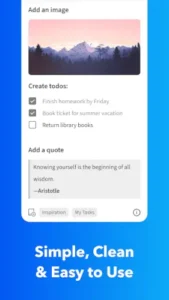
UpNote Tips
You can start UpNote app and create your first note in seconds. Building a system that keeps your notes organized without becoming a project in itself takes a little strategy. These tips help you get the most out of this clean, fast note taker.
Use notebooks and tags together for flexible filtering
Here is a question. Why do some users find notes instantly while others scroll endlessly? They use notebooks and tags together.
UpNote tips from experienced users all say the same thing. Notebooks are broad containers. Tags are specific labels. A user who combines notebooks and tags creates a powerful filtering system. A user who only uses notebooks ends up with cluttered folders.
Enable Focus Mode for writing journal entries or long notes
Focus Mode hides everything except the editor. No sidebars. No menus. Just your words.
Use Focus Mode for journal entries. Use it for long notes. A user who enables Focus Mode writes without distraction. A user who keeps the full interface open gets distracted.
Leverage markdown shortcuts for quick formatting without the toolbar
UpNote similar apps have toolbars. This app has markdown shortcuts.
Use markdown shortcuts. Headings. Lists. Quotes. A user who uses markdown shortcuts formats notes quickly. A user who relies on the toolbar works slower.
Pin important notes to the top for instant access
UpNote app lets you pin notes. Pinned notes stay at the top.
Pin daily journals. Pin project briefs. Pin checklists. A user who pins important notes accesses them instantly. A user who does not pin scrolls to find them.
Use Spaces to separate personal, work, and study notes
Spaces are a premium feature. They separate different contexts.
Create a space for personal notes. Create a space for work notes. Create a space for study notes. A user who uses Spaces keeps contexts clean. A user who mixes everything creates clutter.
Back up and export regularly as an extra backup
UpNote app syncs across devices. Sync is reliable. But backups are still important.
Export key notes. PDF. Markdown. A user who exports regularly has an extra backup. A user who relies only on sync risks data loss.
Try the lifetime deal if you like the app after a few weeks
UpNote codes for free features are not needed. The pricing model is straightforward.
The free version has a 50 note limit. Premium removes the limit and adds features. The lifetime deal is a one time payment. A user who tries the app for a few weeks knows if it fits. A user who buys immediately may regret it.
Use sticky window on desktop for meetings or classes
The sticky window keeps a note on top of other apps. It is a desktop feature.
Use the sticky window during meetings. Use it during lectures. A user who uses the sticky window takes quick reference notes. A user who does not switches windows constantly.
Apps similar to UpNote
If you like UpNote, here are four other apps worth your time. Each offers something similar with a different twist.
Evernote
Evernote is the most direct comparison for rich note taking. Notebooks. Tags. Web clipper. UpNote similar apps should start here. The difference is that Evernote has more features like OCR and AI, but is more expensive and bloated. Good for users who need advanced features.
Bear
Bear is an elegant, markdown friendly note app for Apple platforms. Tags. Clean design. The difference is that Bear is Apple only and has a subscription model. Good for users who are in the Apple ecosystem.
Notion
Notion is a more powerful all in one workspace. Notes. Databases. Wikis. AI. The difference is that Notion is more complex and has a steeper learning curve. Good for users who want a full work OS.
Apple Notes and Google Keep
Apple Notes and Google Keep are simple, fast note apps. Quick capture. Light organization. The difference is that they are less feature rich and have limited cross platform support. Good for users who want a basic note taker.
UpNote Community
No built in social feed or public community network
No feed. No public posts. The tool is for personal use.
Share individual notes via secret web links for reading
You can share notes via secret web links. The links are for reading only. The sharing is limited.
External community on Reddit, YouTube, blogs, and productivity forums
Users discuss setups on UpNote Reddit. They post reviews on YouTube. They share tips on blogs. The community is active.
No in app chat, comments, or team workspace
There is no chat. No comments. No team workspace. The tool is for individual use.
Conclusion
UpNote works for three types of people. First, journalers who want a clean, distraction free writing experience with focus mode and typewriter support. Second, students who need to organize lecture notes and study materials with notebooks and tags. Third, professionals who want a simple, fast note taking tool without bloat and with a one time lifetime license.
Limited advanced features compared to Notion or Evernote. Some features are desktop only, frustrating for mobile only users. Smaller ecosystem with fewer integrations and templates. No deep databases or automations like Notion.
Do you want a fast, clean note taking app with markdown support and lifetime pricing, even if it lacks the advanced features of Notion or Evernote? Or do you need deep databases, OCR, and automations?
If the first one, UpNote offers one of the best lightweight note taking experiences available. If the second one, look at Notion or Evernote. Both answers are fine. Just know what you want.
FAQ
How do I get UpNote download on my phone?
Go to the Google Play Store if you use Android. Search for UpNote Notes Diary Journal. The developer is UpNote Pte. Ltd. Tap install or use the direct link to Download UpNote from the Official Google Play Store.
Is UpNote free to use, or do I need to pay?
The app is free with a 50 note limit. You can create notes, use the rich editor, and sync across devices without paying. The free version is a good way to test the app. Premium removes the note limit, adds attachments, tables, spaces, and export options. Premium is available as a subscription or a one time lifetime purchase.
Where can I find the official website and help documentation?
The official UpNote website has information about features, pricing, and platforms: Official UpNote Website Link.
I have a problem with the app. Who do I contact?
Send an email to the UpNote support team. They handle account issues, billing problems, bug reports, and technical support. Here is the address: support[at]getupnote.com. For UpNote download problems or installation issues, that same email applies. Include your device model, app version, and a description of the problem.
How is UpNote different from Evernote or Notion?
UpNote is simpler and faster. Evernote has powerful OCR and search but is bloated and expensive. Notion is a full work OS with databases and automations but has a steep learning curve. UpNote focuses on note taking and journaling. It has a clean interface, markdown support, and a one time lifetime purchase option. If you want a lightweight, distraction free note app without the complexity, UpNote is a great choice.