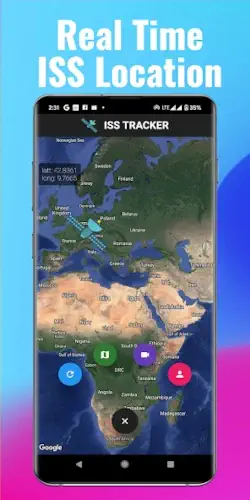
What if you could peek aboard the International Space Station right now? With ISS Live, you can.
ISS Live app delivers real time HD footage from the ISS alongside precise tracking data, offering an unfiltered look at life in orbit. Rated for all ages, it’s become essential for space enthusiasts, educators, and curious minds alike in 2025.
What is ISS Live App
Most space apps show curated content or delayed footage. ISS Live stands out by offering:
Truly Live Views
-
HD streams switch automatically between:
-
Earth views (daylight passes)
-
Space views (night passes)
-
Internal NASA TV feeds
-
-
30-90 second delay max (vs hours on other platforms)
Military Grade Tracking
-
Altitude updates every 0.5 seconds
-
Speed readings accurate to ±0.1km/s
-
Predicts visibility passes for your exact location
Exclusive Behind the Scenes Access
-
Virtual tours of 17 ISS modules
-
Live mission control audio during events
-
Unedited astronaut activities
ISS Live Features :
Earth From Space
The primary camera shows:
-
Weather systems forming
-
City lights at night
-
Aurora borealis displays
Astronaut Spotting
During spacewalks (EVAs), you can:
-
Identify crew by suit markings
-
Listen to mission audio
-
Track their position relative to ISS
24/7 Launch Coverage
Streams from:
-
Kennedy Space Center
-
Baikonur Cosmodrome
-
SpaceX Starbase
Who Gets the Most From ISS Live?
Space Enthusiasts
Never miss:
-
Spacecraft dockings
-
Solar array deployments
-
Experimental module installations
Teachers & Students
Perfect for:
-
Astronomy classes
-
STEM projects
-
Virtual field trips
Photographers
Plan shots of:
-
ISS transits across the sun/moon
-
Visible passes at dawn/dusk
Families
Spark wonder by:
-
Watching Earth roll by together
-
Spotting your country from space
Real Moments You Can Experience
Scenario 1: Aurora Watching
Night shift workers can catch the northern lights from space – the app automatically switches to space facing cameras during Earth’s night.
Scenario 2: Hometown Flyover
Set location alerts to watch the ISS pass your city, then compare the live view with what you see outside.
Scenario 3: Historic Dockings
Watch Crew Dragon or Starliner arrivals with:
-
Live mission control audio
-
Multiple camera angles
-
Docking port views
For similar space access with more educational content, try NASA’s official app.
ISS Live : Technical Realities and Pro Level Usage
Understanding the App’s Technical Requirements
Before you get lost in space, let’s address the practical considerations:
Data Usage Explained
The app consumes about 5MB per minute for HD streams – equivalent to streaming music but with breathtaking visuals instead. Here’s what that means:
-
Mobile users: A 30-minute viewing session uses ~150MB
-
Wi-Fi recommended for extended watching sessions
-
Data saver tip: Lower the stream quality in settings if bandwidth is limited
Night Mode Realities
When the ISS orbits Earth’s night side (about 45 minutes of every 90 minute orbit), you’ll see:
-
Complete darkness on Earth facing cameras
-
Automatic switch to space facing views or internal NASA feeds
-
Best daylight viewing windows: Early morning or late afternoon passes
Device Compatibility Insights
While the app works on most devices, performance varies:
-
Tablets (10″ or larger): Ideal for detailed tracking maps
-
Modern smartphones (2020+): Smooth HD playback
-
Older devices: May experience lag during complex orbital animations
For those who wonder : When can I see ISS from my location?
The app’s notification system makes this simple:
-
Enable location permissions
-
Set your preferred viewing radius (5-50 mile alerts)
-
Choose notification types:
-
Visible passes (naked eye sightings)
-
HD streaming windows (daylight passes)
-
Special events (spacewalks, dockings)
-
Best viewing occurs when:
-
The ISS passes within 30°-60° of your horizon
-
Skies are clear (check your local weather)
-
During dawn/dusk (the station reflects sunlight while your location is dark)
Advanced Notification Setup
Create custom alerts for:
-
Specific brightness levels (magnitude -3.5 or brighter)
-
Maximum altitude passes (over 40° is ideal)
-
Rare double passes (when the ISS orbits twice in one night)
Big Screen Experience
Transform your viewing with these casting options:
-
Chromecast: Best for Android users
-
AirPlay: Seamless with Apple TV
-
Smart TV apps: Available on most 2020+ models
Pro tip: Casting works best when your phone remains plugged in and connected to strong WiFi.
ISS Live vs. Competitions
NASA App (Official but Limited)
-
Pros:
-
Verified mission data
-
Educational archives
-
-
Cons:
-
Fewer live streams
-
Basic tracking only
-
ISS Detector (For Skywatchers)
-
Pros:
-
Excellent pass predictions
-
Augmented reality viewer
-
-
Cons:
-
No live video
-
Fewer educational features
-
Space Launch Now (Rocket Focused)
-
Pros:
-
Comprehensive launch schedules
-
Vehicle specifications
-
-
Cons:
-
Minimal ISS content
-
No live orbital views
-
Conclusion :
What Works Exceptionally Well:
-
Live access to unfiltered space footage
-
Precision tracking that’s accurate to within seconds
-
Educational value for all age groups
What Could Improve:
-
Stream reliability during high-traffic events
-
Ad frequency in free version
-
Battery drain during extended casting sessions
For space enthusiasts who want the most direct connection to the ISS, this app delivers. While the NASA app provides official updates and ISS Detector excels for skywatching, ISS Live remains the best solution for comprehensive, real time space station access.
FAQ
How can I reduce data usage on the ISS Live app?
Switch to ‘Data Saver’ mode in settings (cuts usage to 2MB/min) and download offline orbit maps.
Why does the stream sometimes go black?
This happens when the ISS orbits Earth’s night side. The app automatically switches to space-facing cameras – check back in 45 minutes when daylight returns. NASA’s ISS tracker shows exact day/night cycles.
Is there a way to watch ISS camera feeds without ads?
Yes, the $3.99/month premium version removes ads and adds DVR like playback. Download ISS Live from Google Play Store to compare versions.
How accurate is the real time tracking?
Position data updates every 500ms using NASA’s NORAD algorithms.
What makes this better than the NASA app?
While the NASA App is great for archives, ISS Live specializes in unfiltered real time streams and precise orbital mechanics visualization.