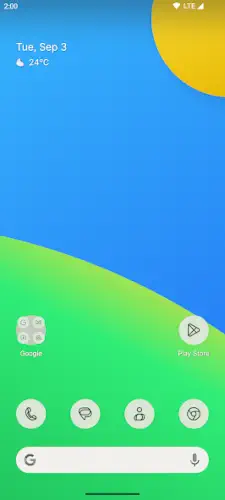
Lawnchair offer that clean Pixel Launcher experience on any Android phone, then adds the customization Google leaves out.

Lawnchair is developed by David Sn as a fork of Launcher3 from the Android Open Source Project, this free and open source launcher has been downloaded more than 1 million times on Google Play. It is still in beta as of 2026, with Lawnchair 15 Beta as the current development branch and it collects no data while showing no ads. The app is rated for ages 3 and up and weighs in at under 10 MB.
What Is Lawnchair?
Lawnchair is a free, open source Android home screen replacement that aims to deliver a Pixel-like experience with extra customization. It is built as a fork of Launcher3 from the Android Open Source Project, which means it starts from the same foundation Google uses for its own Pixel Launcher. From there, it adds features Google keeps locked away: deeper grid control, icon pack support, and more theme options.
The result is a launcher that feels instantly familiar to anyone who has used a Pixel phone, but gives you the levers to make it your own. You get the clean grid, the simple folders and the straightforward app drawer. You also get adjustable density, third party icon packs, and Material You theming that goes deeper than the stock experience. And unlike Nova Launcher, which now includes ads and tracking SDKs in its free version, Lawnchair remains completely free with no monetization attached.
Pixel Style Home Screen and App Drawer
The home screen replicates the Pixel Launcher look and behavior. Clean grid. Simple folders. A straightforward app drawer that opens with a swipe up. If you have used a Pixel phone, Lawnchair will feel immediately familiar. If you have not, it will feel like the version of Android you always wanted but never got from your manufacturer.
Lawnchair supports the Pixel style At a Glance widget and app suggestions. At a Glance shows calendar events, weather and other contextual info right on the home screen. App suggestions surface the apps you use most often at the top of the drawer. Both features make the launcher feel aware of your context without requiring you to configure anything. The Pixel feel is the point, and Lawnchair delivers it faithfully.
Material You and Customization
Material You support is where Lawnchair starts to pull ahead of the stock Pixel Launcher. Dynamic theming pulls colors from your wallpaper and applies them across the launcher, icons and widgets. On supported Android versions, this creates a cohesive look that feels designed rather than assembled.
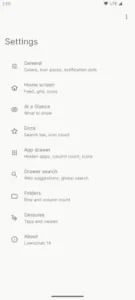
You can also manually adjust colors if the auto generated theme does not match your taste. Grid density is adjustable, so you can go from a spacious four column layout to a dense seven column dashboard. Icon size, dock height and folder shape are all configurable. Third party icon packs are supported and themed icons from Material You can be applied across all apps for a consistent look. The customization depth is not quite at Nova’s level, but it covers the essentials that most users actually want.
Beta Status and Variants
Lawnchair 15 Beta is the main development branch. Some features from the older Lawnchair Legacy have not been fully ported yet, and there are occasional bugs. The team plans a stable release once feature parity and quality targets are met. For users who want a more stable experience, Lawnchair Legacy is still available and rated around 4.0 stars on Play.
The companion app Lawnicons provides additional themed icons optimized for Lawnchair’s style. Installing it alongside Lawnchair gives you a wider selection of icons that match the Material You aesthetic. The developer states no data is collected or shared with third parties and the open source code on GitHub allows independent review of privacy and security practices.
Lawnchair Graphics and Design
Lawnchair uses a clean, stock Android aesthetic that closely mimics the Pixel Launcher’s simple grid, folders and app drawer. Material You theming extracts colors from your wallpaper for a cohesive look across the entire interface. Manual color tweaks let you fine tune the palette if the auto generated theme does not match your taste.
Icon and grid flexibility allow anything from a spacious, minimal layout to a dense, information rich home screen. There are no ads and no paywalls. Everything is free and open source. Visually, Lawnchair is best described as Pixel Launcher with more knobs. Same clean foundation, plus extra levers for icon packs, grids, and colors.
What Users Say About Lawnchair App
What Works
Users love getting the clean Pixel experience on non Pixel phones, plus the ability to hide the search bar, tweak grid density and use icon packs. Reviewers describe Lawnchair as fast, smooth, and lightweight, with quick app drawer opens, search and screen transitions even on older hardware. The lack of ads, in-app purchases and telemetry is a major plus. Many former Nova users find Lawnchair a comfortable jump: similar customization philosophy but with a cleaner, Pixel style base and no ads. One analysis cited a user satisfaction score of 4.7 out of 5 for reliability on aging devices, compared to Nova’s 4.1 in the same demographic.
Where The App Could Improve
Common criticisms include beta rough edges. Some features from Lawnchair Legacy are not fully ported and occasional bugs appear. Development moves slower than commercial launchers, so fixes after Android updates can take weeks. Lawnchair lacks some of Nova’s deepest customization options, like extremely granular gesture mapping and complex scrolling effects. Earlier versions had limited backup and restore, though recent builds improved this and added Nova backup import.
Check out Nova Launcher for deeper customization if you are willing to pay for Prime.
Lawnchair Tips
Beginner Advice
Start from a Pixel like baseline with default settings. When you first install Lawnchair, leave the defaults alone for a day or two. Use the launcher as it comes. Get a feel for the grid, the app drawer and the overall flow. The default configuration is already tuned for a clean Pixel style experience. Changing things before you understand the baseline makes it harder to know what actually improved.
Use icon packs plus themed icons for consistency. Install a quality icon pack from the Play Store, then enable themed icons in Lawnchair’s settings. This combination enforces a consistent look across all apps, even when the underlying icons come from different sources. A cohesive home screen looks intentional. A mismatched one looks accidental. Themed icons pull from Material You so everything matches your wallpaper palette.
Experiment with grid density to fit your screen. The default grid works for most phones, but your screen size and usage habits may call for something different. If you have a tall display and use many apps, increase the grid density. If you prefer a spacious, minimal look, decrease it. Adjust icon size and dock height to match. This is a five minute change that improves every interaction.
Enable optional gestures carefully and test them. Lawnchair offers optional gestures through the AccessibilityService and Device Administrator permissions. These are disabled by default. If you want double tap to lock or similar gestures, enable them and test them. If they interfere with your normal use or feel unreliable, turn them off. There is no penalty for leaving them disabled.
Import Nova backups if migrating from Nova. If you are coming from Nova Launcher, Lawnchair 15 Beta can import your Nova backup. That includes home and dock layout, widgets, folders and selected icon pack. It saves you from rebuilding everything by hand. Check the import option in Lawnchair’s backup and restore settings.
Follow beta updates for new features and fixes. Lawnchair is still in beta. New features and bug fixes arrive through regular updates. Check the changelog or follow the project on GitHub to see what is coming. Some updates add features you did not know you wanted. Others fix issues you have been living with. Staying current is part of using a beta launcher.
Pair with Lawnicons for additional themed icons. Lawnicons is a companion app by the same developer that provides additional themed icons optimized for Lawnchair. Install it alongside Lawnchair to expand your icon options. If you like a consistent, Material You styled look, Lawnicons fills in the gaps that other icon packs leave behind.
Adjust dock height and folder shape for comfort. The dock is the most frequently tapped part of the home screen. Adjust its height so it fits your thumb comfortably. Change the folder shape if the default does not match your aesthetic. These are small changes that make daily use feel better.
Review privacy settings to confirm no data collection. Lawnchair states that it does not collect or share data. The optional Accessibility and Device Administrator permissions are used only for specific system actions. Review these settings yourself to confirm they match your expectations. Open source code on GitHub allows independent verification if you want to go deeper.
Test after Android updates to catch regressions. Major Android updates sometimes break launcher features or reset permissions. After updating your phone, spend a few minutes using Lawnchair normally. Check that gestures still work, icons render correctly and the drawer opens without lag. Reporting regressions helps the development team fix them faster.
Advanced Strategy
Combine Material You colors with manual tweaks for a unique theme. Material You generates colors from your wallpaper, but the automatic palette does not always match what you want. Use the manual color options to fine tune specific elements. The combination of automatic and manual creates a theme that feels personal without requiring you to build everything from scratch.
Use QuickSwitch for enhanced multitasking gestures. QuickSwitch is a separate module that integrates Lawnchair with Android Recents for smoother multitasking transitions. If you use the recents screen often, QuickSwitch makes the experience feel more native and responsive. It is an optional layer that advanced users appreciate.
Create multiple backups for different layouts. Once you have a layout you like, back it up. If you experiment with a new design and do not like it, restoring the old one takes seconds. Consider keeping two or three backups for different contexts: a work layout, a travel layout, a minimal weekend layout. Switching between them is faster than rebuilding.
Test on older devices for performance boost. Lawnchair is lightweight and runs smoothly even on aging hardware. If you have an old phone that struggles with a heavier launcher, Lawnchair can make it feel new again. The Pixel style design uses fewer resources than feature heavy alternatives while still offering solid customization.
Share setups with the Lawnchair community for inspiration. The Lawnchair community on Reddit and other Android forums shares setups, icon pack recommendations and configuration tips. Seeing what others have built can inspire changes you would not have considered. The community is small but active and helpful.
Compare against Nova for feature gaps before committing. Lawnchair does not match Nova’s deepest customization options. If you rely on granular gesture mapping, complex scrolling effects or advanced notification badge configurations, check whether Lawnchair covers your needs before switching. For most users, the gap does not matter. For power users, it might.
Use search integration for apps and contacts. Lawnchair’s search bar finds apps and contacts locally on your device. It does not send queries to a server. Use it as your primary way to open apps rather than scrolling through the drawer. Typing a few letters is faster than hunting through pages.
Enable At a Glance widget for contextual info. The Pixel-style At a Glance widget shows calendar events, weather and other contextual information right on the home screen . It is a small addition that makes the launcher feel aware of your day without requiring you to open a separate app.
Track beta changelogs for upcoming features. Because Lawnchair is in active beta development, new features arrive regularly. Following the changelog helps you know what is coming and what has been fixed. It also gives you a sense of how quickly issues are being resolved.
Consider Lawnchair Legacy if beta issues affect daily use. Lawnchair Legacy is the older, more stable branch of the app. If the current beta has bugs that interfere with your daily routine, Legacy offers a more predictable experience. You lose some newer features but gain reliability. The choice depends on whether you value cutting edge development or day to day stability.
Lawnchair Similar Apps
| App | Best for | Key Difference |
|---|---|---|
| Lawnchair | Pixel look with extra customization, open source | Pixel style grid, Material You, icon packs. Fully free, no ads. Beta status. |
| Nova Launcher | Deep customization, former Nova users | Traditional grid, highly configurable. Free with ads or Prime subscription. More feature depth but ad-supported and privacy controversial. |
| Smart Launcher 6 | Automated organization plus customization | Auto sorts apps into categories. Strong customization, less classic Pixel feel. |
| Niagara Launcher | Minimalism with one handed ergonomics | Vertical list plus wave alphabet. Ad-free. Different interaction model than Lawnchair. |
| Microsoft Launcher | Productivity and Microsoft ecosystem | Strong Microsoft 365 integration. Less granular visual control than Lawnchair. |
Lawnchair is the best free, open source Pixel style launcher for users who want the stock Android aesthetic with more control and no ads. Nova offers deeper customization but now carries ads and tracking concerns. Smart Launcher handles organization automatically. Niagara changes the interaction model entirely. Microsoft Launcher leans into productivity integration. Each solves a different problem. Lawnchair solves the problem of wanting a clean Pixel experience without buying a Pixel phone.
Who Is Lawnchair For?
Lawnchair is for users who want the Pixel look on non Pixel phones. If you have admired the clean, minimal Pixel Launcher from a distance but own a Samsung, Xiaomi or OnePlus device, Lawnchair brings that experience to your phone. The grid, the drawer, the At a Glance widget, the app suggestions. It all feels like stock Android, even when your device shipped with a manufacturer skin.
Privacy conscious users who prefer open source apps will appreciate Lawnchair’s approach. The developer states no data is collected or shared with third parties. The code is available on GitHub for independent review. There are no ads and no tracking SDKs. For users tired of apps that monetize their attention and data, Lawnchair is a clean alternative.
Nova migrants seeking an ad-free alternative will find Lawnchair a comfortable landing spot. The customization philosophy is similar, just less extreme. The Nova backup import makes the transition easy. And the absence of ads means you get a cleaner experience without paying a subscription. If you left Nova because of the 2026 changes, Lawnchair is worth a look.
Users who value simplicity over extreme customization will feel at home with Lawnchair. It offers enough control to feel personal without overwhelming you with options. If Nova’s hundreds of settings felt excessive, Lawnchair’s more focused approach will feel right.
If you want a clean, fast, privacy friendly launcher with a Pixel foundation, Lawnchair is worth trying.
Conclusion
Lawnchair delivers a Pixel style Android launcher experience that stands out for its clean design, meaningful customization and complete absence of ads or data collection. The home screen feels instantly familiar to Pixel users. The Material You theming creates a cohesive look. The grid and icon options give you enough control without overwhelming. The Nova backup import makes migration easy. And the open source nature means you can verify exactly what the app does.
The app has limitations. It is still in beta, which means occasional bugs and missing features from Legacy. Development moves at a community pace, not a commercial one. It does not match Nova’s deepest customization options. Backup and restore, while improved, is not as mature as some alternatives.
For users willing to accept beta status and a simpler customization scope, Lawnchair offers a compelling launcher experience. It does not try to be the most feature rich launcher or the most radically minimal. It tries to deliver the Pixel experience with a few extra knobs and no strings attached. And for a specific kind of user, that is exactly what they want.
If you want a clean, fast, ad-free Pixel style launcher, Lawnchair is worth downloading. Pixel Launcher, but with more knobs. And no ads. And no tracking. That is Lawnchair.
FAQ
How do I download Lawnchair and is it really free?
Lawnchair is completely free to download and use from the Official Google Play Store. The app has been downloaded more than 1 million times and is rated for ages 3 and up. There are no ads, no in-app purchases, and no premium tier. The entire app is free and open source, licensed under GPLv3. If you prefer to download directly from the source, the APK and source code are available through the official Lawnchair GitHub repository. The launcher weighs under 10 MB, making it accessible even on older or low storage devices.
What if I encounter a problem or need support?
For technical issues, bug reports, or feature requests, open an issue on the GitHub repository. The developer email: support[at]lawnchair.app for direct support inquiries is available through the GitHub profile and the Play Store listing. Since Lawnchair is community driven, support comes from contributors and other users rather than a dedicated support team. The Lawnchair Reddit and Discord server are good places to ask questions and compare notes with other users. Response times vary based on contributor availability.
What is the difference between Lawnchair and Lawnchair Legacy?
Lawnchair 15 Beta is the main development branch with the latest features, including Nova Launcher backup import, improved Material You theming, and newer customization options. It is still in beta, which means occasional bugs and missing features from older versions. Lawnchair Legacy is the older, more stable branch that some users still prefer for day to day reliability. Legacy is rated around 4.0 stars on Play. If you want the newest features and can tolerate beta quirks, use the main Lawnchair. If you want a stable experience without surprises, use Legacy.
Can I import my Nova Launcher setup into Lawnchair?
Yes. Lawnchair 15 Beta can import Nova Launcher backups. When you switch to Lawnchair, you can restore your home and dock layout, widgets, folders and selected icon pack from a Nova backup file. This makes migration from Nova quick and painless. The import feature is part of the improved backup and restore system in recent Lawnchair versions. If you are leaving Nova because of the 2026 ads and tracking changes, this import makes the transition much easier. You do not have to rebuild your home screen from scratch.