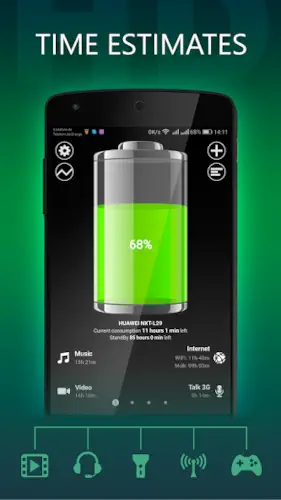
Battery HD gives you specific numbers on how long will that last? An hour of video? Three hours of music? Thirty minutes of GPS?
Battery HD gives you specific numbers for different activities. Music. Video. Browsing. Games. GPS. It answers the question you actually have.
What is Battery HD?
You are looking at a battery monitoring app from smallte.ch for phones and tablets that shows estimated usage time, charging time, battery health, and useful alerts in a simple, customizable interface.
Battery HD is designed to answer the everyday question: How much battery time do I have left? It estimates runtime for activities like music, video, web browsing, standby, GPS navigation, games, reading, and more. The app also supports calibration for better accuracy on your specific device and can show battery information in widgets or the notification bar.
Battery HD holds a 4.6 star rating from more than 538,000 reviews. The app size is roughly 5 MB. The age rating is Everyone. The app is free without locked features.
A battery monitoring app that shows estimated usage time, charging time, and battery health
The category matters here. Battery HD is not a game. It is not a social app. It is a utility tool. It shows you how long your battery will last for different activities. It estimates charging time. It monitors battery health. The information is presented clearly.
Who this app was built for
Users who want to know how much battery time they have left for different activities
The default battery screen shows one estimate. Battery HD shows estimates for multiple activities. You see how long you can watch video. How long you can play games. How long you can browse the web. The information helps you plan.
People who want charging time estimates and percentage alerts
How long until your battery is full? Battery HD estimates charging time. You can also set alerts for specific percentages. The alerts notify you when the battery reaches your preferred level.
Android users who prefer widgets and notification bar battery displays
Battery HD app has widgets. You can put battery status on your home screen. You can also see battery information in the notification bar. The information is always visible.
Anyone who wants simple, customizable battery information without clutter
The app is simple. No complex menus. No overwhelming data. Just the information you need. The interface is clean and customizable.
Battery HD Main Features
Estimated battery time for music, video, calls, browsing, games, reading, GPS, chat, and camera use
This is the headline feature. Battery HD estimates how long your battery will last for each activity. Music. Video. Phone calls. Web browsing. Games. Reading. GPS navigation. Chat apps. Camera use. The estimates are based on your device’s power consumption.
Charging time estimates and alerts when the battery reaches a specific percentage
The app estimates how long until your battery is fully charged. You can set alerts for specific percentages. The alerts notify you when the battery reaches 80 percent, 90 percent, or any level you choose.
Custom calibration for device specific accuracy
Battery HD app can calibrate to your specific device. The calibration improves accuracy. The estimates become more reliable over time.
Widgets and notification bar battery display
The app has widgets. You can put battery status on your home screen. You can also enable notification bar display. The information is always visible.
Charge and discharge alerts with sound or visual notifications
You can set alerts for charging and discharging. The alerts can be sound or visual. You know when the battery reaches a certain level without checking the phone.
Technical battery details such as type, temperature, and time since last charge
The app shows technical details. Battery type. Temperature. Time since last charge. The information is useful for monitoring battery health.
Customization options for colors and widget layouts
You can customize the app’s appearance. Change the battery color. Choose different widget layouts. The customization makes the app feel personal.
Free availability without locked features
Battery HD app is completely free. No locked features. No in app purchases. All features are available to all users.
Battery HD interface and design
Straightforward, information first interface
The app looks simple. No flashy graphics. No unnecessary decoration. Just the information you need.
Simple rather than flashy, helps users quickly check battery estimates and technical data
You open the app. You see the estimates. You see the technical details. The information is clear and easy to read.
Visual customization such as battery color options and different widget styles
You can change the battery color. You can choose different widget styles. The customization does not add complexity.
Where the design works well
The app is fast. It opens quickly. The information is clear. The design does not get in the way.
Where usefulness depends on device calibration and user engagement
The estimates are only as accurate as the calibration. Calibrate your device for best results. The app works better when you engage with it.
What users actually say about the Battery HD app
The parts people enjoy
Positive reviews often mention the activity estimates. The charging time estimates are praised. The widgets are called convenient.
One user wrote: “Finally know how long my battery lasts for different things. Widget is great.”
The parts people complain about
No utility app escapes criticism. Here is what comes up most often.
Usefulness depends on device calibration and how closely you track battery behavior
Battery HD app estimates are not perfect. Calibration improves accuracy. The app is most useful for users who track their battery behavior.
Accuracy improves after calibration but varies by device
Different devices have different power consumption. The estimates vary. Calibration helps but does not guarantee perfect accuracy.
Some users may prefer more detailed analytics
Battery HD is simple. Some users want more detailed analytics. Other apps offer more data. Battery HD focuses on essential information.
Limited advanced features compared to other battery apps
Battery HD does not have advanced features like wakelock tracking or app specific drain analysis. The app is for basic battery monitoring.
How the Battery HD app mechanics work
Open the app to view estimates for different activities
Open Battery HD. You see estimates for music, video, browsing, games, and more. The information is displayed clearly.
Calibrate for device specific accuracy
Run the calibration process. The app learns your device’s power consumption. The estimates improve over time.
Set alerts and widgets for ongoing monitoring
Set alerts for specific battery levels. Add a widget to your home screen. The monitoring continues even when the app is closed.
Core loop: monitor, customize, and receive notifications
Check the estimates. Customize the appearance. Receive notifications. The loop is simple and effective.
Technical details screen shows temperature and health information
The technical screen shows battery temperature. It shows battery type. It shows health status. The information is useful for diagnosing issues.
Recalibrate after major device or battery changes
Calibration is not one time. Recalibrate after major changes. New battery. New device. Major OS update. The recalibration maintains accuracy.
Looking for another battery monitor app with detailed activity estimates and widget support? Check out AccuBattery, a popular alternative that focuses on battery health and charging speed.
Battery HD Tips
You can install Battery HD app and see your first activity estimates in minutes. Getting accurate, useful estimates takes a little setup. These tips help you get the most out of the app.
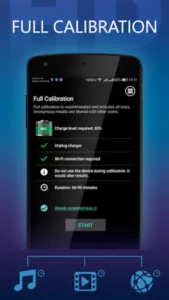
Run the calibration process on your device to improve estimate accuracy
Here is a question. Why do the estimates in Battery HD seem off at first? Because the app does not know your device yet.
Battery HD tips from experienced users all say the same thing. Run the calibration process. The app learns your device’s power consumption. The estimates improve significantly after calibration. A player who calibrates gets reliable numbers. A player who skips calibration gets guesses.
Use the widget or notification bar for at a glance battery monitoring
Battery HD app has widgets. You can put battery status on your home screen. You can also enable notification bar display.
A player who uses widgets checks battery status quickly. A player who opens the app every time spends more effort. Widgets make monitoring easier.
Set charge alerts so you know when the battery reaches your preferred level
You can set alerts for specific battery percentages. The app notifies you when the battery reaches your chosen level.
Set an alert for 80 percent. Unplug when you hear the alert. A player who uses alerts avoids overcharging. A player who ignores alerts charges past the optimal level.
Compare different usage categories, such as video, music, and browsing, to understand what drains your battery most
Battery HD similar apps show one estimate. This app shows multiple estimates.
Compare video time to music time. Compare browsing time to game time. A player who compares categories understands their usage patterns. A player who ignores the differences misses the context.
Check the technical details screen for battery temperature and health related information
The technical screen shows battery temperature. It shows health status. It shows voltage.
High temperature indicates a problem. Low health indicates degradation. A player who checks the technical screen catches issues early. A player who ignores it misses warning signs.
Customize widget size and orientation to match your home screen
Battery HD app has customizable widgets. Change the size. Change the orientation.
A player who customizes widgets fits them perfectly on their home screen. A player who uses default widgets may find them too large or too small. Customization improves the experience.
Use sound alerts if you want a more noticeable charge notification
You can set sound alerts for charging and discharging. The sound notifies you even when the phone is in your pocket.
A player who uses sound alerts never misses a notification. A player who relies on visual alerts must check the screen. Sound alerts are more reliable.
Recalibrate after major device or battery changes for better long term accuracy
Calibration is not one time. Recalibrate after major changes.
New battery. New device. Major OS update. A player who recalibrates maintains accuracy. A player who does not recalibrate gets less reliable estimates over time.
Apps similar to Battery HD
If you like Battery HD, here are other utility apps worth your time. Each offers something similar with a different twist.
AccuBattery
AccuBattery focuses on battery health and charging speed. It measures real capacity and tracks wear. The difference is that AccuBattery does not have activity specific estimates. Good for users who want health tracking with more detailed analytics.
GSam Battery Monitor
GSam Battery Monitor shows detailed usage statistics. It tracks app drain, wakelocks, and CPU usage. The difference is that GSam does not have activity estimates or widgets. Good for users who want deep drain analysis rather than activity predictions.
Greenify
Greenify hibernates background apps to save battery. It stops apps from running when not in use. The difference is that Greenify does not show activity estimates or charging time. Good for users who want to actively manage battery drain rather than just monitor it.
Other battery monitoring and optimization tools
Other apps like Battery Life and Battery Guru provide similar information. Some focus on remaining time. Others focus on health. The difference is in the presentation and features. Good for users who want a different interface or additional metrics.
Battery HD Community
Community value comes from user shared calibration results, support information, and review feedback
The community exists outside the app. Users share calibration tips on forums. They post reviews. They discuss accuracy. The shared knowledge is valuable.
Users share calibration tips and battery insights on forums
Reddit and XDA have active discussions. Users compare calibration results. They share battery insights. The discussions are helpful.
Conclusion
Battery HD works for three types of people. First, users who want to know how much battery time they have left for different activities like music, video, browsing, and games. Second, people who want charging time estimates and percentage alerts to avoid overcharging. Third, Android users who prefer widgets and notification bar battery displays for quick access.
Usefulness depends on device calibration and how closely you track battery behavior. Accuracy improves after calibration but varies by device. Some users may prefer more detailed analytics. Limited advanced features compared to other battery apps.
Do you want to know exactly how long your battery will last for different activities, or is the default battery estimate enough for you?
If the first one, Battery HD gives you the detailed estimates you need to plan your day. If the second one, you probably do not need this app. Both answers are fine. Just know what you want.
Frequently asked questions about Battery HD
How do I get Battery HD download on my phone?
Go to the Google Play Store if you use Android. Search for Battery HD. The developer is smallte.ch. Tap install or use the direct link to download Battery HD from the Official Google Play Store
Is Battery HD free to use, or do I need to pay?
The app is completely free. All features are available without paying. There are no locked features. The app contains non intrusive ads, but the core functionality including widgets, alerts, and calibration tests are all free .
Where can I find the official website and help documentation?
The developer can be reached directly at support[at]smallte.ch for support questions or at the Official Battery HD website.
I have a problem with the app. Who do I contact?
Send an email to support[at]smallte.ch. The developer responds to user questions and issues. Include your device model, Android version, and a description of the problem for faster assistance .
Does Battery HD actually save battery or just monitor it?
Battery HD is a monitoring app. It does not save battery directly. It shows you estimates for different activities, charging time, and technical battery details. The information helps you make smarter decisions about usage. If you want to actively save battery, consider pairing it with optimization apps like Greenify. But for knowing exactly how long your battery will last for music, video, games, browsing, and other activities, Battery HD is the app to use.