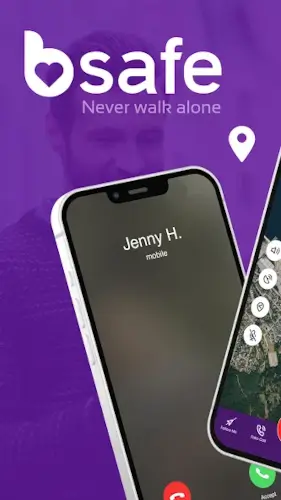
bSafe is a personal safety app that connects you to a trusted network of guardians who can see your location, hear what is happening and receive recorded evidence if you trigger an SOS alert.
Developed by Mobile Software AS after founder Charlen experienced a s assault, bSafe app has been downloaded over 1 million times and covered by major outlets like ABC, CNN, and BBC. It is free to download with a premium subscription for advanced features and it works on both Android and iOS.
What Is bSafe?
bSafe is a personal safety app designed to help users deter, document and respond to potentially dangerous situations while walking, traveling or going about daily life. The app was created after a real incident. Charlen, the founder, was s assaulted and she and her father built bSafe to give people a way to stay connected to trusted contacts when they feel unsafe.
The core idea is simple. You build a network of guardians, usually friends or family. When you feel at risk, you can trigger an SOS alert, share your live location or start a Follow Me session so someone always knows where you are. If something happens, the app captures live audio and video as evidence and sends it to your guardians. It is a safety net built on real time visibility.
SOS Alerts and Voice Activation
You can trigger an SOS alert two ways. The first is an in-app button. The second is a custom voice phrase you set yourself. The voice activation matters because it works even when your phone is in a pocket or bag. You do not need to fumble for your device in a stressful moment. You just say the phrase, and the alert fires.
When the SOS is triggered, the app sends an alarm to your designated guardians with your live GPS location. From that moment, they can see where you are and what is happening. The immediacy is the point. There is no delay, no confirmation screen, no additional steps. The alert goes out the moment you need it.
Live Streaming and Automatic Recording
Upon SOS activation, bSafe starts live audio and video streaming to your guardians. They can see and hear what is happening in real time. The app also automatically records audio and video and sends the files to your guardians as evidence. This is not just about getting help. It is about documentation.
For anyone who has been in a situation where they needed proof of what happened, this feature has real value. The recording starts automatically when the SOS is triggered, so you do not have to remember to open a recording app in the middle of a crisis. The evidence is captured and preserved without you having to think about it.
Free vs Premium
The free tier gives you basic SOS alerts, location sharing and a limited number of guardians. It is ad-supported and many features are locked or restricted. The premium subscription unlocks the full feature set: live streaming, automatic recording, unlimited guardians, extended background tracking and other advanced tools.
Pricing varies by region and store, but commonly cited rates are around $0.49 per week, $4.99 per month, or $19.99 to $49.99 per year. There is also a 24 hour on-demand option for around $0.99, which gives you full premium access for a day. That option is useful if you are traveling or going out somewhere unfamiliar and want extra protection without committing to a subscription.
bSafe Core Features
bSafe is built around one idea: if something happens to you, the people who care about you should know immediately and be able to see what is going on. Everything else in the app supports that idea. Here is what actually matters and why each feature exists the way it does.
SOS Alarm (Manual and Voice Activation)
You can trigger an SOS alert two ways. The first is the obvious one: open the app and press the button. The second is the one that actually matters in a dangerous situation: a custom voice phrase you set yourself . You say the phrase and the alert fires even if your phone is in your pocket or buried in your bag.
That second option is not a gimmick. In a real emergency, you do not always have time to pull out your phone, unlock it, open an app and press a button. Sometimes you cannot reach for your phone at all. Voice activation removes every one of those steps. You say the words, and the alert goes out with your live GPS location attached. Your guardians see where you are and that something is wrong, without you having to do anything else.
Live Streaming and Automatic Recording
When an SOS is triggered, bSafe does two things at once. It starts live audio and video streaming to your guardians so they can see and hear what is happening in real time. It also automatically records audio and video and sends the files to your guardians as evidence . Both happen without you having to remember to do anything.
Why does this matter? Because most safety tools stop at “help is coming.” bSafe goes a step further and captures what actually happened. If you are in a situation where you need documentation later, whether for a police report, a workplace incident or a legal case, the recording exists. The app did not just call for help. It preserved proof.
Follow Me (Live GPS Tracking)
Follow Me is the feature you will use more often than SOS. Before you leave your house or office, you start a session. Your guardians receive a link and can watch your live location on a map as you move. When you arrive safely, the app sends a confirmation message so they know you made it.
This is not a panic button. It is a peace of mind tool. If you walk home from the train station at night, your partner or a friend can see that you are on your way. If you stop moving for too long or go off-route, they notice. The value is not in the alert. The value is in the quiet visibility that lets you feel watched over without being watched constantly.
Fake Call
The Fake Call feature triggers a fake incoming call on your phone. The call looks and sounds real. You answer it, pretend to talk and use the conversation as a reason to leave an uncomfortable situation.
This is the everyday tool. You use it at a bar when someone will not take no for an answer. You use it on public transit when a conversation is going somewhere you do not want it to go. You use it in a meeting or a social situation where you need an exit and do not want to explain yourself. It is not an emergency feature. It is a social exit strategy that works.
Guardians Network
The guardian network is the backbone of the entire app. You invite friends and family to become your guardians. Once they accept, they receive your SOS alerts, your live streams, your recorded evidence and your location updates. When you trigger something, they know immediately.
You can have multiple guardians, which matters because no single person is available at all hours. One guardian might be asleep, at work, or in a meeting. Another might be free. The premium tier removes limits on how many guardians you can add. But even the free tier gives you enough to build a basic safety net.
Privacy and Data Safety
This is where bSafe requires honesty from both the developer and the user. The app may share your location, personal information and contacts with third parties. Data is encrypted in transit and you can request deletion. But the app inherently collects sensitive data every time you use it, because it uses your microphone, camera and continuous location to function.
That trade-off is real. You are giving bSafe a lot of access in exchange for a safety net. The question is whether you trust that access. The developer states that data is encrypted and deletion is available. But if you are not comfortable with an app having access to your microphone, camera and location, bSafe is not for you. If you are comfortable with that trade-off, the app delivers genuine value.
bSafe Graphics and Design
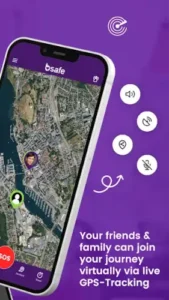
bSafe uses a clean, approachable interface with clear buttons for SOS, Follow Me and Fake Call. The design prioritizes quick access to safety features over visual flair. Map centric screens show your live location and route during Follow Me sessions. Status indicators for SOS, recording and streaming are prominently displayed during active sessions.
The free version includes banner and video ads, which some users find intrusive, especially in a safety app where speed matters. There are no game like graphics, themes or decorative elements. The design is simple and utilitarian, built for fast, stress free access to emergency tools.
What Users Say About bSafe App
What Works
Users and reviewers praise the concept of voice activated SOS, live streaming, and automatic recording as genuinely useful for personal safety. People report feeling safer walking home alone, running in unfamiliar areas or traveling in new cities when guardians can follow their location in real time. The Fake Call feature receives positive feedback for everyday usefulness in defusing uncomfortable situations.
Where The App Could Improve
Common criticisms include reliability and bugs. Numerous users report crashes, GPS lag, delayed or inaccurate location and guardians not receiving alerts reliably. Some say the app works only a fraction of the time, which is a serious concern for a safety tool. Many reviews complain that essential features are locked behind a subscription, making the free version feel almost useless. Users express discomfort with the app’s broad access to microphone, camera and location, and uncertainty about whether recording continues after sessions end. There are also reports of difficulty canceling subscriptions, login problems and significant battery drain.
Check out Dead Man’s Switch for a free motion based safety net.
bSafe Tips For Getting Started
Beginner Advice
Test before relying on it with a trusted guardian. This is the most important step. Do not install bSafe and assume it will work when you need it. Run controlled tests with someone you trust. Trigger an SOS while they are watching. Start a Follow Me session during a short walk. Check whether the alert arrived, whether the location was accurate, and whether the live stream connected. A safety app that fails silently is worse than no safety app at all.
Configure voice activation carefully with an easy phrase. Your voice activation phrase needs to be something you can say clearly under stress. Short, distinct, and unlikely to be triggered by normal conversation. Test it in a quiet room and on a noisy street. If it fires accidentally during a normal chat, pick a different phrase. If it does not fire when you say it, adjust the sensitivity or move the phone closer to your mouth.
Manage permissions and review what data is shared. bSafe needs location, microphone, camera and contacts to function. Go into your phone’s settings and review exactly what is enabled. Decide whether you want background location access or only while using the app. Check the in-app privacy settings to see what data is shared with third parties. You can request deletion of your data if you decide to stop using the app.
Use on-demand premium for high risk situations. You do not need a full subscription to get value from bSafe. The 24 hour on-demand option gives you full premium access for around $0.99. Use it when you are traveling to an unfamiliar city, attending an event or going out late. You get the full feature set for the exact night you need it without committing to a monthly or yearly plan.
Combine with other safety measures. bSafe is one layer. It is not a complete safety plan. Use it alongside regular check-ins with friends, location sharing through messaging apps, and basic situational awareness. Do not treat the app as a guaranteed shield. Treat it as one tool among several.
Watch battery usage and carry a power bank. Continuous GPS tracking and live streaming drain battery quickly. If you are planning a long night out or a full day of travel, carry a power bank. Close other heavy apps to reduce overall drain. A dead phone is a disconnected safety net.
Have a backup plan in case the app fails. bSafe has documented reliability issues. Some users report alerts not arriving, GPS lag or crashes. Before you go out, know what you will do if the app does not work. Have a direct line to a trusted contact. Know how to call local emergency services. The backup plan is not pessimism. It is preparation.
Understand what the free tier actually offers. The free version gives you basic SOS alerts and location sharing, but it is ad-supported and many features are locked. Before you rely on it, check exactly which features work without paying. If the free tier does not cover your needs, decide whether the premium cost is worth it.
Set up multiple guardians for redundancy. Do not rely on one person. Set up at least two or three guardians. If one is asleep, at work or has their phone off, another can respond. Redundancy matters when the alert matters.
Review privacy settings before enabling microphone and camera. bSafe uses your microphone and camera during SOS events. That is necessary for the app to function. But you should understand exactly when those sensors are active and what happens to the data. Check the privacy policy. Check the app’s data safety section on the Play Store. Know what you are agreeing to before you enable the features.
Advanced Strategy
Use Follow Me for regular commutes to build guardian confidence. If you walk the same route home every night, start a Follow Me session before you leave and end it when you arrive. After a few weeks, your guardians know your routine and can spot when something is wrong. The repeated use also tests the app’s reliability without putting you in actual danger.
Trigger fake calls strategically in uncomfortable situations. The fake call feature is genuinely useful. But use it deliberately. If someone is making you uncomfortable at a bar or on public transit, triggering a fake call gives you a natural exit. You can pretend to have an urgent conversation and walk away. Practice the feature once so you know how it works before you need it.
Test SOS in different environments to ensure reliability. The app may behave differently on a quiet street, in a crowded mall or inside a building. Test the SOS in multiple locations. Check whether the GPS locks accurately, whether the stream connects and whether guardians receive the alert. If something fails in one environment, you know to avoid relying on it there.
Combine with location sharing apps for layered safety. bSafe sends your location to guardians during active sessions. Apps like Google Maps location sharing or Life360 provide continuous location sharing that runs in the background. Together, they cover both active emergencies and passive visibility. The guardian always knows roughly where you are, and bSafe handles the emergency escalation.
Use on-demand premium when traveling or attending events. The 24 hour premium option is designed for exactly this. Concerts, festivals, late night events and trips to unfamiliar cities are higher risk situations. Pay the small fee, get the full feature set and let it expire when you are back to your normal routine.
Monitor battery usage and optimize background settings. Check your phone’s battery settings periodically to see how much power bSafe is consuming. If it is excessive, adjust the background location settings or disable features you are not actively using. The app is worth the battery cost, but there is no reason to accept more drain than necessary.
Share feedback with the developer for improvements. bSafe has a history of reliability complaints. The developer has been responsive in some cases. If you find a bug or have a feature idea, share it. The app improves when users report what is not working.
Pair with Dead Man’s Switch for motion-based safety. bSafe handles the panic button scenario. Dead Man’s Switch handles the scenario where you become incapacitated and cannot press anything. Together they cover both active emergencies and passive detection. bSafe responds when you trigger it. Dead Man’s Switch responds when you cannot.
Keep local emergency numbers readily accessible. bSafe is a tool for contacting your guardians. It is not a direct line to 911 or local emergency services. Keep those numbers saved in your phone and accessible without unlocking the device. The app is a complement to emergency services, not a replacement.
Review recorded evidence with guardians after a test. After running a test SOS, review the recorded audio and video with your guardian. Check the quality. Check whether the files actually arrived. Understand what the evidence looks like. If the quality is poor or the files did not send, you need to know before a real emergency.
bSafe Similar Apps
| App | Best for | Key Difference |
|---|---|---|
| bSafe | Personal safety with SOS, live streaming and recording | Guardian network, voice activation, automatic evidence capture. Freemium with heavy paywall. |
| Noonlight | One tap emergency dispatch to professionals | Direct connection to emergency responders. Less focus on guardian networks. |
| Snug Safety | Daily check-ins for people living alone or traveling | Scheduled check-ins with alerts if you miss them. Focused on routine, not panic button emergencies. |
| Dead Man’s Switch (Kleeschulte) | Motion based safety net | Monitors movement and alerts contacts if you stop moving. Free, no subscription. |
| Google Personal Safety (Pixel) | Integrated safety tools on Pixel phones | Emergency SOS, car crash detection, location sharing. Built into the OS, Pixel only. |
bSafe is the most feature rich option for guardian network safety. If you want direct emergency dispatch, Noonlight is the better fit. If you want passive motion monitoring, Dead Man’s Switch is simpler and free. If you want scheduled check-ins, Snug Safety covers that. Each tool solves a slightly different problem.
Who Is bSafe For?
bSafe is for solo travelers and people who walk alone at night. If you regularly find yourself in situations where you feel vulnerable, the guardian network gives you a layer of visibility that a phone call or text message cannot match. Your guardians see your live location, hear what is happening, and receive recorded evidence if something goes wrong.
Students and young adults in unfamiliar cities will find bSafe useful. College campuses, new neighborhoods and late night commutes all carry some risk. Having a friend follow your location on a map is a small thing that provides real peace of mind. The Fake Call feature is especially useful for getting out of uncomfortable social situations.
Anyone who wants a guardian network for peace of mind will appreciate bSafe’s core concept. The app is built around the idea that safety is a shared responsibility. Your guardians are part of your safety plan. The app connects you to them in real time.
People willing to test and understand the app’s limitations will get the most value from bSafe. The app has reliability issues. It has a paywall. It has privacy trade-offs. If you go in with clear expectations and test it thoroughly, it can be a useful tool. If you expect it to work perfectly out of the box, you will be disappointed.
If you want a safety app that connects you to trusted contacts in real time, bSafe is worth trying.
Conclusion
bSafe delivers a feature rich personal safety experience built around SOS alerts, guardian networks, and evidence capture. The voice activation works when your phone is in your pocket. The live streaming gives guardians real time visibility. The automatic recording captures evidence. The Fake Call feature handles everyday uncomfortable situations.
The app has serious limitations. Reliability issues are widely reported. Core features are locked behind a subscription. Privacy concerns around microphone and camera access are valid. Billing and account problems frustrate users. Battery drain is significant. Android ratings are low for a reason.
For users willing to test the app thoroughly, understand its limits and possibly pair it with other safety measures, bSafe offers meaningful protection. It does not try to be a complete safety solution. It tries to connect you to people who care about you when something goes wrong. And when it works, that connection matters.
If you want a safety app with a guardian network and evidence capture, bSafe is worth downloading. Just test it first.
Safety is not a feature. It is a plan. bSafe is one piece of it.
FAQ
How do I download bSafe and is it really free?
bSafe is free to download from the Official Google Play Store. The free tier includes basic SOS alerts, location sharing and a limited guardian network, but it is ad-supported and many features are locked behind a subscription. The premium upgrade runs around $0.49 per week, $4.99 per month or $19.99 to $49.99 per year depending on your region. There is also a 24 hour on-demand option for about $0.99 that gives you full premium access for a single day, which is useful for travel or nights out without committing to a monthly plan.
What if I encounter a problem or need support?
For technical issues, billing problems, or account questions, contact bSafe support directly at support[at]getbsafe.com. The company has been responsive to some enterprise and team users, though consumer support experiences vary. If you have trouble canceling a subscription, contact support through the app or the website rather than trying to cancel through the app store, since some users report difficulty with the standard cancellation flow.
What is the difference between the free and premium versions of bSafe?
The free version gives you basic SOS alerts, location sharing and a limited number of guardians. It is ad-supported and does not include the features that make bSafe stand out. The premium version unlocks live audio and video streaming, automatic recording of evidence, unlimited guardians, extended background tracking and other advanced tools. The free tier is enough to test the app and understand how it works. The premium tier is what you actually want if you plan to rely on bSafe in real situations.
Can I use bSafe without a subscription for occasional high risk situations?
Yes. The 24 hour on-demand option gives you full premium access for a single day at around $0.99. You do not need a monthly or yearly subscription to get the full feature set. If you are traveling to an unfamiliar city, attending a late night event or going out somewhere you feel less safe, the on-demand option covers that specific window. When the 24 hours expire, you revert to the free tier. This is the most cost-effective way to use bSafe if you only need premium features occasionally.