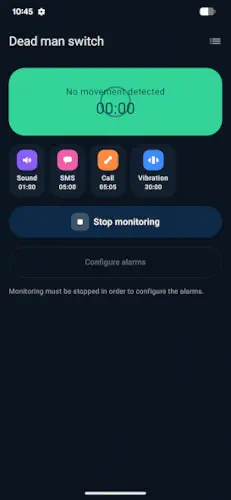
Dead Man’s Switch is a safety app that automatically raises an alarm if your phone stops moving for a period you set.
Dead Man’s Switch is developed by Johannes Kleeschulte, this motion based safety net has earned a 4.4 star rating and has been downloaded more than 10,000 times on Google Play. The app is rated for ages 3 and up, requires no account and contains no ads, no in-app purchases and no subscriptions.
What Is Dead Man’s Switch?
Dead Man’s Switch is a free, ad-free Android safety app that automatically raises an alarm if your phone stays still for a period you set. It uses the phone’s motion sensor to detect whether you are still moving. If the phone remains still for too long, alarms begin to fire in sequence. Those alarms can include a loud sound, strong vibration, an automatic phone call with speakerphone enabled and an SMS with your GPS location sent to up to three contacts.
The app is built for people who might not be able to call for help themselves. Lone workers. People living alone. Outdoor enthusiasts. Anyone with a health condition that could leave them incapacitated. The concept is simple: if you stop moving, someone should know.
Motion Based Monitoring
The app continuously monitors your phone’s movement through its motion sensor. You set a no-movement interval. If the phone stays still for that entire window, the alarm sequence begins. Any detected movement resets the timer and cancels any pending alarms. The system assumes that movement means you are okay.
You can also adjust how sensitive the motion detection is. This matters because some phones move subtly when you are sitting still and some people are simply more stationary than others. Tuning the sensitivity reduces false alarms while still catching real emergencies.
Four Alarm Types
Dead Man’s Switch offers four alarm types that can be configured and combined based on your needs. Sound plays a loud warning tone. Vibration triggers a strong vibration alert. Call automatically dials a saved number and enables speakerphone. SMS sends a custom text to up to three numbers with a Google Maps link to your current GPS location.
Each alarm can have its own no-movement duration. You might set the sound to fire after 30 minutes of stillness and the SMS to fire after 60 minutes. The escalation lets you start with gentle warnings and build to full emergency alerts. That customization matters when you are trying to balance catching real emergencies against annoying false alarms.
Free and Ad-Free
Dead Man’s Switch is 100% free. There are no ads, no in-app purchases and no subscriptions. It is built for personal safety, not enterprise. The developer states the app does not collect data, but it may share location and messages as part of its function since sending SMS with GPS links requires passing that information to your chosen contacts. Data is encrypted in transit.
That trade-off is worth understanding. The app needs to share your location with your emergency contacts to function. It does not collect that data for itself. The distinction matters for users who are privacy conscious but still want the safety net.
Dead Man’s Switch Graphics and Design
Dead Man’s Switch uses a simple, utilitarian UI for configuring alarms, timers, sensitivity and contacts. The emphasis is on clarity and speed of setup rather than visual polish. A recent redesign in September 2026 introduced a new app icon and refreshed look, along with an improved activity log with tappable location links.
There are minimal animations. No themes, no icon packs, no decorative elements. The design is straightforward and no-nonsense, matching its role as an emergency safety net. When you need to set up an emergency alert system, you want it fast and clear. The interface respects that.
Dead Man’s Switch Core Features
Dead Man’s Switch is not packed with features. It does not try to be a Swiss Army knife of personal safety. It does one thing and it does that thing in layers so you can tune it to your actual risk. Here is what actually matters and why each piece earns its place.
Motion Monitoring
The app continuously reads your phone’s motion sensor. You set a no-movement interval. If the phone stays still for that entire window, the alarm sequence begins. Any detected movement resets the timer and cancels any pending alarms.
The logic is simple, but the implications are not. This is the difference between an app that asks you to check in and an app that watches whether you are still physically present in your own life. There is no button to press. There is no reminder to dismiss. The phone simply notices whether you are moving, and if you are not, it acts. That passivity is the entire point. You do not have to remember to use it. It just runs.
Four Alarm Types (Configurable and Combinable)
When stillness is detected for too long, the app escalates through four alarm types. Sound plays a loud warning tone. Vibration triggers a strong vibration alert. Call automatically dials a saved number and enables speakerphone. SMS sends a custom text with a Google Maps GPS link to up to three numbers.
The escalation matters. A single alarm type leaves gaps. Sound alone might be missed if you are in a noisy environment. SMS alone might not be seen for hours. Combining sound, call, and SMS creates redundancy across different channels. Your emergency contact hears the phone ring, sees the message, and gets your location. If one channel fails, another covers it.
Customizable Timing Per Alarm
Each alarm can have its own no-movement duration. You might set sound to fire after 30 minutes, the call to fire after 45 minutes and the SMS to fire after 60 minutes. The sequence escalates gradually, giving you more time at each stage before the next alarm triggers.
This is where the app becomes genuinely useful across different risk profiles. If you are a lone worker on a construction site, you want alarms to fire quickly. If you are living alone and want peace of mind without constant false alerts, longer intervals make more sense. The customization means the same app serves both scenarios without compromise.
Adjustable Motion Sensitivity
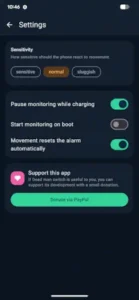
You can tune how sensitive the motion detection is. If you are sitting still but awake, a high sensitivity setting will fire false alarms. If you set it too low, it might miss subtle movement and treat actual stillness as an emergency. The balance point depends on your phone, your placement, and your activity.
This setting is the difference between an app you trust and an app you disable after a week of false alarms. Take the time to tune it. Test it during normal activity and during intentional stillness. Find the sensitivity that matches your reality, not a hypothetical one.
Visual Pre-Warning
Before any alarm fires, the app can show an optional on-screen warning. This gives you a chance to move the phone and cancel the sequence if you are awake but simply have not moved in a while. It prevents the awkward scenario where you are sitting perfectly still reading a book and the app decides you are in danger.
For users who are often stationary while awake, the pre-warning is essential. Without it, the app becomes unusable during any focused activity. With it, the app catches emergencies without punishing you for being still while conscious.
Background Service and Auto Start
The app runs as its own background service. Monitoring continues even when the app screen is closed. You can set it up once and forget about it. Auto start after reboot means the monitoring resumes automatically if your phone restarts, so you do not have to remember to re-enable it every time.
This is not a small detail. An emergency app that stops working after a phone reboot is worse than useless. It creates false confidence. The auto start feature means the protection persists without requiring any ongoing attention from you.
Auto Pause While Charging
Monitoring pauses automatically while the phone is charging. If you leave your phone still on a charger overnight, the app will not fire false alarms. The reasoning is sound. Charging typically means the phone is stationary in a controlled environment, not that you are incapacitated.
That said, this setting should be used with awareness. If you rely on the app for overnight monitoring while sleeping alone, auto pause would disable that protection. The feature exists for users who charge their phone in safe scenarios and do not want the alarms firing during normal charging stillness.
Activity Log
The app maintains a log showing when monitoring was running and which alarms were triggered. Location links in the log are tappable for quick review. You can see exactly what happened and when.
The log serves two purposes. It helps you troubleshoot false alarms by showing what triggered them. It also provides a record of the app’s activity, which matters if you are using it in a professional or family context where someone wants to know the app was active.
Privacy and Cost
Dead Man’s Switch is 100% free with no ads, no in-app purchases, and no subscriptions. The developer states the app does not collect data. It may share location and messages as part of its core function, because sending SMS with GPS links requires passing that information to your chosen contacts. Data is encrypted in transit.
The distinction here matters. The app does not collect data for itself. It does not build a profile of your location or your contacts. It simply transmits what it needs to transmit so your emergency contacts get the alert. For users who are privacy conscious but still want a safety net, this is a reasonable trade-off.
Dead Man’s Switch Tips
Beginner Advice
Tune motion sensitivity and placement for your use case. Start with default sensitivity, then adjust based on whether you get false alarms or missed movement. Keep the phone where it will move with you, like a pocket, belt clip or nearby table. A phone buried in a bag that stays still while you move defeats the entire purpose. The sensor needs to feel what your body is doing.
Disable vibration alarm if it causes resets. This is one of the most common issues users report. When vibration is enabled as an alarm, the vibration itself can register as movement and cancel the sequence before the escalation completes. Many users turn vibration off and rely on sound plus SMS or call instead. Test this on your device before trusting it.
Use auto pause while charging wisely. The app can pause monitoring automatically while the phone is charging. If you leave your phone still on a charger overnight, enable this to avoid false alarms. But do not rely on the app for sleep monitoring if you use auto pause. It is designed to pause in that scenario, not to detect emergencies during sleep.
Set realistic timers based on your activity. For high risk activities like solo hikes or dangerous work, use shorter no-movement intervals. For general living alone peace of mind, longer intervals of one to three hours may be more practical. The right timer depends on how quickly you would need help if something went wrong.
Test before depending on it with controlled runs. Do not install the app and assume it works. Run controlled tests where you leave the phone still and verify that sound, call and SMS all fire as expected. Confirm that your contacts receive the GPS link correctly. Testing once is not enough. Test different scenarios, different placements, and different alarm combinations.
Combine with other safety measures. Dead Man’s Switch is one layer of safety, not a complete solution. Use it alongside regular check-ins, location sharing or other safety apps. It is an extra net, not a replacement for emergency services or human contact.
Mind battery impact and carry a power bank. Continuous motion monitoring and background service use battery. Users report noticeable drain. If you rely on the app for long outings, carry a power bank. Adjust settings to balance safety and battery life based on your priorities.
Keep the phone where it moves with you. This sounds obvious, but it is the most common cause of missed detection. If the phone sits on a table while you walk around the room, the sensor reads stillness. If it is in your pocket while you work, it reads movement. Placement is not a small detail. It is the difference between the app working and the app failing.
Understand it is not a replacement for emergency services. The app sends alerts to your chosen contacts. It does not call 911 or emergency services automatically. It notifies people who can then take action. That distinction matters. The app is a bridge between you and the people who care about you, not a direct line to professional responders.
Check settings after Android updates. Major Android updates sometimes reset permissions or change how background services work. After updating your phone, open the app and verify that monitoring is still enabled, permissions are intact and your contacts are still configured. A two minute check prevents a night of unprotected risk.
Advanced Strategy
Use shorter intervals for high risk activities. If you are doing something genuinely dangerous, whether that is solo hiking, working at heights or handling hazardous materials, set the first alarm to fire quickly. Thirty minutes of stillness in a dangerous situation is too long. Ten or fifteen minutes gives you a real safety net.
Use longer intervals for general living alone peace of mind. If your main concern is having a safety net while living alone, longer intervals work better. One to three hours of stillness is unusual for a healthy person and warrants attention. Shorter intervals in this scenario create false alarms that make you ignore the app.
Test on different phone placements to find reliable detection. Your pocket, belt clip, chest pocket and nearby table all produce different motion signatures. Test each placement during normal activity. Find the spot that reliably detects your movement without generating false positives. This takes an afternoon and saves months of frustration.
Combine with location sharing apps for layered safety. Dead Man’s Switch sends your GPS location in SMS alerts. Pair it with a continuous location sharing app like Google Maps location sharing or Life360 for a fuller picture. The SMS gives your contacts a snapshot. Location sharing gives them a trail.
Set up multi-SMS contacts for redundancy. The September 2026 update adds support for sending SMS to multiple numbers. Use this. Send alerts to two or three people. If one person is asleep, at work or has their phone off, another can respond. Redundancy matters when the alert matters.
Use the activity log to review false alarms. The activity log shows when monitoring was running and which alarms were triggered. Review it periodically. If you see repeated false alarms, adjust sensitivity or placement. If you see missed detections, do the same. The log is your feedback loop.
Adjust sensitivity based on activity type. Sitting at a desk produces different motion patterns than hiking. If you use the app for both, consider adjusting sensitivity between activities or finding a middle ground that works for both. Some users keep two configurations and switch between them.
Pair with scheduled check-ins from other apps. Apps like Snug Safety send scheduled check-in reminders. Dead Man’s Switch handles the emergency case where you become incapacitated. Together they cover both scheduled and unexpected scenarios. Snug catches missed check-ins. Dead Man’s Switch catches sudden stillness.
Monitor battery usage and optimize settings. Check your battery settings periodically to see how much power the app is consuming. If it is excessive, adjust sensitivity or shorten monitoring sessions where possible. The app is worth the battery cost, but there is no reason to accept more drain than necessary.
Share feedback with the developer for improvements. The developer, Johannes Kleeschulte, is active and responsive. If you find a bug, have a feature idea or notice wording issues in the UI, share them. The app is free and community driven. User feedback shapes future updates.
Dead Man’s Switch Similar Apps
| App | Best for | Key Difference |
|---|---|---|
| Dead Man’s Switch (Kleeschulte) | Personal safety via motion monitoring | Motion based DMS with sound, call, and SMS+GPS. Free, no ads . |
| bSafe | Personal safety while walking or traveling | Panic button, fake call, dead man’s switch, live location. Broader safety suite. |
| Snug Safety | Wellness check-ins for people living alone | Scheduled check-in reminders, alerts if you miss them. Focused on routine, not motion. |
| Beacon Safe | Modern multi channel check-in | Email, SMS, voice, push, multi phase escalation. Newer service with freemium model. |
| deadmanswitch.com | Digital inheritance after death | Encrypted package delivered if no presence detected. About post-mortem messages, not real time safety. |
| Google Inactive Account Manager | Digital inheritance after long inactivity | Sends account data after months of inactivity. Long term, not for daily safety. |
Dead Man’s Switch is the simplest free motion based option for Android. If you want a broader safety suite with panic buttons and location sharing, bSafe covers more ground. If you want scheduled check-ins, Snug Safety is built for that. If you want digital inheritance, deadmanswitch.com or Google Inactive Account Manager handle that. Each tool solves a different problem. Dead Man’s Switch solves the problem of sudden incapacitation with no way to call for help.
Who Is Dead Man’s Switch For?
Dead Man’s Switch is for lone workers who need automatic alerts if they become incapacitated. If you work alone in a warehouse, drive for a living, do trades work or handle night shifts where no one checks on you, this app fills a gap. It does not replace a proper lone worker safety system, but it adds a free layer of protection that many workers do not have.
People living alone who want a safety net will find the app valuable even if emergencies are rare. The peace of mind is the point. Knowing that someone will be alerted if you stop moving means you do not have to worry about the scenario where you fall and cannot call for help. The app watches for that scenario.
Outdoor enthusiasts like hikers and solo travelers will appreciate the motion based monitoring for remote activities. If you hike alone, the app can alert your emergency contacts with your GPS location if you stop moving. That is a meaningful safety net in areas with limited cell coverage and no one nearby to help.
Anyone with a health condition that could leave them unable to call for help will find the app useful. Conditions like epilepsy, diabetes, heart conditions or severe allergies can incapacitate someone suddenly. Dead Man’s Switch detects the stillness and alerts your contacts. It is not a medical device, but it is a practical safety layer.
If you work alone, live alone, or spend time in remote places, Dead Man’s Switch is worth trying.
What Users Say About Dead Man’s Switch App
What Works
Users consistently say the app does exactly what it promises. Many report it is perfect for their situation: living alone, working alone or having a chronic condition that could become life threatening. Reviews highlight use cases like door dashing, trades work, gardening, hiking and night shifts, where an automatic SMS or call with location is valuable if something goes wrong. Users appreciate the lack of ads, subscriptions and complexity. Multiple reviewers confirm that motion detection is reliable when configured correctly, giving them peace of mind.
Where The App Could Improve
Common criticisms include noticeable battery usage due to continuous motion monitoring and the background service. Some users report that the vibration alarm can interfere with detection, since the vibration itself can register as movement and cancel the alarm. Older reviews complained about SMS being limited to a single number, though the September 2026 update adds support for several SMS numbers. Some users mention awkward English phrasing in the UI or messages. A few users report occasional motion detection issues, requiring sensitivity tweaks or different phone placement.
Check out SleepGuard for a check-in based sleep protection utility.
Conclusion
Dead Man’s Switch delivers a motion based personal safety net that stands out for its simplicity and cost. The app watches for stillness. The alarms escalate from sound to vibration to call to SMS with GPS location. The timing is customizable per alarm. The background service runs even when the app is closed. The auto start after reboot means you do not have to remember to re-enable it.
The app has limitations. Battery usage is noticeable. Vibration alarms can interfere with detection. Older reviews complained about SMS limits, though the September 2026 update improves this. Wording in the UI is occasionally awkward. Motion detection may miss movement in some scenarios, requiring sensitivity tweaks.
For users willing to configure the app properly and understand that it is a personal safety layer rather than a complete solution, Dead Man’s Switch offers meaningful protection. It does not try to be a corporate lone worker platform or a digital inheritance service. It tries to do one thing well: alert your contacts if you stop moving. And for people who live or work alone, that is exactly what they need.
If you want a free, no-ads safety net that watches for stillness, Dead Man’s Switch is worth downloading.
If you stop moving, someone should know. Dead Man’s Switch makes sure they do.
FAQ
How do I download Dead Man’s Switch and is it really free?
Dead Man’s Switch is completely free to download and use from the Official Google Play Store. The app contains no ads, no in-app purchases and no subscriptions. The developer, Johannes Kleeschulte, built it as a personal safety tool, not a commercial product. If you find it useful, there is an optional PayPal donation link inside the settings menu, but the app functions fully without contributing anything.
What if I encounter a problem or need support?
For technical issues, bug reports, or feature suggestions, contact the developer directly at johannes.kleeschulte[at]googlemail.com. The developer is based in Germany and lists a physical address and privacy information through the Play Store. He has been responsive to user feedback in the past, including adding multi SMS support and an activity log in the September 2026 update. If you find wording issues in the interface or unexpected behavior, sharing feedback helps improve the app for everyone.
What makes Dead Man’s Switch different from other safety apps?
Most safety apps require you to actively check in or press a panic button. Dead Man’s Switch works passively. It watches whether your phone is moving, and if it stays still for too long, it escalates alarms automatically. You do not have to remember to use it. You do not have to press anything. It runs in the background and only intervenes when something appears wrong. That passive approach is what makes it useful for scenarios where you might become incapacitated and unable to call for help yourself.
Does Dead Man’s Switch replace emergency services or a lone worker safety system?
No. Dead Man’s Switch is a personal safety layer, not a professional emergency response system. It alerts your chosen contacts with a call and SMS containing your GPS location. It does not call 911 or emergency services automatically. It does not replace a proper lone worker monitoring platform used by employers. It also does not handle digital inheritance or post mortem messaging. It solves one specific problem: alerting the people who care about you if you stop moving and cannot ask for help. Treat it as an additional layer, not a complete solution.