Duo Mobile is an enterprise grade multi factor authentication tool developed by Cisco that balances stringent security requirements with user friendly access.
Duo Mobile app holds a 4.6 star rating from over 1.5 million user reviews on the Google Play Store. With a download size of approximately 80MB, it is designed for a working age audience, from corporate employees and university students to IT administrators managing access policies.
The Duo Mobile Verification Process
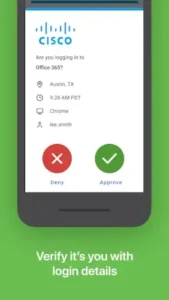
The primary method for how to use Duo Mobile is the push notification. When you attempt to log in to a work application, a prompt is sent directly to your phone. A single tap approves or denies the request. This method prioritizes speed and simplicity.
For situations without internet access, the app generates time based one time passcodes (TOTP). These six-digit codes provide a reliable offline backup. This functionality also supports a passwordless login with Duo Mobile, where you can use your phone’s biometric sensor, like a fingerprint or face scan, to approve a sign in instead of typing a password.
The most distinctive aspect is the Duo Mobile device health check. Before granting access, the system can analyze your device’s security posture, checking for elements like an active screen lock or up-to-date operating system. It verifies the device itself is trustworthy.
The Enterprise Advantage of Duo Mobile
This app’s strengths are rooted in features designed for organizational control. The device health verification in Duo Mobile goes beyond simple user authentication, ensuring the connecting device complies with company security policies. This is a core part of a zero trust security model.
Access is further refined through adaptive access policies in Duo Mobile. The system can grant or restrict entry based on contextual factors like your geographic location, your role within the company, and the health of your device. Furthermore, its integration with single sign on with Duo Mobile streamlines the experience, allowing one verification to grant access to multiple approved applications.
This entire system operates under significant administrative oversight. Your organization’s IT department configures the security policies, which means your experience, from the types of checks to the recovery process, is largely defined by their settings.
The Duo Mobile Application Interface
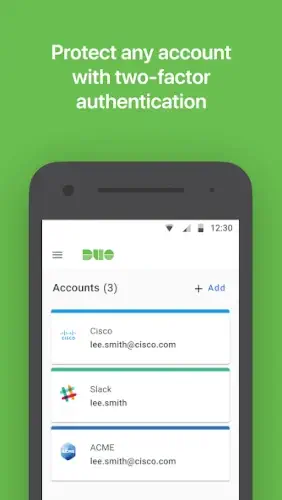
The interface is professional and purpose-built. The design philosophy is clarity for compliance. The main screen presents a simple list of your added accounts, making it easy to find a passcode or respond to a push notification. The visual design is clean, with minimal distractions, focusing on completing the security task efficiently.
The initial Duo Mobile setup guide typically involves scanning a QR code provided by your employer or institution. This seamlessly enrolls your device. To protect this central access hub, the app itself can be secured with a PIN or your device’s biometrics, ensuring that even if your phone is unattended, your corporate access remains protected.
For those in environments using different systems, a similar enterprise focused application is Okta Verify, which provides comparable push notification based authentication. However, Duo Mobile’s deep integration with Cisco’s security ecosystem and its emphasis on device health give it a particular standing in the corporate world.
Duo Mobile Tips
A smooth experience with the Duo Mobile app hinges on understanding its enterprise oriented nature. The initial setup is typically straightforward: you scan a QR code provided by your organization’s IT department, which enrolls your device in their security system. This process links your specific phone to your work account.
Adopting a few proactive habits can significantly improve your daily interaction. One of the most crucial Duo Mobile tips is to enroll a backup device. This could be a tablet or an old phone. If your primary device is lost, damaged, or has a dead battery, a backup ensures you are not locked out of critical work resources. For the fastest login experience, enable biometric authentication in the app’s settings. Using your fingerprint or face scan to approve push notifications is quicker and more secure than manually entering a passcode.
It is also important to understand that passcodes are a reliable fallback. If you are in an area with poor cell service or experiencing delays with push notifications, you can always open the Duo Mobile app and retrieve a time-sensitive code to enter manually. Finally, recognize that your IT support team is the primary channel for resolving access issues. They manage account recovery and can help with the Duo Mobile new phone setup process if you upgrade your device.
Duo Mobile Apps in the Security Ecosystem
How does Duo Mobile compare to other authenticators? Its position is distinct. Google Authenticator focuses on simplicity with basic, offline codes. Authy excels at multi-device sync and encrypted backups for personal use. Microsoft Authenticator blends personal and enterprise features with a strong tie to the Microsoft ecosystem.
Duo Mobile apps are fundamentally different because they are enterprise first. Their core strength is not just verifying your identity, but also assessing your device’s health and enforcing organizational policies. While other apps ask “Are you the right person?”, Duo Mobile asks “Are you the right person using a secure and compliant device?”. This makes it less of a personal utility and more of an integrated component of a corporate security infrastructure.
Conclusion :
The Duo Mobile app serves as a powerful, policy driven security tool. Its role is less about individual choice and more about being an integral, non negotiable part of a modern organizational defense system. It is the gatekeeper that enforces rules you do not directly control.
For securing corporate and institutional access, Duo Mobile stands as a top tier solution. It delivers a remarkably smooth and user friendly authentication experience, especially with push notifications and biometrics, while operating at a high level of security and compliance that meets the demanding needs of enterprise environments.
Frequently Asked Questions
What is the main purpose of Duo Mobile?
It provides an extra layer of security for your online accounts, particularly for work or school. It verifies your identity with a second step, like approving a push notification or entering a code, ensuring only you can access protected resources.
How do I perform a Duo Mobile download and initial setup?
You can get the Duo Mobile app from the official Google Play Store. The setup is typically guided by your organization. You will usually scan a QR code provided by your IT department to link the app to your work or school account. For more details, visit the official Duo Mobile website.
Can I use Duo Mobile for personal accounts like Facebook or Gmail?
Yes, the Duo Mobile app supports standard two factor authentication for many non enterprise services. You can add these accounts within the app by scanning their QR codes, just as you would with any other authenticator app.
What should I do if I get a new phone?
This is a common situation. Before you get rid of your old device, contact your IT administrator or help desk. They can help you transfer your account or provision a new one on your new phone. For application specific issues, you can contact Cisco support at support[at]duosecurity.com.