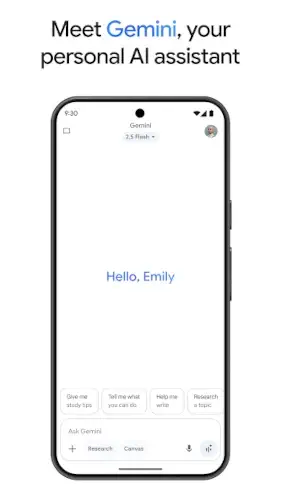
Gemini, Google’s ambitious project to consolidate its AI future, moving beyond simple queries into a realm of collaborative creation and complex task execution.
Gemini have 4.7 star rating from over 1 million reviews on the Google Play Store, requires approximately 120 MB of storage, and is geared toward a general audience of teenagers and adults.
Gemini Proposition: An AI Partner
What does an AI assistant become when it is designed not just to answer, but to collaborate? The answer defines Gemini, which positions itself as a conversational engine built for both productivity and creative exploration, directly integrated into the fabric of the mobile experience.
The design philosophy is intentionally minimalist and focused. The interface is dominated by a clean chat window, prioritizing the conversation above all else. This approach reduces cognitive load and makes the technology feel immediately accessible. But how does this simplicity balance with its powerful capabilities? The power is revealed not in the UI, but in the output. You ask a complex question and receive a structured, detailed response. You request an image, and it appears inline within the chat. The design gets out of the way, allowing the intelligence of the model to be the main event. It feels less like using a complicated app and more like having a direct line to a powerful computational brain.
This experience is fundamentally different from previous generations of assistants. Gemini moves beyond chatbots by operating on a foundational model trained for true multimodality from the ground up. This means it natively understands and generates a blend of text, code, and images, rather than stitching separate systems together. Its intent is not merely to retrieve information but to synthesize, create, and reason. The difference is palpable when you ask it to compare concepts in a table, draft an email in a specific tone, and then generate a supporting image all within the same, continuous conversation.
The integration advantage is arguably Gemini’s most significant strategic edge. Being woven into the Google ecosystem is not an afterthought; it is a core utility. You can ask it to find a specific email in your Gmail, summarize a document from your Google Drive, or pull up recent videos on a topic from YouTube, all through natural language. This turns the assistant from a standalone tool into a central control panel for your digital life within Google’s walled garden, creating a seamless workflow that is difficult for disconnected third party apps to replicate.
Gemini Feature: Capabilities and Tiers
The promise of a collaborative AI is realized through a specific set of features, some of which are gated behind a subscription, creating a clear value proposition.
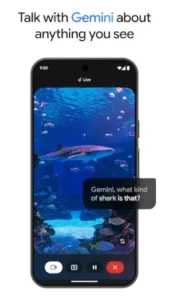
Gemini Live offers real time, voice driven interaction. The utility here is for scenarios that benefit from back and forth dialogue: brainstorming ideas aloud, rehearsing a difficult conversation, or working through a complex problem step by step. The experience is fluid and feels more like a coaching session than a traditional Q&A, though its value is highest for users who regularly engage in this type of preparatory work.
The content creation and conversion tools are where Gemini showcases its multimodal muscles. You can provide a text description and generate a custom image, a capability that is useful for creating simple illustrations for presentations or social media posts. The ability to turn a document into a podcast is a novel feature for consuming long form text on the go. The practical value is high for specific use cases, though the quality and style of generated media may not always match that of dedicated, advanced creative tools.
A key technical differentiator is the deep research capability and extended context window, especially in the Pro tier. The model can process up to 1,000,000 tokens, which is equivalent to roughly 1,500 pages of text. This allows you to upload a massive document, a lengthy report, a transcript, or even a book, and ask for a detailed summary, a critical analysis, or to extract specific themes. This is a powerful research accelerator, but its effectiveness depends entirely on the quality and structure of the source material you provide.
This leads to the subscription model. The free tier of Gemini is competent for everyday tasks. However, the Gemini Pro and Ultra plans unlock the most advanced models, the full extended context for deep research, enhanced reasoning, and early access to new features like advanced video generation. The decision to upgrade is straightforward: if you are a professional, researcher, or creator who regularly pushes the boundaries of what an AI can do, the paid tiers are designed for you. For the casual user, the free version remains impressively capable.
Gemini User Experience: Interacting with Intelligence
The theoretical power of an AI means very little if the daily interaction is cumbersome. Gemini generally delivers a sophisticated conversational experience, though with some expected friction.
The conversational flow for complex, multi turn tasks is where it shines. You can ask a follow up question using “it” or “that,” and the model consistently understands the reference. It maintains a strong thread of context, allowing you to build upon previous answers, refine ideas, and explore tangents without needing to constantly re explain your premise. This makes it feel like a true dialogue.
Its multilingual and translation prowess is robust, supporting numerous languages. It can not only translate text but also hold a conversation that switches between languages, making it a capable tool for international communication and cross lingual research.
Handling complexity is a strength, but not an absolute one. It can follow intricate instructions that involve multiple steps, such as “analyze the sentiment of these three product reviews, then draft a response email that addresses the top two complaints in a professional tone.” However, like all current AI, it can sometimes misinterpret a nuanced request or produce a result that is technically correct but misses the deeper intent, requiring a refined prompt from the user to steer it back on course.
Gemini Critique: Power vs. Polish
Every advanced tool faces the challenge of balancing raw capability with daily reliability. For users exploring Gemini apps or troubleshooting the Gemini app experience, understanding these growing pains is essential.
Synthesizing user sentiment reveals a clear appreciation for the assistant’s potential, tempered by frustration with its current execution. The community widely praises its advanced creative and research capabilities, particularly its ability to generate detailed content and process complex documents. These features are the main draw for the Gemini app and represent a genuine leap beyond basic chatbots. However, this praise is consistently shadowed by reports of technical instability. Users frequently mention glitches such as chat threads unexpectedly breaking, slow response times during peak usage, and occasional “hallucinations” where the AI provides confident but incorrect information.
These issues highlight the gap between the model’s sophisticated design and the polished user experience expected from a Google product.
The Google Assistant conundrum creates significant confusion for many users. When you replace Google Assistant with Gemini on Android devices, you gain powerful conversational and creative features but lose specific, reliable voice commands that control smart home devices, set precise timers, or execute hands, free routines. This creates a functional trade off. You are essentially choosing between a brilliant but sometimes inconsistent creative partner and a highly efficient, predictable voice remote for your phone and home. This transition period has left many users wondering whether they are expected to use both assistants for different tasks, a situation that undermines the promise of a unified AI experience.
Privacy and data handling is a critical consideration with any cloud based AI. Google states that conversations with Gemini are not used to train its core models without user permission and are not shared with advertisers. This is a positive stance. However, this policy exists within the broader context of Google’s extensive data collection ecosystem. While your Gemini chats might be walled off, the assistant is deeply integrated with services like Gmail and Drive, which do inform your broader advertising profile. For the privacy conscious user, this creates a complex picture where the AI itself may be respectful, but the platform it resides on has a fundamental business model built on data analysis.
Optimizing Gemini:
To harness the full potential of this tool, you need to approach it with strategy. For those seeking practical Gemini tips, this guide will help you work with the AI, not against it.
Crafting effective prompts is the most important skill for getting high quality results. For creative tasks, provide clear context and style guides. Instead of “write a poem,” try “write a short poem in the style of Mary Oliver about finding resilience in urban environments.” For analytical work, specify your desired output format: “analyze the market data in this spreadsheet and provide three key takeaways in a bulleted list.” For research, prime the AI with a role: “Act as a history professor and explain the causes of the Industrial Revolution, focusing on technological innovations.” These structured requests guide the AI more effectively toward your goal.
Leveraging ecosystem integration is where the Gemini app offers unique utility. You can directly ask it to “find the latest budget spreadsheet in my Drive and summarize the quarterly expenses,” or “check my Gmail for messages from Sarah and draft a polite response acknowledging her project update.” This turns the assistant into a powerful orchestrator of your existing workflow. The key is to be specific about the app and the action you want to perform, treating Gemini as a conversational interface for your Google workspace.
Troubleshooting common issues requires a patient approach. For slow responses, check your internet connection first, as the heavy processing occurs on Google’s servers. If a chat thread becomes buggy or the AI seems to lose context, the most effective solution is to start a new conversation. This gives the model a clean slate and often resolves persistent errors. If you encounter a factually incorrect response, use the feedback feature within the app. Politely pointing out the inaccuracy helps improve the model for everyone.
Conclusion: The Right Tool for the Right User
So, who is the Gemini app truly for? The answer points toward a specific, technically inclined user rather than a general consumer.
Gemini represents a revolutionary leap for the user who regularly engages in complex brainstorming, content creation, and deep research. It is the ideal tool for writers, developers, students, analysts, and strategists who need a collaborative partner to generate ideas, process large amounts of information, and overcome creative blocks. If your work involves synthesis and creation, and you are comfortable with the occasional need to refine prompts or restart a chat, Gemini will feel like a superpower.
However, it may be an overcomplicated or unstable solution for the user who primarily needs quick answers, reliable smart home control, and consistent, hands-free assistance. If your main uses for an AI are setting alarms, checking the weather, controlling your lights, and getting fast factual answers, the current feature gap and instability might lead to more frustration than benefit. For this user, sticking with the classic Google Assistant or a more focused tool might provide a smoother daily experience.
Within the competitive AI assistant market, Gemini carves out a leading position as the most integrated and creatively-capable assistant for power users within the Google ecosystem. It delivers groundbreaking capabilities but demands a more engaged and technically tolerant user. Your decision to adopt it hinges on a simple question: are you willing to trade some reliability and familiar functionality for a massive increase in creative and analytical power? For professionals and creators, that is an easy calculation to make.
Frequently Asked Questions
Can Gemini really help me with writing tasks?
Yes, it can help draft emails, brainstorm ideas, and improve your writing style. You can ask it to write in different tones or formats, making it useful for both professional and creative projects.
Where can I get the official Gemini download?
You can download Gemini app from the Google Play Store. For technical support with the installation or app functionality, contact Google directly at apps-help[at]google.com.
Is there a community resource for learning advanced features?
Yes, the Gemini Wiki offers user created guides on prompt engineering, using advanced features, and troubleshooting common issues.
How does the visual analysis feature work?
You can show Gemini images through your camera or gallery and ask questions about them. It can identify objects, analyze scenes, or read text from images, though accuracy depends on image quality and complexity.
What’s the main difference between the free and paid versions?
The free version handles everyday tasks well, while Gemini Advanced (paid) offers more sophisticated reasoning, better coding capabilities, and enhanced productivity features for complex projects.