
Getting children excited about math practice is like convincing cats to take baths. Yet Moose Math somehow makes it happen.
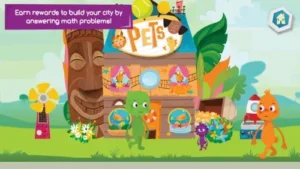
Moose Math it’s a carefully designed system that tricks kids into learning through what feels like playtime.
How Moose Math Hacks Kids’ Brains
Activities That Disguise Learning as Play
While most math apps drill flashcards, Moose Math builds real skills through:
-
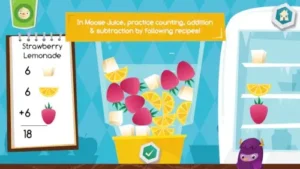
Moose Juice:
Kids “blend” smoothies by adding 3 berries + 2 bananas = 5 ingredients
Why it works: Ties abstract numbers to physical mixing actions -
Lost & Found:
Sorting mismatched toys by color/shape develops early geometry skills
Hidden benefit: Teaches classification, a foundational scientific skill
The Reward System That Actually Motivates
Unlike meaningless digital stickers, Moose Math gives:
-
Buildable city parts for correct answers (bridges, houses, etc.)
-
Neuroscience behind it:
-
Immediate rewards trigger dopamine hits
-
Visible progress (watching their city grow) reinforces persistence
-
Moose Math Features That Give Parents Peace of Mind
Report Cards That Show More Than Grades
The app tracks:
-
Specific skills mastered (e.g., “counting by 10s”)
-
Areas needing work (“subtraction below 10”)
-
Most valuable part: Suggests real world activities like “Practice at the grocery store by counting apples”
Ad Free by Design
Key advantages:
-
No accidental purchases by tiny fingers
-
No disruptive video ads breaking concentration
-
Comparison point: 87% of free kids’ apps contain ads (Moose Math is in the rare 13%)
The Parent Perspective
What They Love:
-
*”My 5 year-old now notices ‘math problems everywhere’, at the park, in recipes…”*
-
“Finally an educational app where the moose doesn’t make me want to mute my tablet.”
What They Wish Was Better:
-
“Profile management is a mess, my daughter created 7 ‘players’ in one day.”
-
“Would pay for Spanish version if available.”
Similar to Endless Numbers but with broader skill coverage. Prefer reading+math? Try Khan Academy Kids (4.7 stars).
Not all educational apps are created equal. While Moose Math shines in early arithmetic, some alternatives specialize in different areas. Here’s how it stacks up, no marketing fluff, just real differences that matter.
Moose Math vs. Endless Numbers (4.4 stars)
Endless Numbers excels at counting and number recognition with adorable monster animations. But Moose Math goes further:
-
Broader skill coverage: Addition, subtraction, sorting, and geometry
-
City building rewards vs. Endless’ passive animations
-
Better for applied math: Kids connect concepts to real world actions (e.g., blending smoothies = adding ingredients)
When to choose Endless Numbers: If your child needs focused help on 1-100 number recognition.
Moose Math vs. Starfall (4.0 stars)
Starfall blends reading and math, while Moose Math specializes:
-
Math depth: Starfall’s arithmetic feels like a side activity; Moose Math’s games are all math-centric
-
Reward systems: Starfall offers stars; Moose Math ties progress to building a personalized city
-
Teacher tools: Moose Math’s report cards are more detailed for tracking math skills
When to choose Starfall: If you want a reading/math combo for well rounded practice.
Moose Math vs. Khan Academy Kids
Both are free, ad free, and backed by Khan Academy, but serve different purposes:
-
Moose Math: Deep math immersion through game mechanics
-
Khan Academy Kids: Full curriculum (literacy, social-emotional learning, etc.) with lighter math focus
Best combo: Use Khan Academy Kids for broad learning, Moose Math for targeted math reinforcement.
How to Read Moose Math Progress Reports (And Actually Use Them)
Most parent dashboards are useless. Moose Math’s reports are surprisingly practical, if you know how to interpret them.
1. Accessing the Report:
-
Tap the parent icon (lock protected)
-
Select your child’s profile (if multiple exist)
2. Key Sections Explained:
-
Skills Mastery:
-
Green check = Solid understanding (e.g., “Counts to 20”)
-
Yellow arrow = Needs practice (e.g., “Subtraction within 10”)
-
-
Activity Breakdown:
-
Shows which games your child plays most (and avoids)
-
Example: If “Pet Bingo” is ignored, they might need subtraction help
-
-
Offline Suggestions:
-
Concrete ideas like “Practice adding with cereal pieces at breakfast”
-
3. Turning Data Into Action:
-
For weak areas:
-
Guide your child toward relevant activities (e.g., more “Moose Juice” for addition)
-
Use the suggested real world exercises
-
-
For strong areas:
-
Challenge them: “Can you solve this without counting on fingers?”
-
Why this matters: Unlike vague school report cards, these updates let you target exactly where help is needed.
Pro Tips From Parents Who’ve Been There
1. The City-Building Motivation Hack
-
Set a rule: New buildings unlock only after completing:
-
1 counting activity
-
1 addition/subtraction game
-
1 shape sorting task
-
-
Why it works: Ensures balanced skill development
2. Grocery Store Math Reinforcement
-
Play “Pet Bingo IRL”:
-
“We need 6 apples. There are 3 in the bag, how many more?”
-
“Which is longer: the broccoli or celery?” (ties to measurement skills)
-
3. Preventing Profile Chaos
-
Take a screenshot of your child’s avatar
-
Name profiles clearly (e.g., “Liam_School” vs. random defaults)
-
Last resort: Email support[at]duckduckmoose.com for profile recovery
Conclusion :
Best for:
-
Parents who want guilt free screen time that’s actually educational
-
Teachers needing a station activity for math centers
-
Kids who thrive on visual, game based learning
Not ideal for:
-
Older kids (content caps at 1st grade level)
-
Anti-screen families preferring physical manipulatives
-
Multilingual households (no Spanish/other language support yet)
Moose Math won’t replace teachers or tutors, but it’s the rare app that makes kids want to practice math. In a world of flashy, shallow “educational” games, that’s something special.
FAQs
Where can I download Moose Math for my child?
Download Moose Math from Google Play Store or visit Khan Academy Kids page.
How do I access Moose Math progress reports?
Tap the parent icon ( locked), select your child’s profile, and view skill breakdowns with offline activity suggestions.
Can multiple children use one device?
Yes, but take screenshots of each profile avatar – kids can accidentally create unlimited profiles.
Is Moose Math really free with no ads?
Completely free, no ads, and no in app purchases – part of Khan Academy’s non-profit mission.
How does Moose Math compare to Tusk for shift workers?
(Moose Math is for kids’ education; contact android[at]duckduckmoose.com for unrelated app queries)