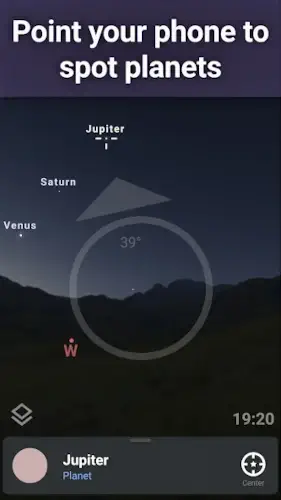
Stellarium solves the mystery of the sky. Which ones are planets and which ones are stars?
Stellarium app matches what your camera sees with a real time map of the stars above you. That bright dot near the horizon? Jupiter. That cluster of stars over there? The Pleiades. That streak moving slowly across the sky? A satellite.
What Is Stellarium?
A planetarium app that fits in your pocket. That is the shortest answer. But let me explain what that actually means.
You open Stellarium. The app uses your location and the current time to generate an accurate map of the night sky above you. Then you point your device upward. The screen shows exactly what you would see if you had a professional star chart in your hands.
Tap any object on the screen. The app tells you its name. Its distance from Earth. Whether it is a star, planet, constellation, comet, or satellite. The free version already covers thousands of objects. The paid Plus upgrade expands the catalog to show objects as faint as magnitude 22, which means you can see far more than the naked eye ever could.
The publisher, Noctua Software, built this for a wide audience. Astronomy fans use it to plan observing sessions. Students use it for homework and projects. Educators use it in classrooms. Casual skywatchers use it during camping trips or backyard evenings.
Everyone gets the same accurate sky. The only difference is how deep you want to explore.
What You Can See and Do with Stellarium
Stellarium gives you tools. What you do with them is up to you.
-
Realistic sky map showing stars, planets, satellites, and constellations
-
Night mode with a red display to protect your eyes’ dark adaptation
-
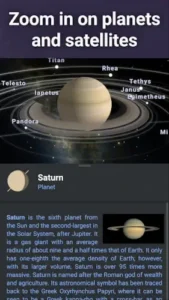
3D rendering of major solar system planets and their satellites
-
Location and time based sky simulation so the map reflects what you see from where you are
-
Advanced object catalog in Plus, showing objects as faint as magnitude 22 instead of magnitude 8
-
Observing tools for more serious astronomy use in the upgraded version
The free version works perfectly for casual use. You can identify the Big Dipper, find Mars, track the International Space Station. The Plus version adds depth. Faint nebulas. Distant galaxies. Detailed observing logs. You only need it if you outgrow the free features.
Stellarium Design
Most apps look great in a bright room and fall apart in the dark. Stellarium does the opposite.
The design is clean and immersive. Flashy effects do not exist here because they would distract from the actual sky view. The interface stays out of the way until you need it. Celestial objects are easy to identify without clutter or unnecessary labels.
The red night mode is the standout feature. White light destroys your night vision. Red light preserves it. When you turn on night mode, the screen shifts to red tones. You can read the interface, find objects, and check information without ruining your ability to see faint stars.
That small detail separates Stellarium from apps designed for daytime use. This one was built for real observing conditions. Backyard patios. Dark sky parks. Mountain campsites. Anywhere you actually look at stars.
Stellarium User Reviews :
The positive feedback focuses on realism first. Users say the sky map looks exactly like what they see above them. Accuracy comes second. The positions of planets, stars, and constellations match reality without noticeable lag or drift. Ease of identifying objects gets consistent praise. You do not need an astronomy degree to use Stellarium. Point, tap, read. That is it.
The main tradeoff is the paid upgrade. Advanced features and deeper catalogs are reserved for Stellarium Plus. The free version shows objects down to magnitude 8. The Plus version goes to magnitude 22. That difference matters if you want to find faint nebulas, distant galaxies, or dim comets. For casual users, the free version already covers everything visible to the naked eye and basic binoculars.
Even with that limitation, Stellarium is well regarded by astronomy users across both major app stores. The free version gives you a complete experience. The Plus version gives you a professional tool.
How the Stellarium App Works
No complicated setup. No manuals. Here is how you use Stellarium.
Step one: open the app
Tap the icon. The app loads the sky map based on your last location and time.
Step two: allow location access
Stellarium needs your position to show the correct sky. Without location, the map will be wrong. Allow access once and forget about it.
Step three: set the time to now or any moment in the past or future
The default is the current time. But you can change it. Want to see what the sky looked like last month? Change the date. Want to plan for next week? Change the date forward. The simulation updates instantly.
Step four: point your phone toward the sky
Raise your device. The screen follows your movement. What you see on screen matches what is above you.
Step five: tap on any object to identify it
See something bright and curious? Tap it. The name appears. Tap again for more details. Distance, type, brightness, and sometimes a brief description.
Step six: read the name, distance, and basic information
That is it. You just identified a celestial object in five seconds.
Why the workflow works
The app behaves like an interactive sky guide. Simple actions lead to effective results. Stellarium turns astronomy into something visual, immediate, and easy to explore. No prior knowledge required. Just curiosity and a few taps.
Stellarium tips: Small Changes That Improve Your Stargazing
These are not secrets. They are habits that separate a frustrating night of squinting at dots from a rewarding evening of discovery.
-
Turn on night mode when observing outdoors so your eyes stay adapted to darkness. White light ruins your night vision for twenty minutes. Red light preserves it. Switch night mode on before you step outside.
-
Use the app in a dark environment for better visibility of fainter sky details. Street lights and phone screens both create glare. Find a dark spot. Let your eyes adjust for ten minutes. Then open Stellarium.
-
Match the app’s time and location settings carefully so the sky view stays accurate. The app guesses your location. Check it anyway. Wrong location means wrong sky. Wrong time means wrong planet positions.
-
Upgrade to the Plus version if you want a much deeper object catalog. The free version shows magnitude 8. Plus shows magnitude 22. That difference is thousands of objects versus millions. Worth it if you use the app more than once a month.
-
Use the app as a learning tool to identify constellations before a real stargazing session. Practice indoors first. Learn where Orion sits in March or where Cassiopeia appears in summer. Then go outside and find them for real.
-
Compare what the app shows with what you see through binoculars or a telescope for better astronomy practice. Binoculars reveal craters on the Moon and moons around Jupiter. Stellarium confirms what you are looking at. Use them together.
Looking for active Stellarium codes? The app does not typically use promo codes. The free version already works without payment. The Plus upgrade is a one time purchase through the app store. No codes needed. No subscription traps.
Stellarium similar apps:
| App | Main Similarity |
|---|---|
| Sky Guide | Mobile sky map and astronomy identification. |
| Star Walk 2 | Interactive astronomy app with real time sky tracking. |
| SkySafari | Deeper observing and telescope friendly astronomy features. |
| SkyView | Augmented reality sky identification. |
| Stellarium Web | Browser based companion with a realistic star map. |
Each app shares a piece of what Stellarium app delivers. Sky Guide offers a cleaner interface for casual users. Star Walk 2 adds augmented reality overlays. SkySafari gives you telescope controls. SkyView makes identification feel like a game. Try one or two and see which interface fits your observing style.
How the Astronomy Community Uses Stellarium
Stellarium is not built around social networking. You will not find feeds, followers, or comment sections inside the app. But a strong educational and astronomy community exists around it.
Users share observing tips in astronomy forums. Someone discovers a comet visible at dawn. They post the coordinates. Others open Stellarium, type the numbers, and find it themselves. Sky discoveries get discussed in Reddit threads and Facebook groups. Stargazing setups, from cheap binoculars to expensive telescopes, get compared and reviewed. Learning spaces like schools and planetariums use Stellarium as a teaching tool.
The broader ecosystem supports this community. Stellarium is not just a mobile app. The brand includes web based planetarium tools and desktop software for serious astronomers. That means you can learn on your phone, plan on your laptop, and observe with both. The same sky. The same names. The same coordinates.
A familiar environment across devices and platforms makes learning faster. You are not relearning an interface every time you switch screens.
Conclusion
Accuracy. Night friendly design. A clear upgrade path for serious observers. Those three pieces make Stellarium worth keeping on your phone.
But every stargazer faces the same fork in the road. Do you want a basic guide to the night sky that identifies the Big Dipper and points out Mars? Or do you want a deeper catalog that reveals faint nebulas, distant galaxies, and dim comets moving slowly across the frame?
The free version serves the first group perfectly. The Plus version serves the second.
Neither choice is wrong. The only mistake is standing under a clear night sky with no idea what you are looking at.
So open Stellarium. Point it at the brightest dot above you. Tap the screen. Read the name. Then look up again.
That dot will never look the same.
Video Source: Plateau Astro
FAQ
Where is the official place to get Stellarium download?
Download Stellarium from the official Google Play Store is the only safe source. Third party sites cannot guarantee you get the real app without modified code.
Where can I read official news, version updates, and feature announcements?
The official Stellarium website posts everything. New Plus features, sky catalog expansions, bug fixes, and platform updates all appear there first. Check it when you notice something different in the app.
Where do I find detailed object information, astronomy guides, and observation planning tips?
The Stellarium wiki page. Community maintained. No fluff. Just planet data, star catalogs, moon phase calendars, and observing checklists from experienced amateur astronomers.
I ran into a crash, a tracking issue, or a display problem. Who actually responds?
The developer email address for support is: help[at]stellarium-labs.com. Mention your device model, operating system version, and what you were trying to identify when the problem appeared. Screenshots help. Short and polite messages get faster replies.