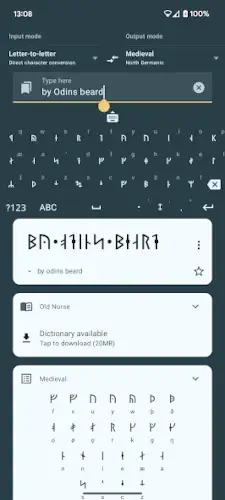
Ever wanted to write your name in Viking runes or Tolkien’s Cirth? Write in Runic makes it possible, not through simple letter swaps, but by converting the actual sounds of your words into authentic runic symbols.
With a 4.7 star rating, 1M+ downloads and a compact 15MB download size, Write in Runic app bridges history, linguistics, and fantasy fandom in one sleek package. Whether you’re crafting D&D puzzles, studying Old Norse, or just curious about runes, here’s why it stands out.
How Write in Runic Works: Sound Over Spelling
Most rune converters just replace letters (A → ᚨ). Write in Runic is different. It uses phonetic transliteration, meaning it prioritizes pronunciation. For example:
-
“Night” (pronounced nite) might render as ᚾᚨᛁᛏ in Elder Futhark.
-
“Knight” (silent *k*) could become ᚾᚨᛁᛏ too, because that’s how you say it.
This matters if you care about historical accuracy. Old Norse and Anglo Saxon runes represented spoken language, not modern spelling quirks. The app even adjusts for regional accents, so “water” (American wadder vs. British waw ter) yields slightly different runes.
Free vs. Premium: What You Get
Free version includes:
-
Elder Futhark (Viking Age runes)
-
Younger Futhark (Swedish/Norwegian and Danish variants)
-
Medieval Runes (used in Scandinavia post-1000 AD)
-
Basic Ogham (Early Irish script)
-
Tolkien’s Cirth (from The Hobbit and Lord of the Rings)
Premium unlocks (one-time $4.99 purchase):
-
Anglo-Saxon Fuþorc (used in Beowulf era England)
-
Old Turkic and Old Hungarian runes
-
Armanen (19th century occult runes)
-
Gothic, Glagolitic, and other rare scripts
A side by side comparison in the app lets you see how the same phrase changes across alphabets, useful for spotting linguistic shifts over time.
Why Hobbyists and Pros Use It
-
Learn as You Go
Each script comes with a guide explaining its history, pronunciation, and cultural context. Swipe to see how runes evolved from Elder Futhark to Medieval styles. -
Tolkien Niche
Fantasy fans use the Cirth mode to replicate Dwarven inscriptions or Elvish messages. Try writing “Mellon” (Elvish for friend) in authentic Cirth. -
Upcoming Keyboard
The developer confirmed a runic keyboard is in beta, soon you’ll type runes directly into messaging apps.
What Users Say (And Complain About)
Pros:
-
“Finally, a rune app that doesn’t treat ‘th’ as two letters. It gives me þ (thorn) like real Old English.“
-
“The Ogham mode saved me hours crafting Celtic themed D&D props.”
-
Clean interface with non intrusive ads (free version).
Cons:
-
A few reports of premium scripts not unlocking until restarting the app.
-
No keyboard yet (though it’s coming).
-
Limited guidance on typing complex runes like bindrunes.
If you need a runic keyboard now, check out Rune Writer 2, though it offers fewer historical scripts.
If you’ve ever tried translating modern words into runes and thought, “Why does this look off?“, you’re not alone. Most apps just swap letters, but Write in Runic goes deeper, converting sounds, not just spelling.
Write in Runic Tips for Better Results
Phonetic Tweaks: Speak Like a Viking
Since the app prioritizes pronunciation, small spelling adjustments can make your runes more accurate:
-
“Thor” → “Þórr” (Old Norse spelling ensures you get ᚦᚢᚱ, not *T-H-O-R*)
-
“Light” → “Lite” (removes the silent gh, giving you ᛚᚨᛁᛏ in Elder Futhark)
-
“Queen” → “Kween” (Old English used cw, so this yields ᚲᚹᛁᚾ instead of *Q-U-E-E-N*)
Pro Tip: For languages like Old Norse or Anglo Saxon, check Wiktionary for period accurate spellings before transliterating.
Alphabet Reference: Decode Like a Historian
Each script in the app includes a rune chart with:
-
The rune’s original name (e.g., Fehu for ᚠ)
-
Its sound value (*f* or *v* in some dialects)
-
Historical context (e.g., “Elder Futhark runes were used between 150–800 AD“)
Use this to:
-
Avoid mistakes (e.g., Sowilo ᛊ always means *s*, never *k*)
-
Craft intentional messages (ᚷᛁᚠ gif means “gift” in Proto-Germanic)
Cache Fixes: When Premium Content Stalls
A common gripe: paying for scripts but they don’t unlock. Fixes:
-
Force close the app, then reopen.
-
Clear cache (Android: Settings → Apps → Write in Runic → Storage).
-
Reinstall if needed (purchases are tied to your Google/iCloud account).
The developer is active on Reddit and typically responds to bug reports within 48 hours.
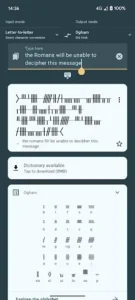
Write in Runic Alternatives and Comparisons
Rune Writer 2
-
Best for: Typing runes directly into texts or social media.
-
Downside: Only supports Elder Futhark and Younger Futhark, no Tolkien or Ogham.
Write in Hieroglyphs (Same Developer)
-
Overlap: Uses the same phonetic engine but for Egyptian hieroglyphs.
-
Niche: Great if you’re into Assassin’s Creed Origins or ancient Egypt.
Runic Oracle
-
Focus: Divination (think tarot cards, but with runes).
-
Skip if: You want to write rather than interpret meanings.
Write in Runic is the only app that combines phonetic precision with Tolkien, Ogham, and 10+ other scripts.
Conclusion :
Worth the Download? Absolutely.
-
Free version covers the basics (Elder Futhark, Tolkien, Ogham).
-
Premium ($4.99) is a steal for rare scripts like Armanen or Gothic.
-
Upcoming keyboard will make it even more practical.
FAQ
How accurate is the rune translation in Write in Runic?
The app uses phonetic conversion, not direct letter swaps, so results match historical pronunciation. For example, “Thor” becomes ᚦᚢᚱ (þórr) in Elder Futhark.
Can I use Write in Runic for Dungeons & Dragons?
Absolutely. The Elder Futhark and Tolkien’s Cirth modes are perfect for D&D spells, scrolls, or worldbuilding. For specifics, see “How to write D&D spells in Elder Futhark“ in the app’s tutorial section.
Why are some scripts locked after I pay for premium?
Restart the app or clear its cache (Settings → Apps → Storage). If issues persist, contact support at maartentrompper[at]freedom.nl.
From were i download Write in Runic ?
Download Write in Runic from Google Play Store
How does Write in Runic compare to Rune Writer 2?
Write in Runic offers more scripts (like Ogham and Old Turkic) and phonetic accuracy. Rune Writer 2 focuses on keyboard input but has fewer options.