FoxFi was the app that outsmarted carriers for years.
Remember when turning your Android phone into a WiFi hotspot meant either paying extra or jumping through technical hoops? FoxFi changed that. Now folded into PdaNet+, it’s still one of the most useful tools for sharing your mobile data – if you know how to use it right.
What FoxFi Actually Does
At its core, FoxFi solves one problem beautifully: getting internet from your phone to other devices without:
-
Paying your carrier extra for “official” tethering
-
Voiding your warranty by rooting your phone
-
Dealing with complex setups
Here’s what you’re working with:
WiFi hotspot mode – The holy grail when it works (WPA2 secured)
USB tethering – Less glamorous but more reliable
Bluetooth option – Slow but works in a pinch
The magic was in how it bypassed carrier detection. For years, it let you share data with laptops, tablets, even a Nintendo Switch – all while your carrier thought you were just using your phone normally.
Here’s what you need to know before getting excited:
It’s not the FoxFi of 2015 anymore:
-
WiFi hotspot mode is increasingly blocked on newer Android devices (especially Android 12 and up)
-
Carriers have caught on – Verizon and AT&T in particular have gotten better at detecting tethering
-
USB tethering remains solid – This is now the most reliable way to use it
Devices that still work best:
-
Older Android phones (pre-2020 models often have fewer restrictions)
-
Certain carriers (Sprint users report better success than Verizon)
-
Phones not purchased directly from carriers (unlocked models tend to have fewer limitations)
How to Set It Up Right Now
-
For WiFi (if your device allows):
-
Install PdaNet+ (the current app that includes FoxFi’s features)
-
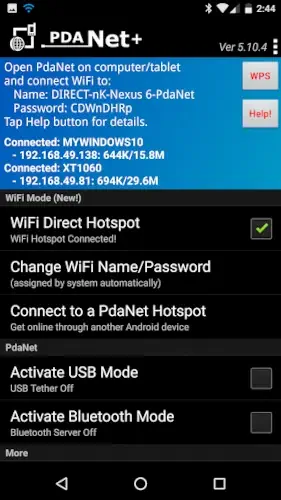
Enable “WiFi Direct Hotspot” in settings
-
Connect your laptop/tablet – may need to use the proxy IP shown in the app
-
-
When WiFi fails (which it often does):
-
USB tethering is your best bet:
-
Connect your phone to computer via USB
-
Enable USB tethering in PdaNet+
-
Install the Windows/Mac client if needed (only for some setups)
-
-
Bluetooth works but is painfully slow – really just for emergencies
-
-
The WiFi Share trick (for Windows users):
-
Use USB tethering to get internet to your PC
-
Then use PdaNet+’s “WiFi Share” to broadcast that connection as WiFi
-
Why This Still Matters
Even with limitations, FoxFi/PdaNet+ is worth having because:
-
No root required – Unlike some tethering solutions
-
Works internationally – Bypass carrier restrictions when traveling
-
Saves money – Avoid $20+/month tethering fees from carriers
FoxFi’s glory days of easy WiFi sharing may be fading, but as a USB tethering tool, it’s still surprisingly useful – especially when you’re in a bind and need internet on your laptop right now. Just temper your expectations and have that USB cable ready.
What Users Think About FoxFi/PdaNet+
The reviews tell an interesting story. People who’ve used FoxFi (now part of PdaNet+) fall into two camps:
The Loyal Fans:
*”This app saved me $30/month for years by bypassing Verizon’s tethering fee.”*
*”Still works perfectly on my Samsung Galaxy S9 – I use it daily for my laptop.”*
“The USB tethering option is rock solid when WiFi hotspot fails.”
The Frustrated Recent Users:
*”Stopped working after I upgraded to Android 13 – WiFi mode is completely blocked now.”*
“Customer support never replied to my emails about purchase verification.”
*”Works intermittently on my Pixel 7 – have to restart my phone constantly.”*
The 4-star average rating reflects this divide. Those with older phones (especially pre-2020 models) tend to give 5 stars, while users with newer Androids often give 3 stars or less. The common thread? Everyone agrees it was revolutionary before carriers and Google started locking down tethering access.
When You Might Need a FoxFi Alternative
If you’re using a phone released in the last 2-3 years, you’ll likely need to consider other options. Here’s how the alternatives stack up:
| App | What It Does Best | Where FoxFi Still Wins |
|---|---|---|
| NetShare | Creates WiFi hotspot without root | Offers USB/Bluetooth fallbacks |
| EasyTether | Reliable USB tethering | No need for separate desktop app |
| PDANet+ | FoxFi’s successor with more options | Original FoxFi interface simpler |
| Magic WiFi | Works on some newer Androids | Doesn’t require proxy setup |
Important note: Many “FoxFi alternatives” on the Play Store are either scams or just repackaged versions. The ones above have proven somewhat reliable based on recent user reports.
Keeping FoxFi Working (When Possible)
If you’re determined to make it work, these tricks help:
-
USB Tethering is King
-
Nearly 100% reliable across devices
-
Doesn’t trigger carrier detection like WiFi
-
Pro tip: Use a USB-C to Ethernet adapter for fastest speeds
-
-
The APK Backup Trick
-
Find an older version that worked on your device
-
Disable auto-updates in Play Store
-
Keep the APK file saved somewhere safe
-
-
Data Usage Alerts
-
Set hard limits in your phone settings
-
FoxFi doesn’t have built-in monitoring
-
Warning: Watching videos via tethering can burn 1GB/hour
-
-
The Airplane Mode Reset
-
Enable airplane mode
-
Start FoxFi/PdaNet+
-
Disable airplane mode
(Works sometimes to bypass carrier checks)
-
Does FoxFi Still Work in 2026?
The short answer is yes, but with significant limitations. FoxFi still works, but it is no longer the universal solution it once was .
The Compatibility Challenge
The original FoxFi app relied on a legacy WiFi hotspot mode that has been phased out by Android system updates . This classic mode is now only functional on older phones running Android 6.0 (Marshmallow) or earlier . The developer notes that as of Android 7.0 (Nougat), the old WiFi mode was no longer allowed even on Verizon phones .
If you try to install FoxFi on a newer device running Android 13 or 14, you may encounter an “App not installed as app isn’t compatible with your phone” error . Even if you manage to install it, the WiFi hotspot functionality often fails to work properly . Some users have reported success by using older, rooted devices to generate a working license and then transferring the signed app to newer phones, but this is a complex workaround, not a standard solution .
The Workaround
Recognizing the limitations of the old FoxFi app, the developers have integrated a new “WiFi Direct Hotspot” feature into PdaNet+ . This newer method works on all Android phones 4.1 or later, but it requires installing a client app or setting up a proxy on the connecting device .
So, while you can still find FoxFi and use it on older devices, the primary solution for modern phones is to use the updated capabilities within the PdaNet+ app.
Still Worth Using If:
-
You have an older Android phone (pre-Android 12)
-
Your carrier isn’t aggressively blocking tethering
-
You’re comfortable with USB cables as backup
Not Worth The Hassle If:
-
You have a Pixel 6/7/8 or recent Samsung
-
Your carrier plan already includes hotspot
-
You need reliable WiFi tethering daily
FoxFi was like having a secret key to free tethering for years. While that key doesn’t work in as many doors anymore, it still opens some – especially if you’re willing to use USB tethering as your main option. For those with newer phones, exploring alternatives like NetShare or even carrier unlocked hotspot mods might be more practical today.
FoxFi vs PdaNet: Which Tethering App Should You Choose?
This is a common question, and the answer depends entirely on your device and your needs.
The Short Answer
Choose PdaNet+ for modern devices. Choose FoxFi only if you have an older phone (Android 6.0 or earlier) and want a simple, no-client WiFi hotspot.
Key Differences
| Feature | FoxFi | PdaNet+ |
|---|---|---|
| Primary Method | Legacy WiFi Hotspot | WiFi Direct Hotspot, USB Tether, Bluetooth |
| Compatibility | Older Android (6.0 and earlier) | Newer Android (4.1+) |
| Ease of Use | Very easy; one-tap WiFi hotspot | May require a client app or proxy setup |
| Device Support | Works with any Wi-Fi device (game consoles, TVs, etc.) | Not for game devices or TVs |
The “Needs Analysis”
The deciding factor is often your data plan. The developers have identified four types of plans :
-
Plan 1 or 2: Your carrier restricts or meters your hotspot usage. You will need to use PdaNet+ to bypass these restrictions.
-
Plan 3 or 4: Your carrier allows and doesn’t meter your hotspot usage. PdaNet+ will not make any difference for you .
If you are unsure what data plan you have, the developers suggest it doesn’t hurt to use PdaNet+ anyway . The free version of PdaNet+ has a timed usage limit, but it offers the most up-to-date solution for tethering on modern devices .
FAQ
Where can I download FoxFi / PdaNet+?
Get the official FoxFi / PdaNet+ app from the Google Play Store or visit the developer’s site at pdanet.co. For support, email support@junefabrics.com.
Why can’t I see my phone’s hotspot in WiFi direct mode?
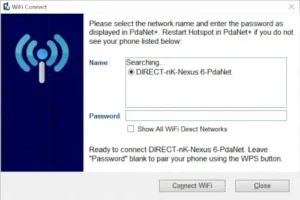
Make sure you’ve restarted the hotspot in PdaNet+ and left the password field blank if using WPS pairing. Some devices require enabling “Show All WiFi Direct Networks” in settings.
Is USB tethering faster than WiFi hotspot mode?
Yes, USB typically provides more stable speeds (especially for large downloads), while WiFi direct is more convenient for quick connections.
How do I change the WiFi name/password in PdaNet+?
The system assigns these automatically for security, but you can customize them in your phone’s native hotspot settings if your device allows.
Will this work on my new Android 14 device?
WiFi hotspot mode has limited compatibility, but USB and Bluetooth tethering still work reliably on most newer devices when configured properly.