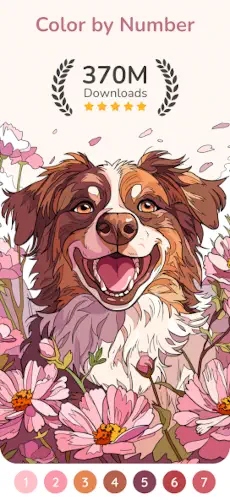
Happy Color is not like most coloring apps that give you a blank page and expect you to draw.
Happy Color does the opposite. The picture is already there. Every section has a number. Every number matches a color. You just tap and fill. No decisions. No stress.
What is Happy Color ?
You are looking at a relaxing paint by number coloring app with a huge library of free pictures, simple tap to color gameplay, and a strong stress relief focus.
Happy Color is designed as a digital coloring book for adults and casual users. The app emphasizes relaxation, mindfulness, and easy creative play, with more than 40,000 free pictures available across themes like nature, fashion, animals, Disney, and original art. Its biggest appeal is simplicity. You tap the numbered areas, fill them with color, and watch the picture come to life, which makes it ideal for short breaks, unwinding at night, or anyone looking for a low effort creative hobby.
On Google Play, Happy Color holds a 4.6 star rating from more than 3.8 million reviews. The app size comes in at roughly 180 MB. The age rating is 4 and up. The app is free with ads and offers a subscription for an ad free experience.
A relaxing paint by number coloring app with free pictures
The category matters here. Happy Color is not a drawing app. It is not a painting app. It is a paint by number app. The difference is important. You never choose colors. The colors are assigned to numbers. You never decide where to put them. The sections are pre defined. Your only job is to tap. This removes all creative pressure. The result always looks good because the picture was designed to look good.
Who this app was built for
Not every mobile user will enjoy Happy Color. Here is who will.
Adults looking for stress relief through simple coloring
Adult coloring became popular because it quiets the mind. Happy Color takes that further. No decisions about which color goes where. No risk of ruining a page with a bad choice. Just tap and relax. The repetitive motion and the gradual reveal of the image create a meditative state.
Casual users who want quick, satisfying art sessions
A complete picture might take 10 to 20 minutes. A single session might be 2 to 3 minutes. You can open the app, color a few sections, and close it. The progress saves automatically. This makes Happy Color perfect for waiting rooms, commutes, or any short break.
People who enjoy paint by number instead of free drawing
Some people want to create art but feel intimidated by a blank canvas. Paint by number removes the intimidation. The picture is already designed. The colors are already chosen. You just execute. The finished piece looks like you made something, without needing any artistic skill.
Anyone who wants a large library of free content
40,000 free pictures. That number is not an exaggeration. The library is massive. New pictures added daily. You can color every day for years and never run out of new pages. The free tier is genuinely generous compared to other freemium coloring apps.
Happy Color Main Features
The app offers several features. Here are the ones that matter most.
40,000 plus free coloring pages
The library is enormous. Categories include nature, fashion, animals, flowers, patterns, mandalas, portraits, landscapes, and more. Exclusive Disney collections feature characters from classic and recent films. New pictures appear daily.
Tap to color paint by number gameplay
Each picture is divided into numbered sections. The color palette shows numbers with matching colors. Tap a section. The color fills. Repeat until the whole picture is colored. No dragging. No painting. No decisions.
Powerful search to find pictures by topic
You can search by keyword. Type “cat” to see all cat pictures. Type “Disney” to see all Disney pictures. Type “flower” to see floral designs. Search saves time when you want a specific theme.
Exclusive Disney and licensed content
Happy Color has official Disney licenses. You can color scenes from Frozen, The Lion King, Beauty and the Beast, and more. The Disney pictures are more detailed than standard pages. They take longer but feel more rewarding.
New pictures added daily
The library grows every day. A new batch of pictures appears every 24 hours. You never run out of fresh content. The daily update gives you a reason to open the app regularly.
Offline coloring support with no Wi Fi needed
Download pictures while online. Color them anywhere. On a plane. In a subway. At a cabin. Offline mode works smoothly. No internet connection required after the picture is downloaded.
Charity event collections where coloring supports causes
Happy Color occasionally runs charity events. Color a special collection of pictures. The app donates proceeds to a cause. Past events have supported mental health awareness, environmental causes, and children’s hospitals.
Postcards category for coloring and sharing messages
The postcards section features pictures designed as digital postcards. Color them. Add a message. Share them with friends or family. A nice touch for birthdays or holidays.
Custom themes and refreshed design modes
The app periodically refreshes its design. New themes. New layouts. New navigation. The changes keep the interface feeling modern without making you relearn how to use it.
Art by professional artists and global creators
The pictures are not generated by AI. They are drawn by real artists. Professional illustrators. Global creators. The art quality is consistently high. Lines are clean. Subjects are varied.
Happy Color Graphics and Design
Bright, friendly interface that puts art first
The app looks cheerful. The home screen shows featured collections, new arrivals, and your recently colored pages. The focus is always on the artwork.
Clean and easy navigation
Bottom tabs for Library, Favorites, Profile. Search bar at the top. Categories are clearly labeled. You never have to dig through nested menus to find what you want.
Large preview images and simple color selection
Each picture has a large thumbnail. You see exactly what you are getting before you open it. The color palette is simple. Numbers are large. Sections highlight when tapped.
Where the design works well
Speed is the priority. Pictures load quickly. Coloring responds instantly. The app never lags or stutters. The smooth performance keeps the experience relaxing.
Where ads and subscription prompts may interrupt
The free version includes ads. A video ad may play after completing a picture. Banner ads may appear at the bottom of the screen. Popups encouraging you to subscribe appear occasionally. These interruptions break the flow. The subscription removes all ads.
What users say about the Happy Color app
The parts people enjoy
Positive reviews often mention the massive free library. 40,000 pictures with no paywall impresses users. The Disney collection gets consistent praise. The app is called calming, fun, and unexpectedly satisfying. Many users say it helps with anxiety or insomnia.
One user wrote: “So relaxing. I color before bed and it helps me fall asleep. So many free pictures.”
The parts people complain about
No free app escapes criticism. Here is what comes up most often.
Ads in the free version
Ads appear after completing a picture. The frequency can feel high during long coloring sessions. The subscription removes ads but costs money.
Subscription prompts can be frequent
Popups encouraging you to subscribe appear when you open the app and after finishing pictures. The prompts can feel aggressive to users who just want to color for free.
Requests for more free content
Even with 40,000 free pictures, some users want more. They feel that certain categories or licensed collections should be free.
Some users want even more variety
The library is large but focused on certain themes. Nature, animals, mandalas, Disney. Users looking for abstract art, architecture, or specific niches may feel limited.
How the coloring mechanics work
Select a picture from the library
Browse the gallery. Tap a thumbnail. The coloring screen opens. Free pictures are clearly marked. Some collections may require watching an ad or subscribing.
Tap areas marked with numbers
Each section of the picture shows a number. 1, 2, 3, and so on. Tap a section. The app highlights it. The corresponding color is selected automatically.
Each number corresponds to a color
The color palette shows numbers with color swatches. Number 1 might be dark blue. Number 2 might be light blue. The mapping is set by the artist. You do not choose.
Fill all numbered areas to complete the picture
Tap every section. Color every area. The picture gradually reveals itself. A grayscale outline transforms into a full color image. The progress bar shows how much remains.
Watch the image come to life as you color
The transformation is satisfying. A blank outline becomes a vibrant illustration. The final reveal is the reward for completing the page.
Save or share the finished artwork
Tap the save button. The finished picture saves to your camera roll. Tap share to post to Instagram, Facebook, or messaging apps. No watermark on free version.
New pictures added daily to the library
Open the app each day. A new batch of pictures appears. Color fresh content daily. The library never stagnates.
Looking for another relaxing paint by number app with a large free library? Check out Colorfy, a similar coloring app with tap to fill controls and thousands of free pages.
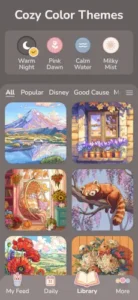
Happy Color Tips
You can open Happy Color and start tapping in seconds. Getting the most out of the massive library, offline mode, and special collections takes a little planning. These tips separate users who enjoy the app as a daily habit from users who open it once and forget it exists.
Use search to find pictures matching your interests faster
Here is a question. Why scroll through thousands of thumbnails when you can type three words?
Happy Color tips from frequent users all say the same thing. Use the search bar. Type “cat” to see cat pictures. Type “Disney” for Disney. Type “flower” for floral designs. Search saves minutes of scrolling. It also helps you discover categories you did not know existed. The search feature is powerful. Use it.
Start with larger, simpler images for quick relaxing sessions
New users open the app and pick a beautiful, detailed Disney scene. Then they feel overwhelmed. Too many small sections. Too many numbers. The session takes longer than expected.
Start with large, simple images. Mandalas with thick sections. Animals with bold outlines. Florals with open petals. These pictures have fewer, larger sections. You finish faster. The satisfaction comes sooner. Work up to detailed images when you have more time or patience.
Color during short breaks for a stress reset
Happy Color app is not just for long sessions. It works for short breaks.
Color for two minutes while waiting for coffee. Color for five minutes during a work break. Color for ten minutes before bed. Short sessions add up. They also reset your stress levels without taking a big chunk of your day. Use the app as a micro break tool, not just an evening hobby.
Try Disney and special collection pages for detailed themed art
The standard library is large. The Disney collection is special.
Disney pages are more detailed. More sections. More colors. More time to complete. They feel like a treat, not the daily routine. Save Disney pages for when you have 20 to 30 minutes. The result is worth the extra time. The licensed art quality is higher than user generated content.
Use offline mode when traveling or away from Wi Fi
Happy Color coloring app works without internet. Download pages while online. Color them anywhere.
Download a batch of 10 or 20 pages before a flight. Color them in the air. Download pages before a camping trip. Color them by lantern light. Offline mode makes the app usable in places where other apps fail. Plan ahead. Download before you leave.
Follow charity events for more meaningful coloring
Happy Color runs charity events. Color a special collection. The app donates to a cause.
These events add purpose to your coloring. You relax. A charity benefits. The pictures are usually themed around the cause. Mental health awareness. Environmental protection. Children’s hospitals. Follow the app’s social media or check the events tab to stay informed.
Save favorites to return to the best pages later
You finish a page. You love it. You close the app. That page disappears into the library.
Tap the heart icon. The page saves to your Favorites folder. You can return to it anytime. Color it again with different colors? Not possible. Happy Color uses fixed colors. But you can look at your finished work. Show it to friends. Share it again. Use Favorites as a gallery of your best pieces.
Switch to darker, low glare environment for most relaxing experience
Happy Color art looks good on any screen. The experience feels better in the right environment.
Turn down the lights. Reduce screen glare. Use dark mode if your phone supports it. The contrast between the bright colors and dark background is satisfying. Your eyes strain less. The relaxation deepens. Environment matters.
Happy Color Similar Games
If you like Happy Color, here are five other apps worth your time. Each offers something similar with a different twist.
Colorfy
Colorfy is the closest comparison. Tap to fill coloring. Large library. Custom palettes. Happy Color similar apps should start here. The difference is that Colorfy lets you choose your own colors. Happy Color assigns colors by number. Good for users who want more creative control.
Pigment
Pigment is a premium coloring app with realistic brushes and high quality pages. The tools are more advanced. The subscription costs more. The difference is that Pigment is for users who want to feel like they are using real art supplies. Good for colorists who outgrow Happy Color’s simplicity.
Recolor
Recolor focuses on adult coloring with a calm design style. Large library. Daily new pages. The difference is that Recolor has more detailed illustrations and a stronger community focus. Good for users who want variety and social features.
Lake
Lake is a coloring app that collaborates with real artists. The pages are curated. The art style is distinctive. The difference is that Lake has a smaller library but higher quality illustrations. Good for users who want unique art they cannot find elsewhere.
Color by Number apps
The category of color by number apps is large. Many options. Most work the same way. Tap. Fill. Relax. The difference is that most have smaller libraries and more aggressive ads. Happy Color stands out for its massive free library and Disney license.
Happy Color Community
Happy Color has a stronger community angle than many coloring apps.
Share creations with global community of coloring enthusiasts
The app encourages sharing. Finish a page. Tap share. Post to the in app community gallery. Other users see your work. They can like and comment. The gallery shows popular pages from around the world.
Social sharing and community interaction around art
Beyond the in app gallery, Happy Color supports sharing to Facebook, Instagram, and messaging apps. You can post your finished pages to your social feeds. Friends and family see your art. The app includes shareable postcards with customizable messages.
Charity events and positive habit sharing
Charity events double as community events. Users color for a cause. They share their participation on social media. The shared purpose creates a sense of community even without direct interaction.
External community on Facebook and social platforms
The external Happy Color community is active on Facebook. Users share tips. They post their favorite pages. They ask for recommendations. The Facebook group is more conversational than the in app gallery. Join it if you want deeper discussion.
Conclusion
Happy Color works for three types of people. First, adults looking for stress relief through simple, decision free coloring. Second, casual users who want to create satisfying art without any skill or training. Third, anyone who wants a massive library of free content with daily updates.
If you fit any of those, the download is worth trying.
Ads in the free version can be frequent. Subscription prompts may feel aggressive to some users. The free library is huge, but some users still want more variety. No ability to choose your own colors. No free drawing mode. The app does exactly one thing.
Do you want a completely decision free coloring experience where you just tap and relax? Or do you want more creative control over colors and techniques?
If the first one, Happy Color offers the largest free library and the simplest interface. If the second one, look at Colorfy for custom palettes or Pigment for professional tools. Both answers are fine. Just know what you want.
Frequently asked questions about Happy Color
How do I get Happy Color download on my phone?
Download Happy Color from the Official Google Play Store.
Is Happy Color really free, or do I need to pay?
The app is genuinely free. You can access over 40,000 pictures without paying anything. New pictures are added daily. The free version includes ads, which appear after completing a picture. A subscription removes ads and adds some exclusive content. But the core experience with thousands of free pictures works perfectly well without spending money.
Where can I find the official website?
The official website has information about features, updates, and charity events: Official Happy Color Website.
I have a problem with the app. Who do I contact?
Send an email to the developer support team. They handle account issues, billing problems, bug reports, and feature requests. Here is the address: support.happycolor[at]x-flow.app. For Happy Color download problems or installation issues, that same email applies. Include your device model, app version, and a description of the problem.
Can I use Happy Color offline without Wi Fi?
Yes. Happy Color works offline. Download pictures while you have an internet connection. Color them anywhere. On a plane. In a subway. At a cabin with no Wi Fi. Offline mode works smoothly with no lag. The app saves your progress locally. When you reconnect to Wi Fi, your completed pictures sync to your gallery. Perfect for travel or commuting.