What happens when a social media giant pivots from connecting people to empowering them with artificial intelligence? The result is Meta AI, an application that represents Meta’s ambitious bid to integrate advanced AI directly into the creative and daily workflows of its billions of users.

Meta AI it is a multi modal tool designed to generate video from a text prompt, answer your questions, and even connect to smart glasses. With over 10 million downloads and a 3.4 star rating from more than 100,000 reviewers, it’s clear the app is making a significant impact. The app size is a substantial but justifiable 180MB, reflecting its powerful models, and its appeal spans a wide age range, from Gen Z creators to professionals looking for a productivity boost.
What Is Meta AI and What Can It Do?
Meta AI is an official application from Meta Platforms, Inc. that functions as both a creative studio and an intelligent assistant. Its core purpose is to democratize access to powerful generative AI, moving beyond text to focus heavily on dynamic visual media. The value of Meta AI for video creation is its most immediate draw; it allows you to describe a scene and watch as the AI generates a short, animated video based on your description.
Simultaneously, it serves as a robust Meta AI assistant for daily tasks, capable of answering questions, providing recommendations, and helping with planning through simple text or voice commands. This dual identity makes it a versatile tool for both spontaneous creativity and practical problem solving.
Meta AI Feature :
The app consolidates several advanced technologies into a cohesive user experience, making Meta AI features and tools accessible to a non technical audience.
-
Creative Powerhouse: This is where the app distinguishes itself. The Meta AI video generator can produce custom animations set to music based solely on your text prompts. Beyond video, it offers AI powered presets for editing photos and videos, allowing you to adjust elements like lighting and style with a single tap, bringing a professional touch to personal media.
-
Intelligent Assistant: At its heart, it contains a sophisticated large language model. You can ask it complex questions, request recipe ideas, draft emails, or summarize articles. This functionality positions it as a direct competitor to other AI chatbots, but with the added benefit of being native to the Meta ecosystem.
-
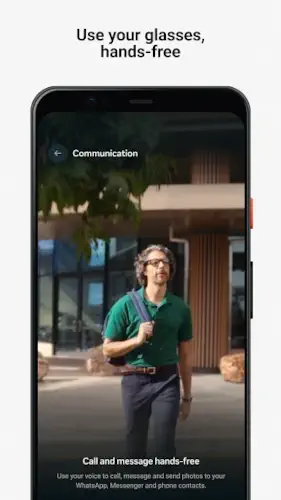
Hardware Integration: A unique advantage is its seamless pairing with Meta AI glasses. This integration enables a Meta AI with smart glasses experience, offering hands-free access to the assistant for asking questions, getting translations, or even creating content through voice commands alone.
-
Community & Sharing: The app includes a social feed where users can share their AI generated “vibes” (videos) and remix each other’s creations. This fosters a collaborative environment and provides a constant stream of inspiration.
Meta AI User Experience: Design and Interface
Meta AI features a clean, modern interface that prioritizes the user’s creations and prompts. The design is minimalist, using ample white space to keep the focus on the AI generated content and the chat interface. Navigation is intuitive, with clear tabs for accessing the assistant, the video creation tool, and the community feed.
In terms of Performance and Integration, the app is generally responsive. Generating a video or getting an answer from the assistant typically takes just a few seconds, leveraging Meta’s robust cloud infrastructure. Its deep integration means it can pull information from Meta’s other services, like Facebook events, to provide contextually relevant assistance.
The primary Technical Considerations noted by users revolve around resource usage. The complex AI models require significant processing power, which can lead to noticeable battery drain on older devices. Some users also report occasional app freezes, especially during the initial startup or while generating particularly complex videos.
What Users Are Saying About Meta AI
Early user feedback highlights the app’s impressive capabilities and its areas for refinement. The overwhelming praise is for the quality and novelty of the AI generated videos. Many users express surprise at how accurately the AI can interpret a text prompt and turn it into a coherent, stylized video. The fact that these advanced features are offered without advertisements is also frequently commended.
The critiques are practical. The aforementioned battery drain is a common point of feedback. Some users also note a slight learning curve in crafting the perfect text prompt to get the desired video output, and a few experience instability with the app crashing. For users seeking a different approach to AI assistance, ChatGPT offers a more established, conversation focused experience with its own set of unique capabilities and a different development philosophy.
Meta AI in the AI Landscape
In the crowded field of AI applications, Meta AI carves out a distinct niche. While tools like ChatGPT and Microsoft Copilot excel at text based tasks, coding, and integration with office suites, Meta AI places a heavier emphasis on visual and creative generation. Its ability to create videos from text is a significant differentiator that most general purpose chatbots lack.
Furthermore, its strategic advantage lies in its native integration with the world’s largest social ecosystem and its pioneering hardware link via smart glasses. This makes it less of a standalone tool and more of an integrated component of a broader digital life, offering a more seamless experience for users already invested in Meta’s products.
Meta AI Practical Tips
AI tool like this is less about learning complex menus and more about understanding how to communicate with it. Implementing a few key Meta AI tips can dramatically improve your results and streamline your experience.
The most important skill to develop is crafting effective prompts for the video generator. The AI interprets language literally, so specificity is your greatest asset. Instead of a vague prompt like “a dog in a park,” try a more detailed scene: “a golden retriever puppy chasing a red ball in a sunny park, cartoon style.” This level of detail gives the Meta AI video generator clear direction on the subject, action, setting, and artistic style. Think of yourself as a director giving instructions to a production team.
The more vivid and precise your description, the closer the final video will be to your vision. This is the fundamental technique for how to use Meta AI for creative projects.
Beyond creation, integrate the AI assistant into your daily routine. This tool is designed for conversation. You can use it to draft a quick email, brainstorm ideas for a project, or get a summary of a complex topic. For instance, you can ask, “What are the key points in this article?” after pasting the text, or request, “Give me three dinner recipes that use chicken and rice.” The key is to be direct and clear in your requests. Leveraging the Meta AI assistant for productivity in this way turns it from a novelty into a practical utility that saves you time and mental energy.
Finally, make the community feed your first stop for inspiration. When you are unsure what to create, browsing the feed shows you what is possible. See a video with a particular color scheme or animation style you like? You can often remix it directly, using it as a starting point for your own idea. This process of getting inspiration from Meta AI community not only jumpstarts your creativity but also helps you understand what kinds of prompts other users are employing to achieve specific visual results.
Meta AI for Creators and Professionals
The application’s utility extends beyond casual use, offering tangible benefits for specific professional and creative workflows.
For Content Creators, the app serves as an unparalleled rapid prototyping tool. A social media manager or video creator can use the Meta AI for content creation to visually test a dozen different concepts for a campaign in the time it would take to storyboard one. You can generate short, stylized clips to present to a client for mood and direction approval before committing to a full production. It allows for quick experimentation with different visual aesthetics, from cyberpunk to watercolor, helping to define a project’s creative direction with minimal investment of time or resources.
In the realm of General Productivity, the assistant functions as a centralized information hub. A professional can use it to quickly summarize a long report, draft a structured agenda for a meeting, or generate a list of questions to ask during a client call. The ability to handle these tasks through simple voice commands, especially when integrated with Meta AI glasses, creates a hands-free workflow that is difficult to replicate with other tools. This makes the Meta AI for professional tasks a viable option for managing the constant flow of information that defines modern work.
Conclusion :
After a thorough examination, the verdict on Meta AI is that it is a remarkably ambitious and largely successful execution of an integrated AI platform. It doesn’t just do one thing well; it competently handles a diverse range of tasks, from generative video to intelligent assistance, within a single, cohesive application.
Its greatest strength is its ability to make advanced AI feel accessible and immediately useful. The video generation feature, in particular, is a standout, offering a creative capability that is still rare in consumer facing applications. The absence of ads and the depth of its free features make it an exceptional value.
The trade-offs, primarily its demand on battery life and occasional instability, are real but are typical of applications pushing the boundaries of on-device and cloud based AI processing. These are likely to improve with subsequent updates as the underlying technology is optimized.
In conclusion, Meta AI is more than a mere feature; it is a glimpse into the future of human computer interaction. It successfully merges the playful potential of creative AI with the practical needs of a digital assistant. For creators, it’s a powerful new brush. For professionals, it’s a capable new colleague. And for everyone else, it’s a fascinating window into what happens when a technology giant fully embraces artificial intelligence. Its evolution will be one of the most interesting stories to watch in the consumer AI space.
Frequently Asked Questions
How do I get Meta AI on my Ray Ban Meta smart glasses?
The Meta AI assistant is integrated directly into the glasses’ operating system. There is no separate “Meta AI download.” Once you pair your glasses with the companion app, the feature is active. Using your voice, you can simply say, “Hey Meta,” to ask questions, play music, or get information.
What’s the most practical use for the hands free communication?
Think of moments when your hands are occupied but your mind is not. Replying to a message while cooking, taking a call while walking the dog, or sending a quick photo of a product on a shelf directly via WhatsApp without reaching for your phone. It shifts communication from a deliberate task to a fluid part of your movement.
Can I adjust the privacy settings for the camera and microphone?
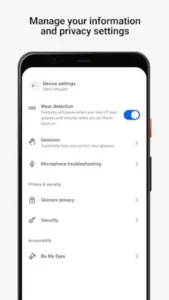
Absolutely. Privacy controls are a central part of the design. Through the device settings in the companion app, you can manage which features are active and customize your controls. An LED indicator on the frame also provides a clear visual signal when you are capturing a photo or video.
What is the purpose of the “Be My Eyes” integration?
This feature connects you with volunteers who can provide visual assistance through the glasses’ camera. It is a powerful tool for tasks like reading labels, navigating new environments, or identifying objects, offering a new layer of practical support and independence.
Who do I contact for technical support or developer inquiries?
For user support and troubleshooting, the best starting point is the help center within the official Meta Smart Glasses website. For developer-specific questions regarding the platform, you can reach out to the developer team. You can find the official app on the Play Store and access more information via the Meta Smart Glasses Wiki.
-
Official Website: https://www.meta.com/smart-glasses/
-
Play Store Link: https://play.google.com/store/apps/details?id=com.facebook.stella
-
Meta Smart Glasses Wiki: https://en.wikipedia.org/wiki/Ray-Ban_Stories
-
General Support: Visit the help section on the official website.
-
Developer Inquiries: facebook.android[at]fb.com