
My Diary – Daily Journal, Lock App addresses a fundamental human impulse: the need to record our inner lives.

For centuries, this meant leather-bound books and physical locks. Today, our thoughts live on devices, creating a new demand for secure digital journaling that protects our most private reflections. My Diary app doesn’t just digitize the old diary; it reimagines it for the modern user, merging the timeless practice of journaling with non negotiable contemporary requirements for strong privacy features and deep personalization. It answers a critical question: where can you write freely, knowing your words are for your eyes only?
This analysis will move beyond the feature list. We will examine how its core functionalities, from biometric locks to mood charts, work in concert to create a genuinely useful tool. We will consider its design philosophy, which prioritizes a frictionless user experience, and evaluate its practical value in supporting mental well being and creating a sustainable journaling habit. This is about understanding whether this app provides a truly private space for self expression or is just another notes app with a lock.
My Diary Privacy and Security
The entire value proposition of a digital diary hinges on trust. Without robust security, any journaling app is merely a public notepad. My Diary – Daily Journal, Lock App understands this, framing privacy not as a bonus feature but as its foundational promise. This is what makes private diary writing possible in a digital age.
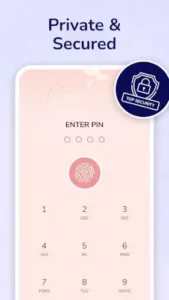
The app’s multi layered lock system is its first and most important line of defense. Offering PIN, pattern, and fingerprint authentication provides both flexibility and robust security. The fingerprint option, in particular, is crucial; it offers the convenience of instant access while ensuring that access is exclusively yours. This eliminates the anxiety of a physical diary being discovered and read.
Beyond the lock screen, the app’s commitment to true data ownership is what sets it apart. With local storage and offline access, your entries reside on your device first. This means your thoughts aren’t stored on a remote server by default, giving you control. The option to back up to cloud services like Google Drive is just that, an option. This approach to encrypted diary app data ensures that your journal remains your property, not a data point in a larger profile. How often do we use apps that claim to be private, only to later find our information is part of their business model? This app’s mechanics suggest a different priority: your confidentiality above all else.
The Journaling Toolkit: Features with a Purpose
A list of features is meaningless without intentionality. My Diary’s tools are designed not to check boxes but to actively enhance and deepen the journaling practice itself, moving it beyond simple text.
The ability to create multimedia journal entries is a prime example. Adding photos, audio recordings, or drawings does more than decorate a page; it builds a richer, more contextual memory capsule. A written description of a day at the beach is one thing. That same entry accompanied by the sound of waves and a faded photo becomes a much more powerful trigger for memory and emotion. This transforms the app from a log into a personal archive.
Similarly, the mood tracker’s value isn’t in the emojis themselves but in the patterns they reveal over time. This feature functions as a simple yet effective visual tool for self awareness. By logging your mood with each entry, you generate data that can highlight cyclical emotional patterns you might otherwise miss. It’s a bridge between casual reflection and mindful introspection, supporting the growing user search for mental wellness apps.
Finally, features like daily reminders and achievement badges address the biggest hurdle in journaling: consistency. The reminder is a pragmatic nudge, while the gamified milestones provide a small hit of psychological motivation. They are subtle design choices that understand human behavior, helping to transform a fleeting intention into a sustained practice.
Making It Yours: Customization and Design
An effective journaling app must feel like a personal space, not a sterile tool. This is where My Diary’s extensive customization options shift from aesthetic niceties to functional necessities. The power to alter themes, fonts, and colors does more than change the look; it changes the feel of the writing experience. A dark mode for late night reflections, a cheerful theme for morning pages, these choices allow the environment to adapt to your mood, making the act of writing feel more personal and intentional.
This commitment to a personalized experience is underpinned by a clean and intuitive user interface. The design choice to minimize clutter and prioritize smooth navigation is a strategic one. It reduces cognitive friction, allowing you to focus on writing rather than figuring out how the app works. The calendar view and search functionality are not mere extras; they are essential organization features that make your journal usable over the long term. They allow you to instantly navigate your own history, finding not just specific entries but also tracing your own growth and changes over weeks, months, or years. This transforms the app from a simple recorder into a navigable map of your own mind.
For those interested in a alternative with a strong focus on cross-platform accessibility, Journey: Diary, Journal offers a compelling option known for its seamless sync across devices.
Integrating My Diary into Daily Life
Understanding features is one thing. Integrating them into a sustainable routine is another. The real test of any My Diary journaling app is whether it moves from a downloaded novelty to a trusted daily tool. Its mechanics provide a clear blueprint for making that happen, offering a practical guide on how to start a digital diary and maintain it.
Consider cloud sync and export not as backup options, but as your long-term preservation strategy. Your journal is a growing asset. The manual or automatic backup to Google Drive or Dropbox is your insurance policy against device loss or failure. More actively, the export function allows you to do something profound: create tangible artifacts from your digital entries. How to preserve your memories? Export a significant month as a PDF, creating a standalone document you can archive or even print. This transforms ephemeral digital data into a permanent record, answering the common user question of how to save My Diary entries for the future.
Building the habit is the most common hurdle. This is where the app’s structure acts as a built-in coach. The daily reminder is your initial prompt, a simple but effective nudge to carve out five minutes. The real habit-forming magic, however, lies in combining this with the mood tracker. Instead of facing a blank page, you have a starting point: tap an emoji. This small action is a low-friction entry into writing. The mood chart then provides visual feedback, reinforcing the habit by showing you the value of your consistency. You’re not just writing; you’re building a data set of your inner life. This method provides a clear answer for anyone searching for how to use My Diary for mood tracking effectively.
Finally, leverage customization as an anti-boredom tool. A static environment leads to a stagnant practice. The ability to change themes, fonts, and colors isn’t just about aesthetics; it’s a way to refresh the experience and signal a new chapter. Feeling contemplative? Switch to a minimalist, dark theme. Need energy? A bright, colorful layout can change your mindset. This ongoing personalization is key to keeping a journal long-term, ensuring the practice evolves with you and remains engaging month after month.
Position and Context: How My Diary Fits In
The market for journaling apps is crowded, making it essential to understand where this specific application sits. Its position isn’t about being the “best” in all categories, but about being the most appropriate for a specific set of user priorities. Its primary differentiators are its uncompromising focus on security and its high degree of visual customization.
When compared to popular alternatives, its unique profile becomes clear. Journey is renowned for its beautiful design and powerful cross platform syncing, appealing to users who journal across multiple devices. Daylio excels as a rapid, tap-based mood tracker and habit logger, prioritizing speed and data trends over long-form writing. Diaro offers robust organization and search capabilities, functioning almost like a life database.
My Diary – Daily Journal, Lock App carves its niche between these options. It is for the user whose foremost concern is privacy. The feeling that their entries are locally stored and behind a true lock is non-negotiable. It is for the user who values aesthetic control, wanting their journal’s environment to reflect their personal taste. It suits those who want a balance between structured tracking (moods) and the freedom of unstructured long form writing. Therefore, it is an ideal My Diary app for beginners who need simplicity and security, or for any user whose primary search is for a secure diary app with lock that feels genuinely personal.
Conclusion :
My Diary – Daily Journal, Lock App succeeds by providing a secure, adaptable, and supportive environment for personal reflection. It executes the fundamentals well: privacy is robust, customization is extensive, and the features included directly support the goal of consistent journaling. It doesn’t try to do everything, but what it does, it does with a clear focus on user trust and personalization.
In a digitally distracted world, the value of a dedicated, private space for unstructured thought cannot be overstated. This app offers a digital room of one’s own, a place to process events, track emotions, and preserve memories without the performative pressure of social media or the insecurity of an unsecured notes app. It facilitates a conversation with oneself, which is often the most important one we have.
This tool will resonate most with specific audiences: individuals who prioritize privacy above all else, those new to journaling who will appreciate its guided structure and simplicity, and users seeking a straightforward visual mood tracker integrated with a writing space. It is a thoughtful and effective answer for anyone looking to build a lasting journaling practice on a foundation of trust.
FAQ
How do I start using the My Diary app?
You can get the app through a direct My Diary download from the Google Play Store. After installing, you’ll set up your preferred security lock to begin journaling.
Where can I find the most accurate information about the app?
For official details, update logs, and direct developer information, the My Diary official website is your primary resource. [Insert Official Website Link Here]
What should I do if I encounter a technical issue or need help?
For dedicated support, you can contact the development team directly at their support email: mydiary[at]habitics.net. They handle inquiries about functionality, troubleshooting, and feedback.
How does My Diary protect my privacy compared to other apps?
My Diary prioritizes local storage with optional cloud backup, giving you control. Its PIN, pattern, and biometric locks ensure access is limited solely to you, making it a truly private digital journal.