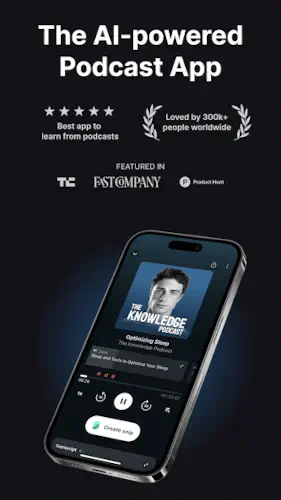
Snipd gives you a podcast player with AI transcripts, chapters, and one tap snips.
You listen to podcasts constantly. Commutes. Workouts. Chores. You hear brilliant insights. You nod along. Then you forget everything. The ideas vanish. Snipd solves that problem.
What is Snipd?
You are looking at an AI powered podcast player and note taking app that turns the moments you hear into searchable highlights, transcripts, summaries, and exportable notes for your second brain.
Snipd is a mobile podcast app that combines a full podcast player with AI transcription, chapters, summaries, and one tap snips you can save, annotate, and sync to tools like Notion, Obsidian, Logseq, and Readwise. The product is developed by Snipd AG, a Swiss company, and is marketed as the most powerful podcast app for learning and knowledge building, with EU based hosting and GDPR compliant data practices. Snipd offers a free tier and Premium AI subscription that unlocks advanced AI features such as auto snipping, custom prompts, multi language support, and richer summaries.
Snipd holds a 4.6 star rating from more than 1,890 reviews. On Product Hunt, it is rated 4.7 out of 5. The app size is roughly 80 MB. The age rating is 12 and up. The app is free with a premium subscription for advanced AI features.
An AI powered podcast player and note taking app for knowledge focused listeners
The category matters here. Snipd is not just a podcast player. It is a podcast player with AI. You get transcripts. You get chapters. You get summaries. You get one tap highlights. The AI turns passive listening into active learning.
Who this tool was built for
Not every podcast listener will need Snipd. Here is who will find it useful.
Podcast listeners who want to remember and reuse insights
Do you listen to educational podcasts but forget the key points? Snipd captures the insights. You can revisit them later.
Knowledge workers who integrate podcast notes into second brain systems
If you use Notion, Obsidian, or Readwise, Snipd fits your workflow. The exports are automatic. The snips become part of your knowledge base.
Students who want to capture and review audio learning
Students can snip key points from lectures and educational podcasts. The transcripts and summaries help with review.
Anyone who listens to educational podcasts and forgets the key points
You do not need to be a student or knowledge worker. If you listen to learn, Snipd helps you retain what you hear.
Snipd Main Features
AI Transcripts and Chapters with speaker identification
The app generates transcripts automatically. The transcripts are animated. Chapters are identified. You can jump to specific topics. The structure is clear.
Episode Summaries and AI Snips for quick previews
You can preview episodes with AI summaries. AI Snips show the most important moments. You can skim without listening to the full episode.
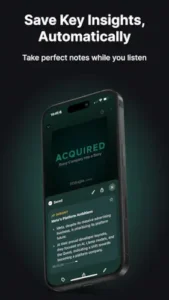
Snips and Notes with audio segments and auto generated summaries
You can snip moments while listening. The app saves the audio segment. It generates a summary. You can add notes. The snips are searchable.
Custom AI Prompts and Multi Language Support for personalized output
You can define custom prompts. Create bullet summaries. Generate reflection questions. Extract key quotes. The AI supports 26 languages.
Discovery and Guests with guest bios and mentioned books
You can discover new podcasts. The app identifies guests with bios and pictures. You can explore episodes with the same guest. Mentioned books are highlighted.
Exports and Second Brain Integrations to Notion, Obsidian, Logseq, and Readwise
You can export snips to Notion, Obsidian, Logseq, and Readwise. The exports are automatic. The integrations are seamless.
Player and Convenience Features including smart downloads and Apple Watch support
Smart downloads save storage. Auto downloads for favorites. Skip intro and outro automatically. Variable playback speed. Apple Watch support for listening and snipping on the go.
Video Snips from popular shows like Huberman Lab and Modern Wisdom
You can snip video moments from popular shows. The video clips are shareable. The visual context adds depth.
Snipd Graphics and Design
Episode cards with chapters, transcript view, and snips lists
The design is centered on content. Episode cards show chapters. The transcript view is detailed. Snips lists organize your captures.
Real time animated transcript with clear markers for chapters and snips
The transcript is animated in real time. Chapters and snips have clear markers. The reading like experience complements the audio.
UI can feel feature dense and occasionally cluttered
The app has many features. The UI can feel dense. Some controls are not immediately discoverable. The layout takes time to learn.
Where the design works well
The design is functional. The transcript view is useful. The snips list is organized.
Where player maturity and accuracy issues affect the experience
The player is still maturing. Bugs exist. Accuracy issues with AI snips. Transcripts can drift from audio. The experience is not perfect.
What users say about the Snipd app
The parts people enjoy
Positive reviews often mention the AI features. The transcripts are praised. The snips are useful.
One user wrote: “Snipd is a game changer for podcast learning. I actually remember what I hear now. The Notion export is perfect.”
The parts people complain about
No podcast app escapes criticism. Here is what comes up most often.
Player maturity and bugs with limited auto downloads and sorting issues
The player is not fully polished. Auto downloads are limited. Sorting options are limited. Bugs exist.
Accuracy and control issues with AI snips capturing wrong sections
The AI snips are not always accurate. Wrong sections are captured. Editing clips can be tedious.
Transcripts can drift from audio; editing clips can be tedious
The transcripts are not always perfect. They can drift from the audio. Manual editing is required.
Missing desktop and web app for managing snips beyond mobile
There is no desktop app. There is no web app. You can only manage snips on mobile.
How the Snipd app mechanics work
Listen to podcasts in Snipd or import from other players
You can listen directly in Snipd. You can import podcasts from other players. The listening is the first step.
Snip moments using the button or headphone triple tap
You can snip moments with a button tap. You can use headphone triple tap. The snipping is hands free.
Review and organize snips with tags, notes, and collections
You can review your snips. You can organize them with tags. You can add notes. You can create collections.
Use summaries and chapters to revisit key ideas
You can revisit key ideas with summaries. You can jump to chapters. The review is efficient.
Export and integrate snips into second brain tools
You can export snips to Notion, Obsidian, Logseq, and Readwise. The integrations are seamless.
Snipd Tips
You can start Snipd app and snip your first podcast moment in seconds. Getting the most out of the AI features and building a useful knowledge base takes a little strategy. These tips help you capture and retain podcast insights effectively.
Use headphone triple tap for hands free snips while running or commuting
Here is a question. Why do some users capture dozens of snips while others forget to snip anything? They use the hands free shortcut.
Snipd tips from experienced users all say the same thing. Set up the headphone triple tap. You can snip moments without pulling out your phone. A user who uses the shortcut captures more insights. A user who relies on the phone button misses moments.
Fine tune snips in the transcript to capture only the relevant content
Snipd app captures audio segments. The AI sets the start and end points. Sometimes the AI gets it wrong.
Fine tune the snip in the transcript. Adjust the start point. Adjust the end point. A user who fine tunes captures only the relevant content. A user who accepts the AI defaults saves irrelevant audio.
Define custom AI prompts for summary style, reflection questions, or key takeaways
Snipd similar apps have default AI prompts. This app lets you customize.
Create custom prompts. Ask for bullet summaries. Ask for reflection questions. Ask for key takeaways. A user who defines custom prompts gets output that matches their learning style. A user who uses defaults gets generic output.
Use AI Snips and chapters to triage episodes before committing to a full listen
Snipd app has AI Snips and chapters. They show you the key moments before you listen.
Skim the AI Snips. Review the chapters. A user who triages episodes saves time. A user who listens to every episode from start to finish wastes time on low value content.
Sync to Readwise, Notion, or Obsidian early so snips automatically populate your second brain
Snipd codes for free features are not needed. The integrations are already available.
Connect your second brain tool early. Readwise. Notion. Obsidian. A user who syncs early builds a knowledge base automatically. A user who delays sync misses insights.
Experiment with auto sniping to balance automation with manual refinement
Snipd app has auto sniping. The AI captures key moments automatically.
Experiment with auto sniping. See if it works for your shows. A user who finds the right balance saves time. A user who relies only on manual snipping misses moments. A user who relies only on auto sniping captures too much noise.
Treat Snipd primarily as a learning tool, not a replacement for all podcast apps
Snipd app is a learning tool. It is not a fully polished podcast player.
The player is still maturing. Bugs exist. A user who treats Snipd as a learning tool appreciates its strengths. A user who treats it as a primary podcast player gets frustrated.
Watch player settings and keep expectations realistic for the still maturing player
Snipd app is evolving. The player is improving. It is not perfect.
Check player settings. Adjust downloads. Adjust sorting. A user who watches settings avoids surprises. A user who expects perfection is disappointed.
Apps similar to Snipd
AI podcast players with transcripts and summaries
Other AI podcast players exist. Podcastle. Otter. The difference is that they are less focused on personal knowledge management. Good for users who want AI features without the second brain integrations.
Readwise and Reader
Readwise and Reader are text focused highlight tools. Snipd is audio focused. The difference is the medium. Good for users who want to combine audio and text highlights in one workflow.
Notion, Obsidian, and Logseq
Notion, Obsidian, and Logseq are second brain tools. Snipd exports to them. The difference is that they are not podcast players. Good for users who already use these tools and want to add audio insights.
Conclusion
Snipd works for three types of people. First, podcast listeners who want to remember and reuse insights from educational shows. Second, knowledge workers who integrate podcast notes into second brain systems like Notion and Obsidian. Third, students who want to capture and review audio learning from lectures and podcasts.
Player maturity and bugs with limited auto downloads and sorting issues. Accuracy and control issues with AI snips capturing wrong sections. Transcripts can drift from audio; editing clips can be tedious. Missing desktop and web app for managing snips beyond mobile.
Do you want to turn podcast listening into active learning with AI transcripts, snips, and second brain integrations, even if the player is still maturing and bugs exist? Or do you prefer a polished podcast player without the learning features?
If the first one, Snipd offers a unique way to capture and retain audio insights. If the second one, look at Overcast or Pocket Casts. Both answers are fine. Just know what you want.
FAQ
How does Snipd save key insights while I listen to podcasts?
Snipd listens alongside you. When you hear something worth keeping, you tap the Snip button. The app captures that exact moment, transcribes it, and organizes it into your personal knowledge library. No more scrambling for a notepad or replaying episodes three times to find that one stat. It works offline, works in the background, and doesn’t interrupt your listening flow.
Can I download episodes and listen without an internet connection?
Yes. Snipd download functionality lets you save episodes directly to your device. Perfect for flights, commutes through tunnels, or anywhere your signal drops. The snips you create remain saved and searchable even when you are offline. You control your library, not your data plan.
Where can I get the app, and is there a website to learn more?
You can download Snipd directly from the Official Google Play Store. For a full overview of features, pricing, and use cases, visit the official website at Official Snipd Website.
What makes Snipd different from standard podcast apps?
Most podcast apps treat episodes as disposable. You listen, you forget, you move on. Snipd treats podcast content as raw material for your own knowledge base. It captures what matters to you, organizes it, and makes it retrievable months later. You are not just consuming information. You are building a personal archive of insights that reflect your interests and professional growth.
Who do I contact if I need support or have feedback?
For technical support, feature requests, or general inquiries, reach out to the development team directly at hello[at]snipd.com. The team is responsive and actively incorporates user feedback into product updates. For partnership or press inquiries, use the general contact form available on the official website.